
ASRock DeskMini X300 2.5G Series
4.2Editor score
AM4 Socket Support
1.92L Form Factor
Triple Display Output
This guide compares the best barebone PCs with AMD processors for gaming and work, helping you choose the right compact desktop for your needs.
Barebone PCs with AMD processors offer a flexible foundation for building compact desktops tailored to specific performance needs. These systems allow users to select their own memory and storage for a custom fit.
We evaluated ten top-rated models based on processor power, expandability, cooling efficiency, and connectivity options. Our analysis focuses on real-world utility for work and gaming scenarios.
Each pick highlights key strengths and potential trade-offs to help you decide quickly. Note that stock and pricing fluctuate frequently on retailer platforms.
4.2Editor score

4.0Editor score

3.1Editor score
This table provides a side-by-side look at the core specifications and features of every model considered in this guide.





This AOOSTAR MACO mini PC is a top contender for users needing raw power in a small chassis. It earns a solid rating for its Ryzen 7 PRO 8845HS processor and advanced connectivity options.
We may earn a commission when you buy through this link, at no additional cost to you.
The system delivers exceptional multitasking performance thanks to 8 cores and 16 threads. Its OCuLink port allows for external GPU connections with minimal latency loss.
You will need to source your own memory and storage. The premium price reflects the high-end specs but may be a hurdle for budget buyers.
This unit is ideal for gamers or professionals who want a powerful, expandable desktop without the bulk of a tower.
The OCuLink port enables external GPU setups with near native performance by using dedicated PCIe bandwidth.
Dual 2.5G LAN ports and USB4 interfaces provide enterprise-ready networking and display capabilities for complex setups.
We may earn a commission when you buy through this link, at no additional cost to you.
The GEM12+ is designed for users needing multiple display outputs from a compact unit. It earns a high rating for its display capabilities and robust build quality.
We may earn a commission when you buy through this link, at no additional cost to you.
With four 4K display support via USB4 and DP ports it excels in productivity tasks. The vapor chamber cooling ensures stable performance during sustained loads.
You must provide your own RAM and SSD to start using the system. The package does not include an operating system or storage drive.
This model is perfect for traders or designers who require large virtual workspace setups without cluttering their desk.
The system supports four 4K displays simultaneously enabling complex multi-window workflows for advanced users.
A vapor chamber distributes heat efficiently preventing throttling even when running high-performance applications.
We may earn a commission when you buy through this link, at no additional cost to you.
The GEM12+ PRO offers a high degree of customization through its barebone design. It is a solid choice for users who want to pick their own components.
We may earn a commission when you buy through this link, at no additional cost to you.
Its fingerprint unlock feature adds a layer of security not often found in mini PCs. The processor handles heavy workloads smoothly.
You will need to install memory storage and an OS yourself. This adds time to the setup process but offers full control.
This unit is ideal for hobbyists and power users who value flexibility over plug-and-play convenience.
Built-in fingerprint recognition allows quick secure login without entering passwords repeatedly for daily use.
Dual M.2 slots allow you to choose SSD capacity and type to match your storage needs and budget.
We may earn a commission when you buy through this link, at no additional cost to you.
The DeskMeet X300 stands out as a budget-friendly option for building a custom desktop. It supports full desktop CPUs which gives it an edge over many competitors.
We may earn a commission when you buy through this link, at no additional cost to you.
Its 500W PSU and PCIe slot allow for significant hardware upgrades including dedicated graphics cards. This flexibility is rare in small form factors.
It is larger than typical mini PCs but remains compact compared to standard towers. You must source your own CPU and other parts.
This kit is perfect for budget builders who want desktop performance without a large tower case.
Supports standard AM4 desktop processors enabling much higher peak performance than mobile class chips.
The PCIe slot allows internal addition of graphics or capture cards for more power in a small space.
We may earn a commission when you buy through this link, at no additional cost to you.
The X1 Lite-255 offers a balance of performance and modern connectivity. It is suitable for users who need multiple screens and fast networking.
We may earn a commission when you buy through this link, at no additional cost to you.
Its triple display output lets you connect three monitors simultaneously for a better workspace. Wi-Fi 6e ensures fast wireless connections.
OCuLink support requires an adapter plate and is not hot-swappable. The lower rating suggests potential software or quality inconsistencies.
This model is a good pick for users who need specific connectivity features at a mid-range price.
With HDMI USB4 and DP outputs the system can drive three independent monitors for enhanced multitasking.
Includes USB4 and Wi-Fi 6e which provide high speed data transfer and network performance for modern devices.
We may earn a commission when you buy through this link, at no additional cost to you.
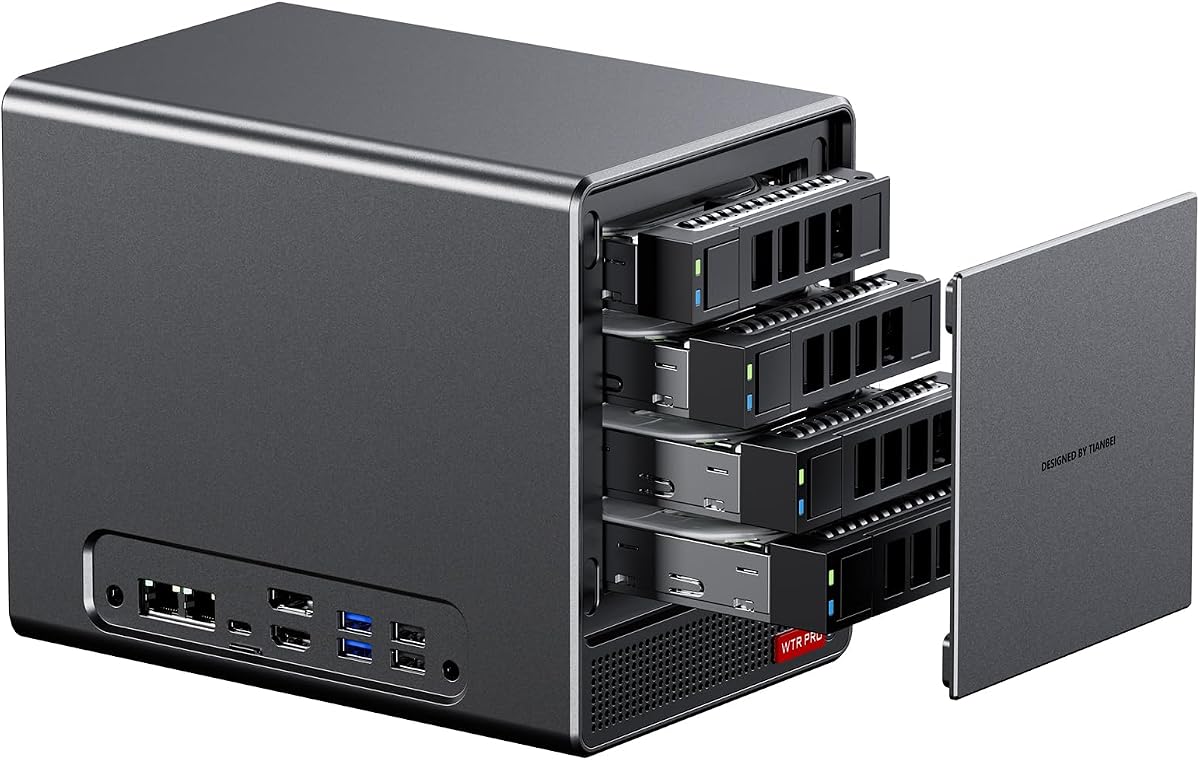
This AOOSTAR WTR PRO is optimized for users looking to build a home NAS or server. It supports multiple large drives for substantial storage capacity.
We may earn a commission when you buy through this link, at no additional cost to you.
Its low power profile makes it ideal for 24/7 operation without excessive electricity costs. Dual LAN ports offer network redundancy options.
It does not include memory or storage so you must plan your budget accordingly. The form factor is larger than standard mini PCs.
This is a strong choice for users focused on file storage and media serving rather than gaming.
With four SATA bays and two M.2 slots you can build a high capacity storage array easily.
Low power consumption allows continuous running without high electricity bills for always-on server needs.
We may earn a commission when you buy through this link, at no additional cost to you.
The DeskMini X300 offers a very compact form factor without sacrificing desktop CPU support. It is a great choice for small office setups.
We may earn a commission when you buy through this link, at no additional cost to you.
It supports three displays via HDMI and DP which is useful for multi-monitor tasks. The 2.5G LAN provides fast wired connectivity.
You must purchase a CPU separately which adds complexity to the build process. The chassis is small limiting internal cooling potential.
This mini PC is perfect for those needing maximum power in a tiny footprint.
Measuring only 1.92 liters this unit fits almost anywhere on your desk or mounted behind a monitor.
Supporting AM4 desktop CPUs ensures you get full performance without mobile class compromises.
We may earn a commission when you buy through this link, at no additional cost to you.
The PN54 brings next-generation AI features to a tiny chassis. It is designed for those who want the latest tech in a small package.
We may earn a commission when you buy through this link, at no additional cost to you.
Its AI NPU accelerates creative and productivity tasks. The Wi-Fi 7 support ensures future-proof connectivity speeds.
It is small at only 0.6L which may limit airflow compared to larger units. Users may find the rating lower due to price expectations.
This unit is ideal for early adopters who need the newest features in a portable form.
The dedicated NPU boosts AI processing tasks making applications like video editing faster and smoother.
Built-in Wi-Fi 7 provides ultra-fast wireless speeds for high bandwidth data transfer and streaming.
We may earn a commission when you buy through this link, at no additional cost to you.
This WTR PRO model provides six drive bays for serious storage expansion. It is a robust choice for home lab enthusiasts needing capacity.
We may earn a commission when you buy through this link, at no additional cost to you.
Support for multiple OS options like Ubuntu and OpenWrt makes it versatile for server tasks. Triple display support adds flexibility for monitoring.
It requires you to install the OS yourself which can be complex for beginners. Fewer reviews mean less community feedback.
This is a strong pick for users managing large data sets or virtualization projects.
With four SATA bays and two M.2 slots you can store terabytes of data locally.
Compatible with Linux and Windows allowing flexible software choices for server or virtualization work.
We may earn a commission when you buy through this link, at no additional cost to you.
The PN54-S1 offers a tool-free design that simplifies hardware upgrades. It is a reliable option for business environments needing stability.
We may earn a commission when you buy through this link, at no additional cost to you.
Wi-Fi 7 support ensures fast connectivity for modern networks. The tool-free chassis allows easy maintenance without specialized tools.
It has fewer features than the higher-end PN54 model. There is limited user rating data to verify performance.
This unit is suitable for businesses that value ease of service and long-term support.
The chassis allows easy access for component upgrades without screws saving time for maintenance.
A three-year warranty provides peace of mind for business users relying on consistent uptime.
We may earn a commission when you buy through this link, at no additional cost to you.
Selecting the right barebone PC involves understanding processor generation, expandability needs, and cooling efficiency.
Newer Ryzen series like the 7000 and 8000 offer significantly better performance and power efficiency than older 5000 series chips.
Look for a CPU that matches your workload whether it is gaming or office tasks to ensure smooth operation.
Check how many RAM and M.2 slots are available to plan for future storage and multitasking needs.
Ensure the system supports high-speed DDR5 memory if you need fast data access for video editing.
Modern systems should have USB4 Thunderbolt and high-speed LAN ports to support fast external devices and networks.
Evaluate the number of display outputs if you plan to use multiple monitors for work or play.
Thermal solutions like vapor chambers prevent throttling during long periods of heavy use to keep performance steady.
Check reviews for noise levels to ensure the fans do not disrupt your environment during operation.
Some models include a power supply while others need a separate purchase so check the package contents before buying.
Ensure the wattage matches your planned components to avoid instability during high-load tasks.
Aluminum cases offer better heat dissipation and durability compared to plastic alternatives for long-term reliability.
Look for tool-free designs if you plan to upgrade components frequently for convenience.
Verify that the hardware supports your preferred OS whether Windows or Linux before committing to a purchase.
Ensure drivers are available for specific features like OCuLink or Wi-Fi 7 to avoid compatibility issues.
A longer warranty period protects your investment against manufacturing defects and provides peace of mind.
Check the manufacturer's reputation for customer service to ensure you can get help if needed.
First install compatible RAM and storage modules carefully to avoid damaging the motherboard pins.
Next apply thermal paste to the CPU and attach the cooling fan securely to ensure proper heat transfer.
Finally keep the unit in a well ventilated area to prevent dust buildup and overheating during use.
A barebone PC includes the chassis motherboard power supply and cooling but no CPU RAM or storage. You must add these components yourself to complete the build.
Most barebone units do not include an operating system. You will need to create a bootable USB and install Windows or Linux separately.
Yes especially models with Radeon 780M graphics and OCuLink support can run many modern games well even without a dedicated internal GPU.
Yes OCuLink offers dedicated PCIe bandwidth which results in lower latency and higher performance for external GPUs than USB4.
Most units have accessible SO-DIMM slots. You simply open the chassis and insert new modules to upgrade the memory.
Many feature silent modes or advanced cooling systems but noise levels depend on load and fan settings during operation.
We have reviewed ten top models ranging from budget-friendly options to premium gaming builds.
Prioritize processing power and cooling efficiency to ensure the system meets your daily needs.
Always verify current availability and pricing on retailer sites before finalizing your order.