
Bluetooth 1D&2D Barcode Scanner, 3-in-1 Bluetooth & USB Wired & 2.4G Wireless QR Barcode Reader
4.3Editor score
Supports 1D and 2D codes
Three connection modes available
High capacity battery life
This guide compares the top barcode scanner for iPad models to help you choose the right wireless or wired device for your workflow.
Finding the right barcode scanner for iPad can transform your workflow significantly. Whether you manage inventory or check out customers, compatibility matters. We explore devices that pair seamlessly with your tablet for reliable scanning performance.
We evaluated ten top-rated models based on connection stability and scanning speed. Our comparison looks at battery life and durability to ensure you get a device that lasts. Each option offers unique features tailored to different professional needs.
Every pick highlights key strengths and potential trade-offs for your specific use case. Prices and availability change frequently so check current listings before buying. Use this guide to find the best barcode scanner for iPad that fits your budget and requirements.
4.3Editor score
4.9Editor score

4.5Editor score
This side-by-side comparison highlights the core specifications and capabilities of each top-rated scanner model to help you make an informed decision for your specific needs.


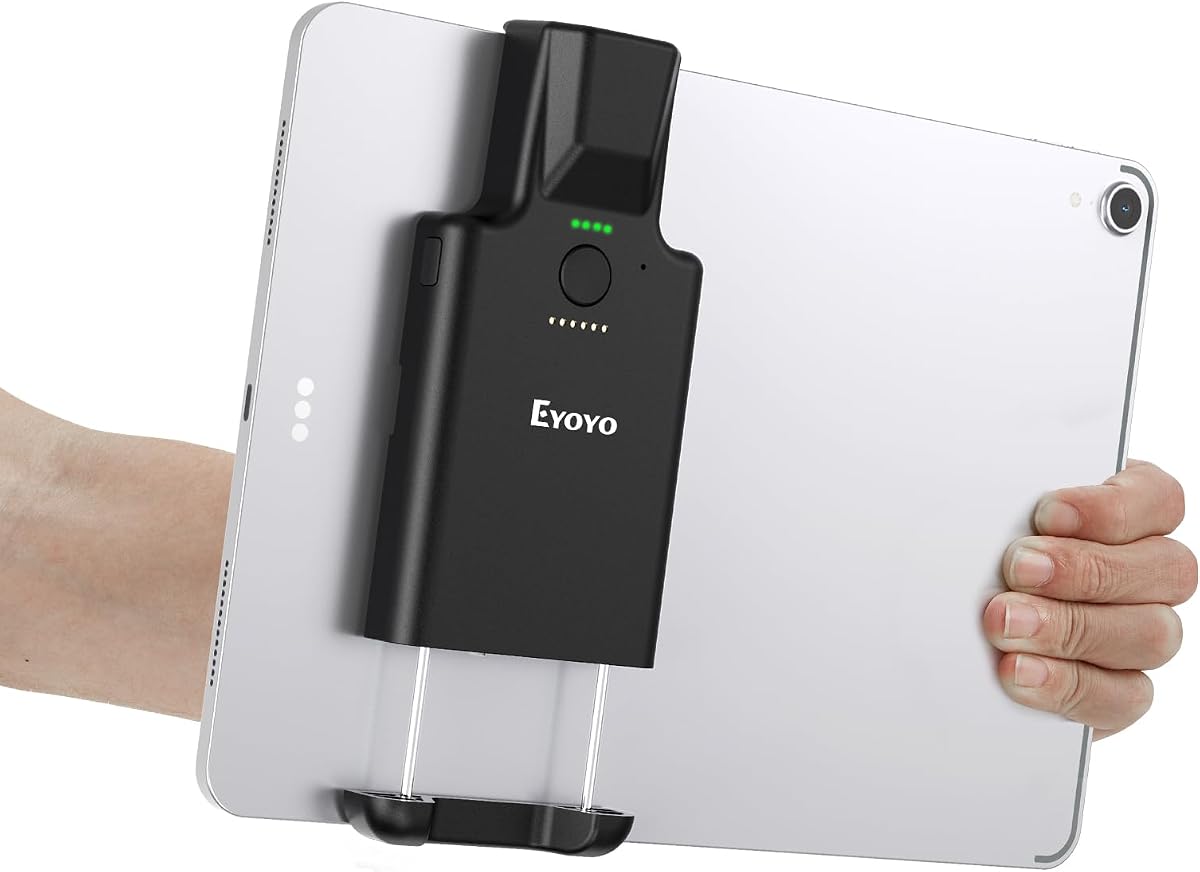
The Eyoyo 1D 2D Portable Bluetooth Barcode Scanner stands out as a top choice for iPad users needing reliable mobile scanning. With a near perfect rating and robust features it delivers exceptional value for retail and inventory tasks.
We may earn a commission when you buy through this link, at no additional cost to you.
Its advanced CMOS imaging technology scans a wide range of barcodes including QR codes and damaged labels with ease. The vertical clip design provides a secure way to attach it directly to your iPad ensuring steady hands during intensive scanning sessions.
While the battery life is impressive lasting up to thirty days on light usage the lack of a 2.4G wireless mode might limit flexibility in some setups. Users should ensure their device size fits the clip range before purchase.
This scanner is ideal for warehouse workers and retail staff who need a dependable all in one solution. The combination of long battery life ergonomic design and versatile scanning capabilities makes it our top pick for iPad compatibility.
The retractable clip fits a range of tablet sizes allowing for stable handheld or mounted operation without needing extra accessories.
With a 3000mAh battery this scanner supports extended shifts without frequent recharging ensuring your workflow remains uninterrupted throughout the day.
We may earn a commission when you buy through this link, at no additional cost to you.
For budget-conscious buyers this Bluetooth 1D&2D Barcode Scanner offers an excellent balance of performance and price. It supports both 1D and 2D codes which is a significant advantage over cheaper 1D only models in this category.
We may earn a commission when you buy through this link, at no additional cost to you.
The three-in-1 connectivity ensures you can switch between Bluetooth 2.4G and USB wired modes depending on your environment. This versatility makes it suitable for varied tasks from retail checkout to inventory management.
While the 2600mAh battery is solid it may not last as long as higher-end models during continuous heavy use. The scanning speed is fast however ensuring efficiency even during peak operational hours.
This model is perfect for small businesses or individuals needing a reliable scanner without breaking the bank. The ability to handle both code types and offer offline storage adds significant value for the price.
Switching between Bluetooth 2.4G and wired modes lets you adapt to different network conditions and device requirements seamlessly.
Store up to 130000 barcodes offline so you can continue working in low-connectivity areas and sync data later.
We may earn a commission when you buy through this link, at no additional cost to you.
The Inateck 1D Bluetooth Barcode Scanner is built for professionals who need reliability and range. Its 115 foot connection range allows you to move freely without worrying about signal drops during extensive warehouse operations.
We may earn a commission when you buy through this link, at no additional cost to you.
The external TPU protective case provides robust physical protection against drops which is essential for rugged environments. Combined with a battery that lasts up to 180 days on standby it minimizes downtime significantly.
While it only supports 1D codes this limitation is often acceptable for specific industrial tasks where QR scanning is not required. The ability to edit prefixes and suffixes adds a layer of customization for database integration.
If you need a scanner that can withstand harsh conditions and provide consistent connectivity this model is a strong contender. The premium build quality and extended battery life justify the higher price point for serious users.
The 115 foot range ensures stable connectivity even when you are far from your iPad or base station.
The TPU case absorbs shock from drops protecting the internal components and extending the device lifespan in tough conditions.
We may earn a commission when you buy through this link, at no additional cost to you.
This NETUM Bluetooth Barcode Scanner is a versatile tool that adapts to various environments with its multiple connectivity options. The high-resolution CCD sensor ensures accurate readings even on damaged or tightly spaced barcodes which is vital for accuracy.
We may earn a commission when you buy through this link, at no additional cost to you.
The auto-sensing mode reduces manual effort allowing you to scan simply by bringing the item close to the scanner. Additionally the programmable features let you tailor how data is transmitted to your system for better integration.
One limitation is its lack of compatibility with certain POS systems which means checking your specific software requirements is essential. The storage mode is a great backup for when wireless signals are weak or unavailable.
Overall this scanner provides a solid mix of features that cater to both casual and professional users. Its ability to store up to 100000 codes offline makes it a reliable choice for inventory tasks in disconnected zones.
Three scanning modes including auto-sensing allow for flexible operation depending on your workflow speed and preference.
Add custom prefixes or suffixes and delete characters to fit your specific database or inventory management system needs.
We may earn a commission when you buy through this link, at no additional cost to you.
The Eyoyo Mini 1D Bluetooth Barcode Scanner is perfect for professionals who value portability above all else. Weighing only 35 grams it fits easily in your pocket without adding bulk to your daily carry.
We may earn a commission when you buy through this link, at no additional cost to you.
Its vibration mode allows for discreet scanning in quiet environments like libraries or hospitals where loud beeps would be disruptive. The three-in-1 connection ways ensure you can adapt to different network setups quickly.
However the battery capacity is smaller compared to larger models meaning it may need more frequent charging during heavy use. Also it only supports 1D codes which limits its use for QR or matrix barcode scanning.
This model is ideal for retail workers or bookkeepers who need a lightweight device for quick checks. If portability is your main concern this scanner delivers exceptional value and convenience without compromising on basic performance.
At just 35 grams it is incredibly easy to hold for long periods reducing hand fatigue during extended scanning tasks.
Turn off the buzzer and rely on vibration feedback to scan silently in noise-sensitive environments.
We may earn a commission when you buy through this link, at no additional cost to you.
The NetumScan Desktop Barcode Scanner offers a unique hands-free solution for fixed stations where speed is critical. Its omnidirectional scanning window allows items to pass through quickly without needing precise alignment or manual triggering.
We may earn a commission when you buy through this link, at no additional cost to you.
The auto-sensing trigger activates when an item moves into the frame making it ideal for high-volume checkout lanes or packing stations. This design significantly improves efficiency by allowing workers to keep both hands free for handling goods.
While it lacks wireless connectivity and relies on a USB cable it provides a stable and consistent connection for stationary tasks. The anti-slip base ensures the scanner stays secure on your counter even during fast-paced operations.
This device is best suited for businesses with dedicated scanning stations like grocery checkouts or warehouse packing areas. If you need to speed up throughput without requiring mobile scanning this desktop model is a top choice.
Scan barcodes from any angle as the scanner automatically detects and reads codes without needing manual triggering.
Keep both hands free to handle packages or products while the scanner reads barcodes automatically as they pass.
We may earn a commission when you buy through this link, at no additional cost to you.
This NetumScan Bluetooth Barcode Scanner comes with a convenient charging dock that doubles as a data receiver reducing cable clutter on your desk. It is specifically optimized for iPhones and iPads ensuring smooth integration with your mobile devices.
We may earn a commission when you buy through this link, at no additional cost to you.
The upgraded wireless chip provides stable connectivity across Bluetooth 2.4G and USB wired modes which minimizes dropouts during critical tasks. Its pocket-sized form factor makes it easy to carry for mobile inventory checks or retail floor duties.
The battery capacity is modest compared to some larger models but the dock ensures it is always charged and ready for use. The vibration mode helps maintain a quiet environment in shared workspaces like offices or libraries.
Ideal for small business owners or mobile workers this scanner offers a balanced set of features at a competitive price point. The included dock adds extra convenience that simplifies your daily workflow and charging routine.
The base station serves as both a charging station and data receiver keeping your scanner ready and organized.
Designed to work seamlessly with iPhones and iPads it ensures reliable pairing and performance on Apple mobile devices.
We may earn a commission when you buy through this link, at no additional cost to you.
This NetumScan Bluetooth Barcode Scanner features a dual-button design that prevents accidental power-offs during intense work sessions. The dedicated side button for power and mode switching ensures you maintain control while scanning items rapidly.
We may earn a commission when you buy through this link, at no additional cost to you.
Built tough to withstand drops from up to two meters this model is designed for rough environments like warehouses or construction sites. The upgraded wireless chip guarantees stable Bluetooth pairing without dropouts which is vital for continuous operation.
The silent vibration mode allows for discreet scanning in quiet spaces while the multiple connection options provide flexibility for different network setups. Its lightweight build reduces hand fatigue during extended use throughout the day.
For professionals who need a rugged reliable scanner that can handle frequent drops and long shifts this model is highly recommended. The thoughtful design choices enhance usability and durability for demanding work environments.
Separate buttons for power and scanning prevent accidental shutdowns ensuring uninterrupted workflow during heavy use.
The robust build can survive drops onto concrete from up to two meters making it suitable for rugged conditions.
We may earn a commission when you buy through this link, at no additional cost to you.
This Bluetooth Wireless Handheld Barcode Scanner supports both 1D and 2D codes which expands its utility for modern inventory needs. It includes offline storage memory for 50000 codes so you can continue working without a constant connection.
We may earn a commission when you buy through this link, at no additional cost to you.
The ergonomic design ensures a comfortable grip during long scanning sessions reducing the risk of hand strain or fatigue. With 2.4G wireless and Bluetooth modes available you can choose the most stable connection for your specific environment.
The user rating is slightly lower which may reflect variability in connection stability or setup complexity. It is worth checking recent reviews to ensure the specific batch meets your expectations before making a purchase decision.
If you need a scanner with offline storage capabilities and support for matrix codes this model offers solid functionality. The included base adds convenience for charging and storage when the device is not in active use.
Store up to 50000 codes offline so you can work in areas with poor connectivity and sync data later.
Scan PDF417 Data Matrix and QR codes in addition to standard 1D barcodes for more versatile data capture.
We may earn a commission when you buy through this link, at no additional cost to you.
The KUIIYER Bluetooth Barcode Scanner features an advanced CMOS sensor that reads both 1D and 2D codes with high accuracy. Its IP54 rating provides protection against dust and water which is beneficial for environments like warehouses or shipping docks.
We may earn a commission when you buy through this link, at no additional cost to you.
The 2000mAh battery supports extended usage allowing you to work through full shifts without frequent charging interruptions. It also offers three scanning modes and storage upload options which give you flexibility in how you manage your data.
While the settings may take some time to configure the extensive barcode support and durable build quality justify the learning curve. The auxiliary light helps improve visibility in dim conditions ensuring reliable scans in all lighting scenarios.
This scanner is a robust choice for businesses that need a reliable durable device for diverse scanning tasks. Its combination of waterproofing and high-resolution imaging makes it a strong contender in the mid-range market.
The 800×600 pixel sensor ensures precise reading of even damaged or low-contrast barcodes efficiently.
Rated IP54 this scanner resists dust and water making it suitable for harsh or outdoor work conditions.
We may earn a commission when you buy through this link, at no additional cost to you.
Choosing the right barcode scanner for iPad involves balancing connectivity and durability and specific feature needs for your workflow.
Look for scanners that support Bluetooth to ensure seamless pairing with your iPad. Some models also offer 2.4G wireless and USB wired modes which provide flexibility if wireless signals are weak in your workspace. Having multiple connection types ensures you can adapt to different environments without needing separate devices.
Prioritize models with Bluetooth 5.0 or later for stable low-latency connections that work well with mobile apps.
Decide whether you need to scan only standard 1D barcodes or if you require 2D QR and matrix codes. Many modern applications and mobile wallets use 2D codes so a scanner with CMOS imaging is more versatile than laser-based 1D models. This capability ensures your device remains useful as businesses adopt more complex barcode standards.
Always verify that the scanner supports all code types you encounter in your daily inventory or sales tasks.
Battery capacity is crucial for all-day mobile scanning. Look for models with at least 2000mAh to avoid frequent interruptions during busy shifts. Consider whether the scanner includes a charging dock which simplifies maintenance and ensures the device is always ready for use.
Longer standby times reduce the need for daily charging and help keep your workflow uninterrupted.
Since you may hold the scanner for hours choose a lightweight model with an ergonomic grip. A compact design fits easily in pockets for mobile workers while a sturdy build protects against accidental drops. Some models also feature clip designs that attach to tablets providing a secure hands-free option.
Comfortable handling reduces hand fatigue and improves scanning speed during extended operational periods.
Industrial environments require scanners that can withstand drops and exposure to dust or moisture. Look for IP ratings such as IP54 or drop protection claims like 2-meter resistance. Durable construction ensures your investment lasts longer and performs consistently in demanding conditions.
A rugged design minimizes replacement costs and maintains productivity in rough workspaces.
Check that the scanner is compatible with your specific iPad apps and POS systems. Some devices may not work with certain platforms like Square so verify integration before purchasing. Programmable features like prefix and suffix editing allow you to customize data output to match your software requirements.
Ensure the scanner supports HID or SPP modes for plug-and-play functionality without extra drivers.
Fast scanning speeds improve efficiency in high-volume settings like retail or logistics. Look for models that offer high decoding rates and auto-sensing features to reduce manual triggering. Accurate reading of damaged or dirty codes is also essential to avoid rework and data errors.
Advanced imaging technology ensures quick reliable scans even on challenging surfaces or labels.
Offline storage is valuable if you frequently work in areas with poor connectivity. Scanners that store thousands of codes internally allow you to sync data once you return to a networked area. This feature prevents data loss and ensures your records are up to date.
Choose a model with enough memory to handle your peak daily volume without needing frequent uploads.
To get started pair your scanner with your iPad via Bluetooth settings following the manufacturer's instructions. Ensure the scanner is fully charged before the first use to maximize performance. Most devices allow you to scan directly into any text field or app without additional software.
Keep the scanning window clean from dust and smudges using a soft dry cloth to maintain accuracy. Avoid exposing the device to extreme temperatures or direct sunlight as this can affect battery health. If the scanner has a removable cover wipe it periodically to prevent debris buildup.
Store the scanner in a dry safe place when not in use to protect it from accidental drops. If your model includes a charging dock place it there regularly to keep the battery conditioned. Regularly update the firmware or settings as recommended by the manufacturer to ensure continued compatibility.
Most modern barcode scanners function as virtual keyboards so they do not require special software. You simply type into any text field or app and the scan data appears. Some advanced models offer configuration tools but basic use is plug and play.
Yes many 2D barcode scanners can read codes displayed on your iPad screen or other devices. This is useful for validating mobile tickets or coupons. However some 1D models may struggle with reflective screens so check the specs for screen scanning support.
Switching between modes usually involves scanning a configuration barcode from the user manual. Some models use buttons or software tools to toggle settings. Always ensure you connect to the correct dongle for 2.4G modes or pair directly for Bluetooth.
Frequent disconnections may be caused by interference or low battery. Move closer to your iPad to improve signal strength and check the battery level. Ensure no physical obstructions are blocking the Bluetooth signal and restart both devices if needed.
Most scanners listed support both iOS and Android devices seamlessly. Just ensure the operating system meets the minimum requirements specified by the manufacturer. Universal compatibility makes them flexible for mixed-device environments.
Battery life varies by model but most provide 8 to 10 hours of continuous scanning. Heavy use like scanning thousands of items daily may require a recharge midday. Models with larger batteries like 3000mAh can last significantly longer on light usage.
We have reviewed ten top models that offer reliable performance and compatibility for iPad users. The Eyoyo Portable stands out as the top choice for its clip design and battery life while the Bluetooth 1D&2D model offers great budget value.
Consider your primary use case when choosing whether you need offline storage or long battery life for warehouse tasks or portability for retail floors. The right scanner will streamline your workflow and reduce manual errors significantly.
Prices and availability change frequently so check the current listings for the latest deals. Use this guide to find the best barcode scanner for iPad that fits your specific needs and budget today.