
8 Bay NAS Case
5.0Editor score
Eight hot-swap drive bays
Dual-chamber design layout
Sturdy galvanized steel frame
Building a reliable network attached storage system requires a chassis designed for continuous operation and high drive density. An ATX NAS computer case provides the structural integrity and cooling needed to keep your data safe and your components running efficiently without overheating issues.
We evaluated ten distinct models based on drive bay count, airflow design, motherboard compatibility, and build materials. Each entry was assessed for its ability to support standard ATX form factors while maximizing storage potential and ensuring long-term reliability for home and enterprise server environments.
Every pick highlights unique features like hot-swap bays, mesh panels, or wooden finishes to match your aesthetic needs. Prices and availability fluctuate frequently, so verify current stock and deals before finalizing your purchase to ensure you get the best value for your specific requirements.
5.0Editor score

4.7Editor score
4.6Editor score
As an Amazon Associate we earn from qualifying purchases.
The following table provides a side-by-side comparison of all ten models to help you quickly identify the right chassis for your specific storage needs and hardware constraints.


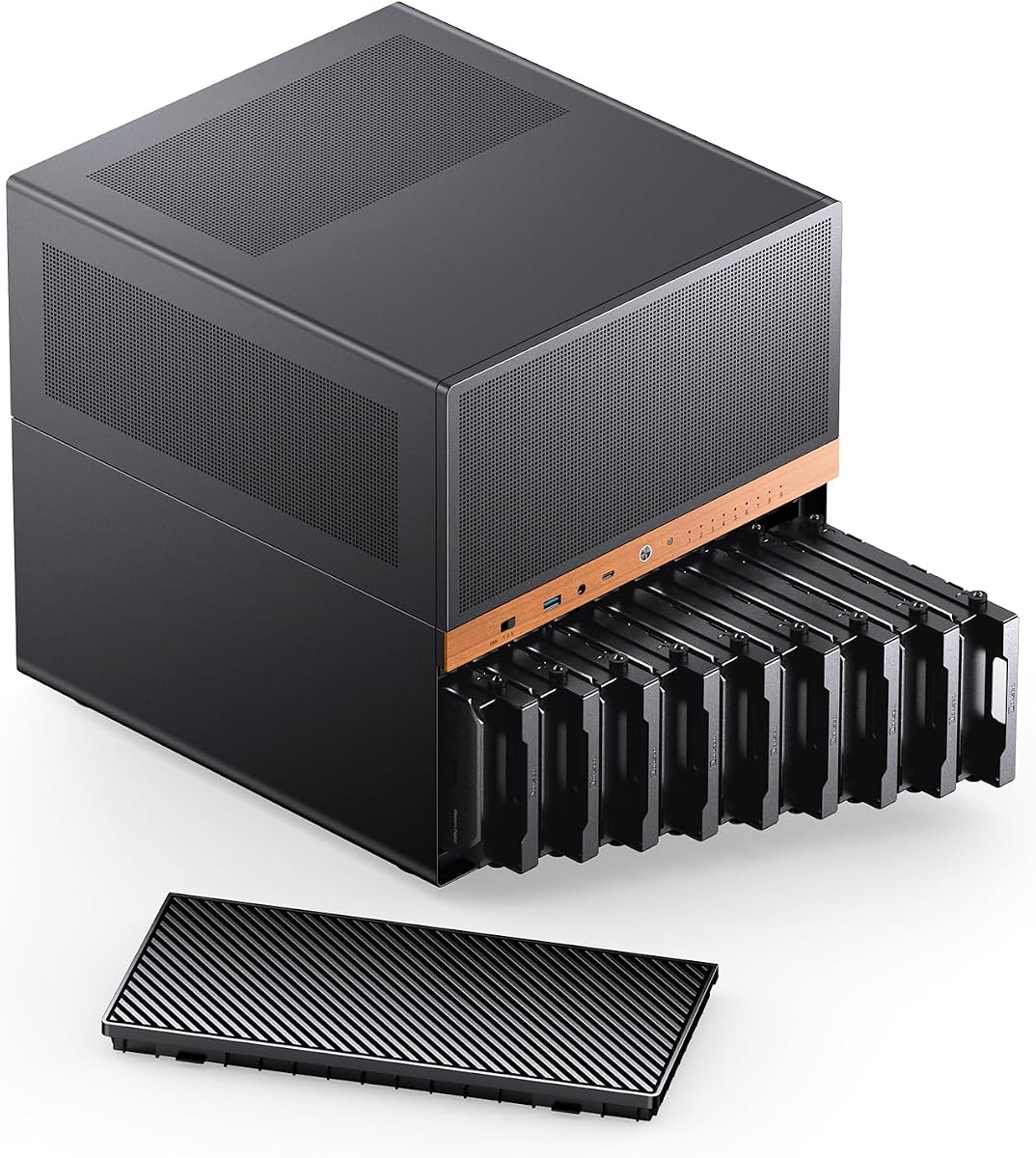
The JONSBO N5 stands out as a top contender for serious home server enthusiasts seeking high capacity storage. It earns a strong rating for its unique ability to house twelve hot-swap drives while maintaining a premium look with walnut wood veneer accents. This case bridges the gap between industrial utility and home office aesthetics effectively.
We may earn a commission when you buy through this link, at no additional cost to you.
Its key strengths lie in the massive drive capacity and the flexibility it offers for GPU-heavy builds. The eight PCIe expansion slots allow for multiple network cards or accelerators, while the front HDD cage is easily removable for maintenance. The airflow is carefully managed to keep high-performance components cool even under heavy loads.
Trade-offs include the larger physical dimensions and a price that reflects its premium materials and features. The wood veneer requires careful handling to avoid scratches and the case is quite deep which may limit placement options in tight spaces. However these issues are acceptable given the performance and storage capabilities it delivers.
This case is ideal for users building a high-end home server or workstation who need significant storage without sacrificing style. If you require space for multiple drives and potentially multiple GPUs the N5 offers a robust solution that few other cases can match in terms of versatility and build quality.
With twelve hot-swap bays and four SSD slots you can build a truly expansive storage array without needing external enclosures or complex cabling solutions for your server setup.
The North American black walnut veneer adds a touch of elegance that makes the case suitable for visible placement in living rooms or home offices unlike standard metal server chassis.
We may earn a commission when you buy through this link, at no additional cost to you.
The 8 Bay NAS Case delivers incredible value for users needing reliable storage without a high price tag. With a perfect rating it proves that budget-friendly options can still offer robust features like hot-swap bays and a durable steel frame. It is an ideal starting point for DIY server builders.
We may earn a commission when you buy through this link, at no additional cost to you.
Key strengths include the dual-chamber design which separates components from drives to improve airflow and reduce noise. The galvanized steel inner frame provides strong structural integrity while the magnetic front panel allows for easy access to the drives. It supports eight 3.5 inch drives plus two SSDs for mixed storage needs.
Trade-offs involve limited motherboard compatibility restricted to micro ATX and ITX formats. The aesthetic is purely functional with no extra styling elements which may not suit all setups. However for a build focused on reliability and cost these compromises are minor compared to the value provided.
This case is perfect for budget-conscious builders creating a home server or network attached storage unit. If you prioritize function over form and need eight drives plus extra SSDs this chassis offers a secure and efficient housing solution for your data needs.
Separating the motherboard area from the drive cage helps prevent dust from settling on sensitive components while allowing independent cooling zones for better thermal management.
The eight 3.5 inch hot-swap bays mean you can add or replace drives without shutting down the system which is essential for maintaining uptime on critical storage servers.
We may earn a commission when you buy through this link, at no additional cost to you.
The JONSBO N6 elevates the premium experience with its combination of storage capacity and flexible power options. It offers nine drive bays and a solid wood finish that complements high-end home setups. The ability to mount power supplies in multiple positions adds unique versatility for custom builds.
We may earn a commission when you buy through this link, at no additional cost to you.
Strengths include the robust cooling system with multiple fan mounting positions and the inclusion of hot-swap bays for easy maintenance. The walnut wood veneer provides a sophisticated look while the internal layout supports both ATX and SFX power supplies. This flexibility allows for tailored airflow management based on your specific components.
Trade-offs involve the complexity of wiring multiple power interfaces and limited GPU length clearance. The power backplane requires careful attention to ensure stable drive startup especially with high-draw enterprise drives. Despite these nuances the overall build quality and design justify its premium positioning.
This case is best for users who want a stylish server chassis with significant storage and power flexibility. If you need nine drives and want to mix power supply types without sacrificing aesthetics the N6 offers a high-quality solution for serious home server projects.
Supporting both ATX and SFX power supplies in multiple positions allows you to optimize airflow and cable routing for your specific hardware configuration without compromising on drive space.
The solid wood paneling gives the case a high-end finish that looks great in a living room or office setting making it a standout choice for visible server builds.
We may earn a commission when you buy through this link, at no additional cost to you.
The DARKROCK Classico Storage Master offers a unique vertical GPU mount that helps reduce sag and improve airflow for high-end graphics cards. It supports thirteen hard drives making it a strong contender for massive storage needs. The mesh front panel ensures efficient cooling for all internal components.
We may earn a commission when you buy through this link, at no additional cost to you.
Its key strengths include the vertical GPU mount which prevents card sagging and improves thermal performance. The case supports a 360mm radiator and includes four fans for robust cooling. Thirteen drive bays provide ample space for extensive storage arrays or media server builds.
Trade-offs include the complexity of installing a GPU vertically which may require additional support or adjustments. The aesthetic is standard with no special styling elements to distinguish it from typical PC cases. However for performance-focused builds these factors are minor compared to the cooling and storage benefits.
This case is ideal for users needing both significant storage and advanced cooling capabilities. If you plan to use high-end GPUs and need thirteen drives the vertical mount and mesh design offer a practical solution for efficient thermal management and storage capacity.
Mounting the GPU vertically reduces sag and improves airflow around the graphics card which helps maintain lower temperatures and better performance during intensive workloads.
The mesh front panel combined with multiple pre-installed fans ensures that air circulates freely through the case keeping components cool even during extended operation.
We may earn a commission when you buy through this link, at no additional cost to you.
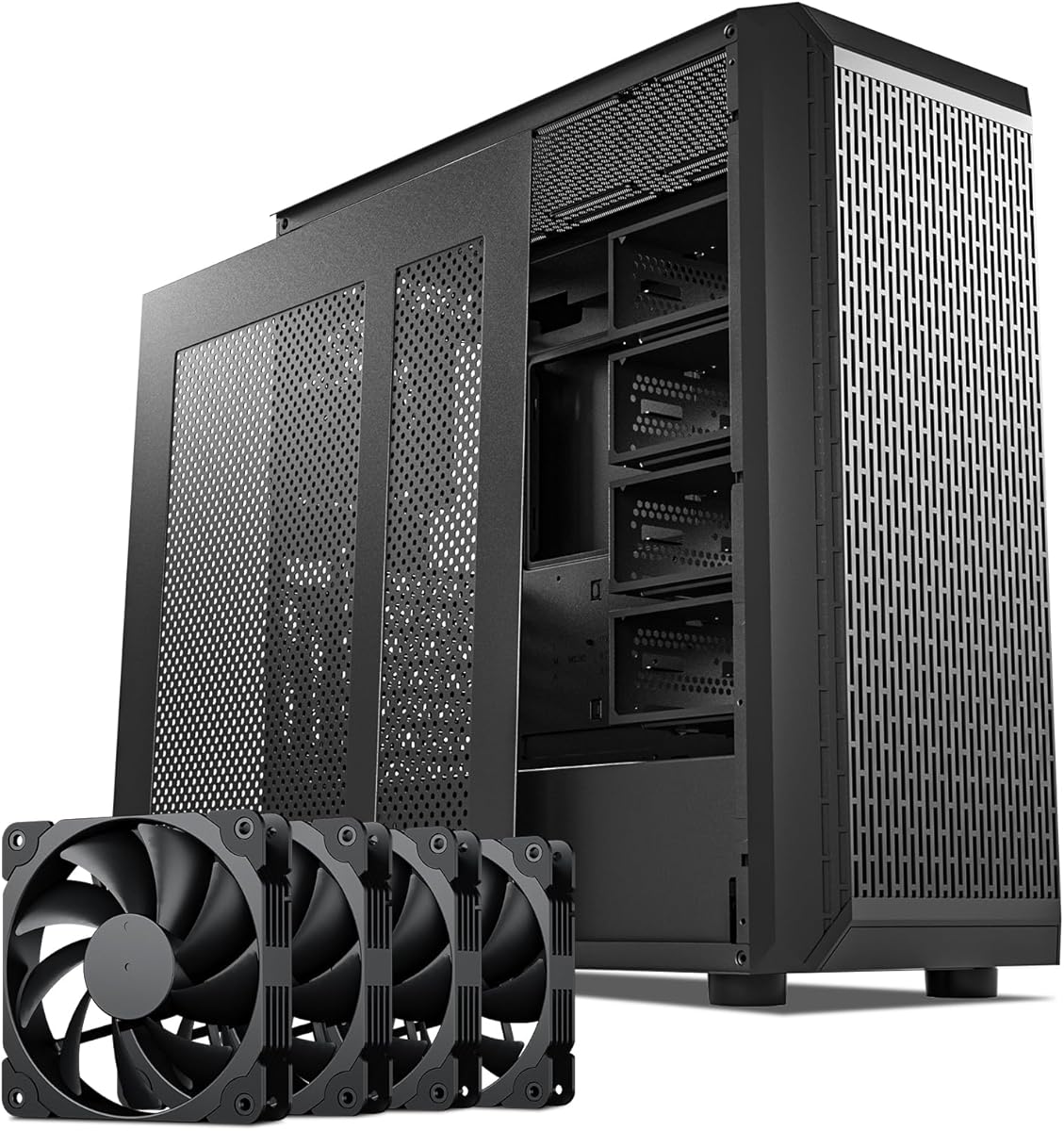
The Rosewill Helium NAS Duo is designed for optimal airflow with four 140mm PWM fans and a mesh panel to keep components cool. It supports eight 3.5 inch hard drives and features a modern USB 3.2 Type-C port for fast data transfer. The case accommodates various motherboard sizes and AIO coolers.
We may earn a commission when you buy through this link, at no additional cost to you.
Key strengths include the robust cooling setup with large PWM fans and a mesh front panel that maximizes air intake. The USB Type-C port adds modern connectivity for external devices. It supports a 360mm radiator making it suitable for high-performance liquid cooling setups.
Trade-offs include mixed user feedback on build quality and drive management. While the airflow is excellent some users report challenges with drive installation and overall sturdiness. However for builders prioritizing cooling and modern connectivity these issues may be manageable.
This case is best for users needing strong airflow and modern connectivity for their NAS build. If you want eight drives and a Type-C port with excellent cooling options the Helium NAS Duo offers a solid foundation for your server project.
Four large PWM fans paired with a mesh front panel create a powerful airflow path that keeps your CPU and drives cool even during prolonged storage operations.
The USB 3.2 Type-C port provides fast data transfer rates for connecting external drives or peripherals directly to the NAS system without extra adapters.
We may earn a commission when you buy through this link, at no additional cost to you.
The KM7B Full Tower Case offers extensive storage with thirteen hard drive bays and supports E-ATX motherboards for advanced builds. Its magnetic front panel makes accessing drives easy without tools. The case supports large liquid coolers and provides a spacious interior for complex server configurations.
We may earn a commission when you buy through this link, at no additional cost to you.
Key strengths include the massive drive capacity and compatibility with larger motherboards which allows for greater expansion options. The magnetic front panel simplifies maintenance and drive swapping while the full tower design offers ample room for cable management and cooling upgrades.
Trade-offs involve the large physical footprint which may require dedicated server rack or space. Limited reviews make it harder to gauge long-term reliability but the build specifications suggest a focus on capacity and expansion. For users needing extreme storage this is a compelling option.
This case is ideal for users requiring maximum drive capacity and motherboard flexibility. If you need thirteen drives and plan to use an E-ATX board the KM7B provides the necessary space and features to support a high-capacity server environment.
With thirteen hard drive bays you can build a massive storage array without needing additional external enclosures which simplifies your setup and improves data management.
Supporting E-ATX motherboards and large liquid coolers gives you the freedom to use high-end components and expand your system without space constraints.
We may earn a commission when you buy through this link, at no additional cost to you.
The Generic ZhenLoong Full Tower delivers the highest drive count with fifteen hot-swap bays and redundant power support for enterprise-grade reliability. It features a heavy duty steel build and eight expansion slots for extensive connectivity. This chassis is designed for serious workstation or server deployments.
We may earn a commission when you buy through this link, at no additional cost to you.
Strengths include the fifteen hot-swap drives and redundant power supply support which ensures high availability and data safety. The robust steel construction provides excellent durability while the eight PCI slots allow for multiple network cards or accelerators. It is built to handle demanding workloads effectively.
Trade-offs include long shipping times and an industrial look that may not suit home office aesthetics. The weight and size also require a sturdy surface or rack mounting. For critical infrastructure however these factors are outweighed by the reliability and capacity offered.
This case is best for enterprise or critical home users needing maximum redundancy and storage. If you require fifteen drives and dual power supplies for uninterrupted operation the ZhenLoong provides a robust solution for demanding server and workstation environments.
Fifteen hot-swap drive bays provide unmatched storage density allowing you to build a massive array for data centers or heavy media storage without external enclosures.
Support for redundant power supplies ensures that your system stays online even if one power supply fails which is critical for maintaining uptime on important servers.
We may earn a commission when you buy through this link, at no additional cost to you.
The Silverstone SST-TJ04B-E is a premium industrial case known for its classic aluminum front panel and robust build quality. It features a positive pressure design to reduce dust and a built-in hard drive cooler to maintain optimal temperatures. This case is designed for reliable long-term storage.
We may earn a commission when you buy through this link, at no additional cost to you.
Strengths include the seven millimeter aluminum front which looks premium and durable. The positive pressure design helps keep dust out and the built-in drive cooler protects your drives from overheating. It supports long graphics cards and has eight expansion slots for flexibility.
Trade-offs include a high cost and a design that may feel dated compared to modern cases with mesh fronts. The cooler is also fixed which may limit customization. For those valuing build quality and longevity these factors are acceptable compromises.
This case is ideal for users needing a durable and stylish chassis for critical storage. If you want a premium look with proven reliability and drive protection the TJ04B-E offers a high-quality option for long-term server or media center builds.
The thick aluminum front panel and solid construction ensure that the case is durable and can withstand years of use without showing significant wear.
Positive pressure design forces dust out of the case rather than letting it accumulate on components which helps maintain performance and reduces cleaning needs over time.
We may earn a commission when you buy through this link, at no additional cost to you.
The JONSBO N4 is a compact NAS case with a walnut wood front that suits home office environments. It holds six 3.5 inch drives plus two SSDs with four hot-swap bays for flexibility. The case supports Micro ATX motherboards and includes a USB 3.2 Gen 2 Type-C port.
We may earn a commission when you buy through this link, at no additional cost to you.
Strengths include the stylish walnut wood panel which looks elegant on a desk. The compact design saves space while still offering eight drive bays for solid storage needs. A USB-C port provides modern connectivity for external drives or peripherals.
Trade-offs involve limited GPU clearance and fewer hot-swap bays compared to larger models. The compact size also restricts cooling options and power supply selection. However for a home setup these limitations are minor compared to the space-saving benefits.
This case is best for users needing a stylish compact server for home or office use. If you value aesthetics and space efficiency while needing eight drives the N4 offers a practical and attractive solution for small-scale storage builds.
The compact form factor allows the case to sit on a desk or shelf without taking up too much room while still providing ample storage for your needs.
The walnut wood front panel gives the case a premium look that blends well with home office furniture making it a great choice for visible server setups.
We may earn a commission when you buy through this link, at no additional cost to you.
The Silverstone Technology CS382 is designed for high-performance NAS builds with support for both SAS and SATA drives. It features eight hot-swappable trays with LED indicators for easy monitoring. The chassis supports Micro ATX motherboards and includes a USB Type-C port for modern connectivity.
We may earn a commission when you buy through this link, at no additional cost to you.
Strengths include support for enterprise-grade SAS drives which offer better reliability and speed. The LED indicators make it easy to monitor drive status without logging into the system. The build quality is robust and designed for continuous operation in demanding environments.
Trade-offs include a higher cost and a compact size that limits expansion options. The case is specialized for storage which may mean less room for additional cards or components. For dedicated storage builds these limitations are acceptable given the performance benefits.
This case is best for users needing enterprise-grade storage reliability and SAS drive support. If you require eight drives with hot-swap capability and high-performance connectivity the CS382 provides a robust and reliable solution for critical NAS builds.
Support for SAS drives and enterprise-grade features like LED indicators and robust build quality ensures that the case can handle demanding and critical storage workloads.
Eight hot-swappable drive trays allow you to replace or add drives without shutting down the system ensuring continuous operation and reducing downtime for maintenance.
We may earn a commission when you buy through this link, at no additional cost to you.
Selecting the right ATX NAS computer case involves evaluating drive capacity airflow design and material quality to ensure your server runs efficiently and reliably over time.
The number of drive bays determines how much storage you can integrate into your system. For home servers you may only need eight bays but enterprise or media builds often require twelve or more. Check if bays are hot-swap for easy maintenance without shutting down your system.
Prioritize cases with enough bays for your current needs plus room for future expansion. Hot-swap bays are essential if you need to replace drives frequently without interrupting service.
Ensure the case supports your motherboard form factor whether it is ATX Micro ATX or E-ATX. Some cases restrict GPU clearance or power supply length based on the chosen motherboard size. Verify the internal dimensions to avoid clearance issues with large components.
Match the case dimensions to your motherboard and components carefully. E-ATX support offers more expansion but requires a larger chassis with proper airflow design.
NAS systems run continuously so efficient cooling is vital to prevent overheating and prolong hardware life. Look for mesh panels ample fan mounts and support for liquid cooling radiators. Proper airflow keeps hard drives cool which is critical for data integrity.
Opt for cases with multiple fan positions and front mesh panels to maximize airflow. Consider liquid cooling support if you plan to use high-performance CPUs alongside your storage array.
A sturdy case protects your drives from physical damage and minimizes vibration which can affect hard drive health. Steel frames and thick panels are preferred for server builds. Some cases feature wood veneers for aesthetics but ensure the structural integrity remains robust.
Choose a case with thick metal panels and strong joints to reduce vibration and protect components. Avoid flimsy materials that might warp or rattle over time.
Your power supply must fit the case and provide enough wattage for all drives and components. Some cases support standard ATX units while others allow SFX or redundant power. Check the PSU length limits especially if you have a large CPU cooler or GPUs.
Ensure the case supports the type and size of power supply you need. Redundant power support is useful for systems that require high availability and uninterrupted operation.
Consider the number of PCIe slots available for network cards or accelerators. USB ports on the front panel like Type-C provide convenient access for external drives. More slots offer better flexibility for adding specialized hardware as your needs grow.
Select a case with enough PCIe slots for your planned expansion and modern USB ports for easy connectivity. This ensures your server remains versatile and upgradable over time.
The look of the case matters if it will be visible in a living room or office. Wooden finishes or stylish panels blend better with home decor than industrial chassis. Ensure the design does not compromise airflow or drive access.
Balance style with functionality by choosing a case that fits your environment without hindering performance. A well-designed case can improve your user experience while keeping your hardware safe.
Prices vary significantly based on features build quality and brand reputation. Higher-end cases offer better cooling and materials but budget options can still meet basic needs. Evaluate what features are essential for your specific use case to find the best value.
Determine your budget early and prioritize features that directly impact your server's reliability and performance. A balanced investment will provide the best long-term value for your NAS build.
Install your drives securely in the bays using the provided screws or toolless mechanisms. Ensure all drives are connected to the motherboard and power supply with proper cables. Verify that the motherboard and components are correctly seated before powering on the system.
Maintain cleanliness by regularly dusting the inside of the case and cleaning the air filters. Check fan operation periodically to ensure they spin freely and cool your components effectively. Good ventilation helps maintain consistent temperatures and extends the life of your drives.
Monitor drive health using system tools to detect early signs of failure. Replace drives proactively when they show warning signs to prevent data loss. Keep your firmware and drivers updated to ensure compatibility and performance for your server setup.
A NAS case provides optimized airflow and drive bays designed for continuous storage operation. This ensures your hard drives stay cool and data integrity is maintained over time. It also offers better vibration isolation to protect your drives.
Standard PC cases may work but lack dedicated drive bays and airflow for multiple drives. NAS cases offer better cooling and mounting solutions which are critical for reliability. If using a standard case ensure you have enough fan mounts and drive space.
ATX NAS cases vary but typically support between eight and fifteen 3.5 inch drives. Some high-end models offer even more bays with hot-swap features. Check the specifications to find the right capacity for your storage needs.
Many NAS cases include hot-swap bays that let you add or remove drives without shutting down. This is ideal for maintaining uptime on critical servers. Ensure your backplane supports hot-swap functionality before purchasing.
Air cooling is simpler and more reliable for continuous NAS operation. Liquid cooling can be used for high-performance CPUs but adds complexity. Most NAS cases focus on fan layouts that keep drives and components cool effectively.
Some NAS cases support both ATX and SFX power supplies for flexibility. Others are limited to standard ATX units. Check the case specifications to confirm PSU compatibility before choosing your power supply.
Prioritize drive capacity and airflow to keep multiple hard drives cool. USB Type-C ports and modern connectivity are useful for external devices. Look for quiet operation if the server will be in a living area.
Wood-finish cases use solid panels over steel frames for both style and strength. They are durable and look great in home settings. Just handle the wood carefully to avoid scratches or damage to the finish.
We highlighted ten top ATX NAS computer cases ranging from budget-friendly options to premium high-capacity models. The JONSBO N5 leads for overall performance while the 8 Bay Case offers excellent value for cost-conscious builders. Each pick balances storage needs with cooling and build quality effectively.
Prioritize drive capacity and airflow when choosing your case to ensure long-term reliability. Look for hot-swap bays and solid construction if you need minimal downtime. Matching the case to your motherboard and components is key to a successful build.
Prices and availability change frequently so always verify current stock before finalizing your purchase. Checking the latest deals helps you secure the best value for your specific needs. Use this guide as a foundation to make an informed decision for your next server build.