
ASUS Pro WS W890E-SAGE SE
5.0Editor score
Intel Xeon 600 support
NitroPath DRAM technology
Advanced AI PC readiness
This comprehensive guide compares the top ASUS server motherboards for workstations and enterprise deployment, evaluating connectivity power delivery and
Choosing the right server motherboard is critical for building reliable workstations and enterprise systems. ASUS offers a wide range of boards designed for different CPU sockets and performance needs.
We have analyzed ten top models based on their power stages, PCIe slot counts, network capabilities, and remote management tools. This list covers options from compact microATX to full E-ATX form factors.
Each selection highlights key strengths and trade-offs to help you match hardware to your workload. Prices change frequently, so verify current listings before purchasing your final components.
5.0Editor score

3.7Editor score
4.3Editor score
The following table provides a side-by-side comparison of all ten models to help you evaluate form factors and key specifications quickly.


This workstation board delivers exceptional connectivity for data centers requiring massive multi-GPU configurations. It stands out with seven PCIe 5.0 x16 slots and dual 10Gb LAN ports for high throughput.
We may earn a commission when you buy through this link, at no additional cost to you.
The robust power delivery includes 32 power stages to handle 96-core CPUs without throttling. Massive VRM and chipset heatsinks with active fans ensure thermal stability under sustained loads.
While it offers PCIe Q-release Slim for easier card swaps, the board demands significant space and power infrastructure. Users should confirm their chassis supports the EEB form factor before buying.
Ideal for architects and researchers building AI workstations or rendering farms needing reliable remote management and extreme I/O throughput without compromise.
Seven full-width PCIe 5.0 slots allow simultaneous use of multiple GPUs or high-speed NVMe adapters for bandwidth hungry tasks.
The IPMI implementation provides hardware level monitoring and control for IT admins managing headless deployments effectively.
We may earn a commission when you buy through this link, at no additional cost to you.
This model is engineered for the future of AI computing with a design that supports Intel Xeon 600 processors. The NitroPath DRAM technology pushes ECC R-DIMM DDR5 performance further.
We may earn a commission when you buy through this link, at no additional cost to you.
Connectivity remains a highlight with seven PCIe 5.0 x16 slots and dual 10Gb LAN ports ensuring data moves quickly between storage and CPU. The board is validated for 24/7 operation.
Power delivery includes 16+(2+2)+1+2 stages which is substantial for workstation tasks. Users should note that the board is designed for the EEB form factor and requires specific power setups.
IT teams needing a premium platform for AI training or complex rendering workloads will appreciate the stability and advanced connectivity options this board provides.
The board is specifically tuned to meet the power and connectivity demands of modern AI applications and heavy workstation workloads.
Multiple power connectors and active cooling solutions ensure the system remains stable during intense processing sessions.
We may earn a commission when you buy through this link, at no additional cost to you.
This CEB workstation motherboard offers a balance of performance and expandability for Intel Xeon 600 systems. It supports up to seven PCIe 5.0 x16 slots and multiple M.2 storage options.
We may earn a commission when you buy through this link, at no additional cost to you.
The NitroPath DRAM technology enhances memory performance which is beneficial for data heavy applications. Users must install a separate IPMI expansion card for remote management features.
Power delivery is handled by 12+(2+2)+1+2 stages ensuring stable performance under load. The board is validated for extensive compatibility with the latest technologies.
Workstation builders looking for a strong foundation with room for growth should consider this model for its flexible expansion capabilities.
With seven PCIe 5.0 slots and multiple M.2 slots this board ensures fast data transfer for modern workstation needs.
The design includes thorough cooling for VRM chipset and M.2 components to maintain stability during continuous operation.
We may earn a commission when you buy through this link, at no additional cost to you.
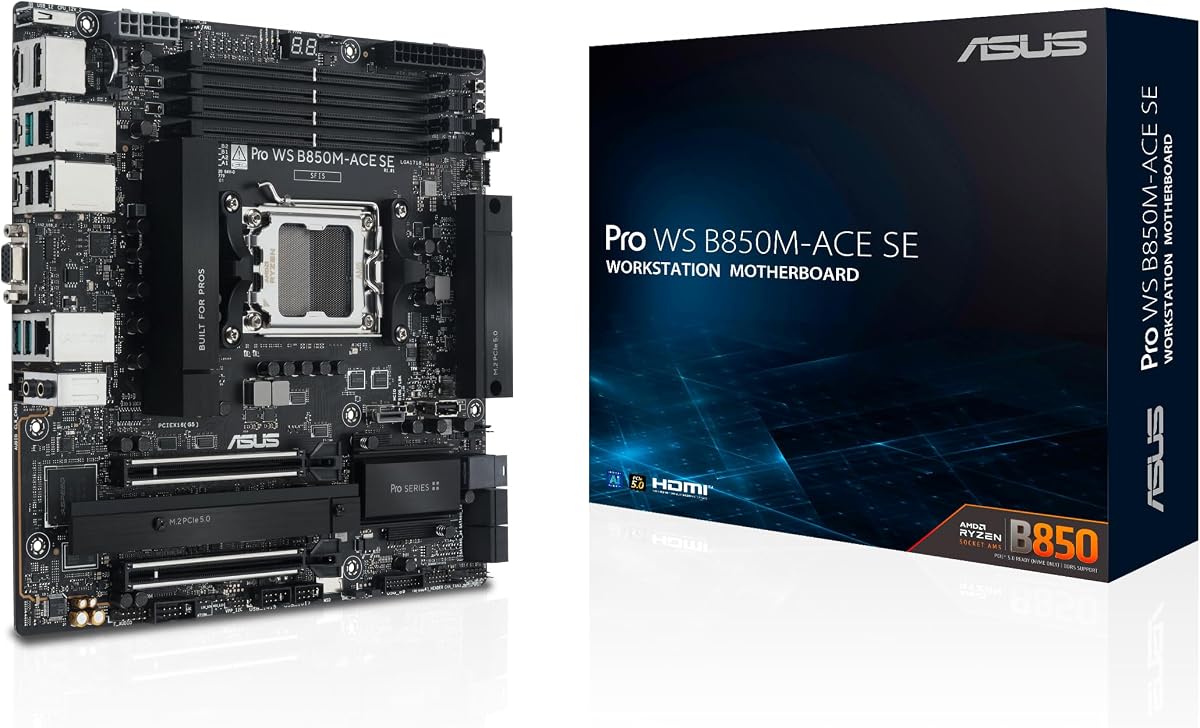
This MicroATX business motherboard is designed to power next-gen AI workloads in a smaller form factor. It supports AMD Ryzen 9000/8000/7000 series processors and includes onboard IPMI remote management.
We may earn a commission when you buy through this link, at no additional cost to you.
The board features two PCIe 5.0 x4 M.2 slots and MCIO NVMe support which provides fast storage options. It also includes two 10G & 2.5G LAN ports for network connectivity.
While it does not match the slot count of larger workstation boards it offers solid reliability and validation for 24/7 operation. The compact design helps fit into space constrained server environments.
Small business owners or edge computing setups will find this board provides enterprise features without the bulk of a full size EEB or E-ATX chassis.
Despite its small size the board delivers onboard IPMI remote management and robust connectivity for business environments.
Designed with AMD AM5 support the board ensures compatibility with current and future Ryzen processors for longevity.
We may earn a commission when you buy through this link, at no additional cost to you.
This CEB workstation motherboard stands out with its integrated WiFi 7 support and compatibility with AMD Ryzen Threadripper PRO 7000 WX-Series Processors. It also provides three PCIe 5.0 x16 slots.
We may earn a commission when you buy through this link, at no additional cost to you.
The robust power and thermal design includes 36 power stages to handle demanding workloads. Users also get three M.2 slots and front and rear USB 20Gbps Type-C ports.
While it offers solid performance for workstation tasks it requires 1DPC memory configuration for optimal speeds. The board is tested for 24/7 operation which ensures stability.
Users needing wireless flexibility alongside high performance workstation features will find this board offers a unique combination of connectivity options for creative professionals.
The inclusion of WiFi 7 ensures ultra fast wireless connectivity which is useful for remote management or data transfer.
With 36 power stages this board provides stable power delivery even under heavy multi core CPU loads.
We may earn a commission when you buy through this link, at no additional cost to you.
This CEB workstation motherboard is designed for the future of AI computing with support for AMD Ryzen Threadripper 9000 and 7000 WX-Series Processors. It features three PCIe 5.0 x16 slots for expansion.
We may earn a commission when you buy through this link, at no additional cost to you.
The board includes USB4 40Gbps ports and dual 10Gb & 2.5Gb LAN ports to handle fast data transfers. Server-grade IPMI remote management hardware and software support is included.
Power delivery is handled by 20 power stages which is substantial for workstation tasks. Users also get support for up to 1TB ECC R-DIMM DDR5 memory modules.
AI researchers and data scientists who need robust connectivity and expansion capabilities for training models will appreciate the specialized features this board provides.
The board is engineered to meet the power and connectivity demands of advanced AI applications and complex workloads.
Server-grade IPMI support ensures IT teams can monitor and manage systems efficiently in remote or large deployments.
We may earn a commission when you buy through this link, at no additional cost to you.
This ATX workstation motherboard supports 13th Gen Intel Core processors and includes an IPMI expansion card bundled for remote management. It features dual 2.5Gb Ethernet ports for network connectivity.
We may earn a commission when you buy through this link, at no additional cost to you.
The board includes dual PCIe 5.0 Safeslots and multiple M.2 slots for storage expansion. Users also get support for Thunderbolt 4 and comprehensive cooling solutions.
It is a solid choice for small business users needing entry level server features like IPMI and stable power delivery. The bundle ensures immediate remote management without extra purchases.
IT administrators looking for a reliable workstation board with immediate remote access capabilities will find this model offers strong value for its feature set.
The bundled IPMI expansion card provides immediate remote access and monitoring capabilities for headless server environments.
DrMOS and durable capacitors ensure stable power delivery even under continuous heavy processing loads.
We may earn a commission when you buy through this link, at no additional cost to you.
This server motherboard supports Intel Xeon E-2300 processors and is built on the Intel C252 Chipset. It provides a Micro ATX form factor which fits into smaller server cases.
We may earn a commission when you buy through this link, at no additional cost to you.
The board is designed for reliability and supports ECC memory for stable operations. It is a solid option for legacy systems or budget focused deployments needing Xeon support.
While it lacks the latest PCIe 5.0 speeds it delivers essential server features for entry level needs. Users should verify compatibility with their existing chassis and power supply.
Small businesses maintaining legacy infrastructure or looking for a cost effective upgrade path will find this board a practical choice for their server builds.
Designed for 24/7 operation this board provides stability for entry level server deployments requiring reliable uptime.
The Micro ATX form factor ensures it fits into space constrained server cabinets without sacrificing essential functionality.
We may earn a commission when you buy through this link, at no additional cost to you.
This E-ATX motherboard is suitable for two Intel Xeon processors of the 5th Generation with LGA-4677 socket. It supports up to 4TB RAM and up to 3 PCIe cards per single CPU.
We may earn a commission when you buy through this link, at no additional cost to you.
The board includes dual Intel 10Gbps Ethernet ports with teaming support for network redundancy. It also features dual M.2 with PCIe 5.0 x4 bandwidth for faster OS booting.
Users must ensure their chassis supports the large E-ATX form factor before installation. Comprehensive IT infrastructure management is available through ASUS Control Center and ASMB11-iKVM.
Data centers and enterprise IT teams requiring maximum CPU and memory capacity will find this board provides a robust platform for mission critical applications.
Support for up to 4TB RAM ensures this board handles the most demanding memory intensive workloads efficiently.
Designed for two Xeon processors this board delivers parallel processing power for high throughput computing tasks.
We may earn a commission when you buy through this link, at no additional cost to you.
This ATX motherboard supports 13th Gen Intel Core processors and includes an IPMI expansion card bundle for remote management. It features dual 2.5Gb Ethernet ports and multiple M.2 slots.
We may earn a commission when you buy through this link, at no additional cost to you.
The board includes PCIe 5.0 SafeSlot slots and comprehensive cooling solutions like large VRM heatsinks. Users get a solid foundation for workstation needs with enterprise management features.
While the user rating is lower it offers significant value for teams needing immediate IPMI access. The bundle ensures intelligence for the IPMI architecture is available out of the box.
Small business server builds needing immediate remote management capabilities and stable power delivery will find this model a practical choice for their requirements.
The IPMI expansion card bundle provides immediate access to remote management tools without additional purchases.
DrMOS and ProCool connectors ensure stable power delivery for 13th Gen processors during heavy workloads.
We may earn a commission when you buy through this link, at no additional cost to you.
Selecting the right ASUS server motherboard requires balancing CPU support, connectivity, and form factor constraints.
Ensure the motherboard socket matches your intended processor such as LGA 1700 or LGA 4677. Newer sockets support DDR5 and higher TDPs.
Verify compatibility with the latest Intel or AMD generations to future proof your investment.
Server motherboards often use EEB or E-ATX sizes requiring larger chassis. MicroATX options exist for compact setups.
Confirm your server case supports the motherboard dimensions and mounting points before purchase.
Server boards often support ECC memory for data integrity. Check supported RAM type and capacity like DDR5 RDIMM or ECC R-DIMM.
Max capacity varies by board so verify it meets your application needs.
Count the number of PCIe 5.0 x16 slots if you plan to use multiple GPUs or expansion cards.
Ensure slots do not bandwidth throttle when fully populated.
Look for dual 10Gb LAN ports or M.2 network cards if high throughput is required.
Ethernet speed affects data transfer rates and network redundancy.
IPMI allows remote power control and health monitoring. Some boards include the card while others require a separate purchase.
This feature is essential for managing headless or remote server deployments.
Check the number of M.2 slots and their PCIe generation like 4.0 or 5.0.
Additional U.2 or SlimSAS ports expand options for enterprise storage.
Server boards require robust VRMs to handle high TDP CPUs. Look for active cooling on VRM and chipset.
Ensure your power supply supports necessary 8-pin connectors for stable operation.
Install the motherboard in a compatible chassis with proper airflow. Ensure CPU socket and power connectors are securely seated before powering on.
Enable XMP or DOCP for memory speeds in BIOS and verify all storage devices are detected. Install ASUS Control Center Express to monitor health remotely.
Keep the system in a climate controlled environment to prevent overheating. Regularly clean dust from fans and heatsinks to maintain thermal performance.
IPMI stands for Intelligent Platform Management Interface and allows hardware level remote control and monitoring independent of the OS. Remote management software often relies on network protocols within the OS. IPMI ensures access even if the OS crashes.
ECC memory corrects errors and prevents crashes in critical workloads. While not always mandatory it is recommended for data integrity. Many server boards support non ECC as well but check compatibility lists.
No DDR4 and DDR5 modules are not interchangeable due to physical notch placement and voltage differences. Server boards support specific generations so always match RAM type to motherboard specifications.
PCIe 5.0 doubles the bandwidth of 4.0 which is vital for high speed GPUs and NVMe storage. It ensures your system does not bottleneck during heavy data transfers or rendering tasks.
Use USB BIOS Flashback if available for updating without CPU. Otherwise boot into UEFI and use the update utility. Always download files directly from the ASUS support portal for accuracy.
EBB boards are wider than ATX requiring large server chassis. Measure mounting holes and ensure your case supports the EEB standard dimensions before attempting installation.
We have compared ten top ASUS models ranging from compact MicroATX to expansive E-ATX workstation boards.
Prioritize CPU socket and memory capacity to ensure longevity for your specific workload requirements.
Always verify current prices and stock levels as component availability changes quickly in the market.