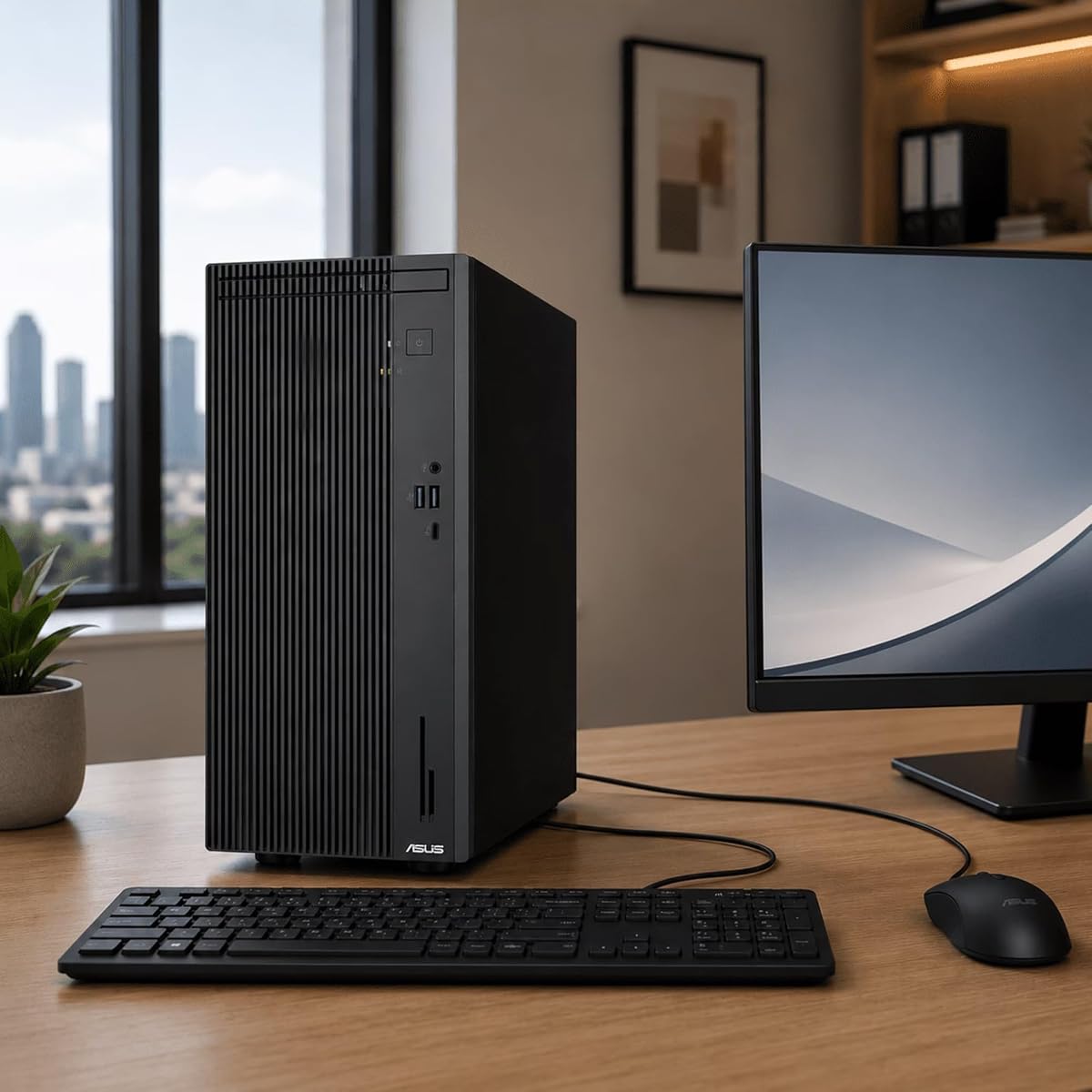
ASUS V500 Business Tower Desktop Computer
5.0Editor score
Intel Core i7 13620H Processor
16GB DDR5 RAM Included
Windows 11 Home Operating System
This guide compares the best ASUS Desktop PC options for gaming and work, reviewing performance, storage, and connectivity to help you choose the right system.
Finding the right computer for your needs can be challenging with so many options available today. ASUS Desktop PC models offer reliable performance for both business and gaming tasks across various price points.
We have carefully evaluated ten different ASUS systems based on processor speed, memory capacity, and storage solutions. Our comparison highlights the unique strengths of each model to simplify your decision process.
Each selection in this list showcases specific capabilities suited for different user requirements. Please note that pricing and availability change frequently, so verify current details before purchasing any item.
5.0Editor score

4.7Editor score

4.2Editor score
The following table provides a side-by-side overview of all ten selected models. It details key specifications such as processor type, memory amount, and storage capacity for quick reference.


This ASUS Desktop PC model stands out as a fantastic entry-level option for users seeking reliable performance without breaking the bank. It holds a perfect rating from customers who appreciate its balanced configuration for everyday computing tasks.
We may earn a commission when you buy through this link, at no additional cost to you.
The Intel Core i7-13620H processor provides ample power for multitasking and standard business applications. Combined with 16GB of DDR5 RAM, the system handles multiple browser tabs and office suites with ease and responsiveness.
Storage is split between an internal SSD and an external drive, which offers flexibility but requires setup. While the external component is convenient for backups, users might prefer fully integrated storage for simplicity.
Anyone needing a dependable workstation for home or small office use will find this model highly suitable. It delivers value through essential features and robust connectivity options at a competitive price point.
The processor ensures smooth operation during typical workloads and creative tasks.
Multiple ports allow you to connect various peripherals and external displays easily.
We may earn a commission when you buy through this link, at no additional cost to you.
The ROG G700 represents a significant step up for gamers who need serious processing muscle and graphical fidelity. It earns top marks for integrating cutting-edge hardware into a cohesive gaming-ready chassis design.
We may earn a commission when you buy through this link, at no additional cost to you.
Equipped with the Intel Core Ultra 7 265F, this system excels in both gaming and streaming scenarios. The RTX 5060 GPU handles ray tracing and AI enhanced visuals effectively for immersive experiences.
A generous 32GB of DDR5 RAM ensures that background applications do not hinder gameplay performance. This memory capacity is particularly beneficial for content creators who edit video while gaming.
Buyers looking for a ready-to-play machine with solid long-term support should consider this model. It combines performance with peace of mind through its included protection coverage.
Realistic lighting and shadows enhance visual immersion in modern game titles.
Air cooled thermal design maintains stable performance during intense usage sessions.
We may earn a commission when you buy through this link, at no additional cost to you.
This model showcases the absolute peak of ASUS Desktop PC engineering with its choice of AMD components. It appeals to enthusiasts who demand the fastest possible load times and rendering capabilities available today.
We may earn a commission when you buy through this link, at no additional cost to you.
The AMD Ryzen 7 9800X3D processor delivers seamless multitasking and blazing-fast performance for the most demanding workloads. Its architecture is optimized for gaming and heavy productivity tasks alike.
With 2TB of PCIe Gen 4.0 storage, you have ample room for extensive game libraries and media files. The massive capacity eliminates the need for frequent management or external drives.
If budget is less of a concern than achieving top-tier performance, this system is ideal. It offers a premium experience with robust hardware designed for future-proofing your setup.
Near-instant load times ensure you spend more time creating than waiting.
Advanced ray tracing delivers stunning visuals for immersive gaming experiences.
We may earn a commission when you buy through this link, at no additional cost to you.
The S501MER brings the latest generation of Intel processing to a sleek chassis perfect for home offices. It offers a streamlined solution for users who prioritize speed and modern connectivity standards.
We may earn a commission when you buy through this link, at no additional cost to you.
Featuring the 14th Gen Intel Core i7-14700, this PC handles productivity software and light content creation with speed. The integrated graphics manage multiple displays effectively for an efficient workspace.
Connectivity is a highlight here, with Wi-Fi 6E ensuring stable and fast wireless internet access. The array of USB ports supports all your peripherals without requiring additional hubs.
Users needing a quiet and efficient machine for daily tasks will appreciate its design. It balances performance with space efficiency to fit into various room layouts easily.
Wi-Fi 6E provides faster speeds and stable connections for your network.
The latest generation CPU ensures smooth multitasking across all applications.
We may earn a commission when you buy through this link, at no additional cost to you.
This version of the V500 focuses on providing generous memory for a fair price. It targets users who need to run many applications simultaneously without experiencing slowdowns or lag.
We may earn a commission when you buy through this link, at no additional cost to you.
With 32GB of RAM, the system handles heavy multitasking and complex spreadsheets with ease. The 13th Gen Core i7 processor supports this memory configuration well for efficient performance.
While the SSD capacity is moderate, the high-speed storage ensures quick boot times and file access. The dual monitor support at 4K resolution makes it excellent for productivity workflows.
Small business owners or power users who value RAM over massive storage will love this pick. It offers a robust platform for demanding workloads without a high-end price tag.
High memory capacity ensures smooth performance even with many apps open.
Support for 4K displays provides crisp visuals for detailed work.
We may earn a commission when you buy through this link, at no additional cost to you.
The 2026 edition updates the lineup with newer graphics technology for forward-looking gamers. It features a dual-glass chassis that looks premium while hiding advanced internal cooling hardware.
We may earn a commission when you buy through this link, at no additional cost to you.
The RTX 5070 GPU provides the horsepower needed for high resolution gaming and streaming. Coupled with the Core Ultra 7 processor, it delivers an immersive experience with detailed lighting effects.
Cooling is managed by a quad-fan system and liquid cooler to maintain performance under load. This thermal management ensures the system remains quiet and reliable during extended sessions.
Gamers who want to future-proof their setup with easy access for upgrades should choose this. The tool-less design allows you to swap components as new technology emerges in the market.
Liquid cooling keeps temperatures low during demanding gaming and rendering tasks.
Tool-less access lets you upgrade parts without specialized tools or effort.
We may earn a commission when you buy through this link, at no additional cost to you.
This bundle emphasizes security and professional management tools through Windows 11 Pro. It is designed for environments where data protection and system control are critical priorities.
We may earn a commission when you buy through this link, at no additional cost to you.
The inclusion of a high-speed USB flash drive adds immediate value for backups. Users can easily transfer sensitive files or system images to keep business data safe.
However, the warranty structure varies between original components and upgrades, which requires attention. The lower rating score suggests some users may have encountered specific hardware or support issues.
Business owners who need professional features and security tools will find this useful. Ensure you review the warranty details carefully before purchasing to avoid surprises later.
Windows 11 Pro offers advanced security features for business environments.
Included flash drive aids in secure storage and transfer of important files.
We may earn a commission when you buy through this link, at no additional cost to you.
The Strix G700 is built for users who need immense data capacity and processing power. With 11TB of total storage, it caters to professionals managing huge media libraries or databases.
We may earn a commission when you buy through this link, at no additional cost to you.
The Core Ultra 9 processor and 128GB of RAM provide an extreme platform for heavy multitasking. This configuration allows for running virtual machines and intensive simulations simultaneously.
While the graphics card is not the newest flagship, the focus remains on storage and compute. It serves well for workstation tasks where raw processing power outweighs gaming frame rates.
Professionals in media production or data science will benefit from this robust architecture. It stands as a powerhouse for specialized workflows that require extensive local resources.
Huge storage space keeps all your projects and files locally accessible.
Top tier CPU ensures fast compilation and rendering times for projects.
We may earn a commission when you buy through this link, at no additional cost to you.
This configuration of the V500 prioritizes memory to support heavy virtual environments. It is an excellent choice for developers or users who run many emulators or VMs at once.
We may earn a commission when you buy through this link, at no additional cost to you.
The 64GB RAM ensures that system performance remains smooth even under heavy multi-load. Combined with a fast PCIe SSD, the system responds quickly to any application launch.
Although it lacks a dedicated graphics card, the integrated UHD graphics are sufficient for 4K streaming. This makes it a great media and work center for those who do not game heavily.
Users who need maximum memory for specific software tasks will find this model helpful. It provides the headroom required for complex computing jobs within a standard business chassis.
High RAM capacity prevents bottlenecks during intensive virtual computing tasks.
Integrated graphics support smooth 4K streaming and multimedia viewing.
We may earn a commission when you buy through this link, at no additional cost to you.
This model delivers a refined business experience with Windows 11 Pro out of the box. It balances performance and space efficiency to fit comfortably into modern office environments.
We may earn a commission when you buy through this link, at no additional cost to you.
The Core i7 processor ensures quick boot times and smooth multitasking for daily workloads. With DDR5 memory running at 5600 MT/s, the system responds instantly to user commands.
Connectivity options are plentiful for attaching office peripherals like printers and scanners. The compact design saves desk space while still offering robust expansion capabilities for future needs.
Enterprise users needing a secure and reliable PC for general tasks will appreciate it. It provides a professional grade platform with excellent security and management features included.
Windows 11 Pro includes advanced security and system management tools.
Compact tower saves desk space while maintaining full desktop capabilities.
We may earn a commission when you buy through this link, at no additional cost to you.
Selecting the right desktop involves considering your primary use cases and budget constraints. We break down the essential factors to help you make an informed decision.
The processor is the brain of your computer and dictates how well it handles tasks. Look for newer generations like the Core Ultra or Ryzen series for better efficiency and speed.
RAM determines how many programs you can run at once. For gaming or heavy multitasking, aim for at least 32GB of DDR5 memory to ensure smooth performance.
SSDs provide faster boot and load times compared to traditional hard drives. Ensure the system has at least 1TB of storage for modern games and large project files.
Integrated graphics work for basic tasks, but dedicated GPUs are needed for gaming. Check the GPU model to verify it supports the resolution and settings you require.
Ports like USB-C, HDMI, and DisplayPort are essential for connecting peripherals. Wi-Fi 6E ensures reliable wireless speeds for streaming and online work.
Windows 11 Home is standard, but Pro offers better security and management tools. Choose Pro if you need advanced features for a business environment.
Compact towers save space, while larger cases offer better cooling. Consider where you will place the machine to ensure it fits your desk or shelf.
A good warranty provides peace of mind against hardware failures. Check the terms and duration to understand what is covered for your specific model.
Keep the computer in a well-ventilated area to prevent overheating during long sessions. Avoid placing it directly on carpet where dust can block intake fans easily.
Regularly update your drivers and operating system to maintain security and performance stability. Use the manufacturer tools to check for BIOS updates periodically for best results.
Clean the keyboard and mouse often to prevent dirt buildup that affects input quality. Use compressed air gently to remove dust from vents and ports every few months.
Most of these models support RAM upgrades up to 64GB or more. Check the specific motherboard slots and type supported to ensure compatibility before purchasing new modules.
Gaming models like the ROG series come with dedicated GPUs. Business models often rely on integrated graphics, so check the specs if you plan to play games.
The Pro version includes advanced features like Remote Desktop and BitLocker encryption. These are useful for business security and remote management scenarios.
Many bundles include a basic wired keyboard and mouse. Always verify the listing details as some models may sell these accessories separately.
Models with advanced cooling systems tend to be quieter under load. Fans may ramp up during gaming but generally maintain acceptable noise levels for home use.
Newer models include Wi-Fi 6E for faster wireless speeds. Older or budget versions might use standard Wi-Fi 6, so check connectivity specs carefully.
We have reviewed ten distinct models ranging from business towers to high-performance gaming rigs. Each offers a unique balance of power and value tailored to different needs.
Prioritize your specific requirements such as memory or storage capacity to find the right fit. A system that matches your workflow will provide better long-term satisfaction than one with just raw power.
Prices and availability change frequently so always confirm current stock before you buy. This guide serves as a starting point to help you find the perfect machine today.