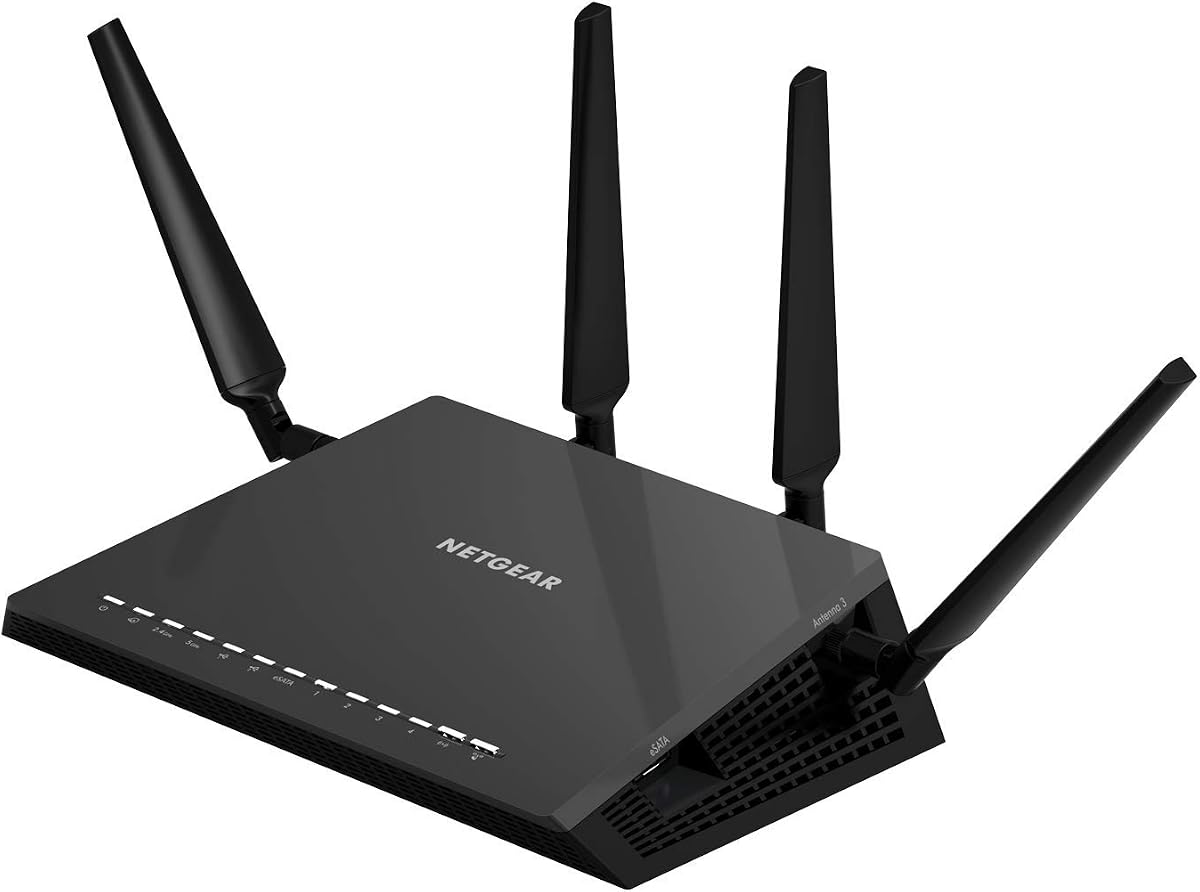
NETGEAR Nighthawk X4S
4.4Editor score
Up to 2500 sq ft coverage
1.7GHz dual core processor
Multiple USB and eSATA ports
This guide compares the top AC2600 WiFi routers for speed range and features helping you choose the best model for your home network needs in October 2026.
Finding the right AC2600 WiFi router can transform your home network experience significantly. These devices offer high speed dual band connectivity that supports multiple devices simultaneously without lag or slowdowns during peak usage times.
We evaluated each model based on real world performance metrics signal range capabilities and advanced features like MU-MIMO and beamforming. Our comparison focuses on reliability security and ease of use for modern smart homes.
Each pick highlights key strengths and ideal use cases so you can match a router to your specific needs. Keep in mind that pricing and availability may change so verify details before purchasing your next device.
4.4Editor score
4.5Editor score

4.1Editor score
The following table provides a side by side overview of all ten top rated AC2600 WiFi routers. Compare their key specifications and features to determine which model aligns best with your network requirements and budget constraints.


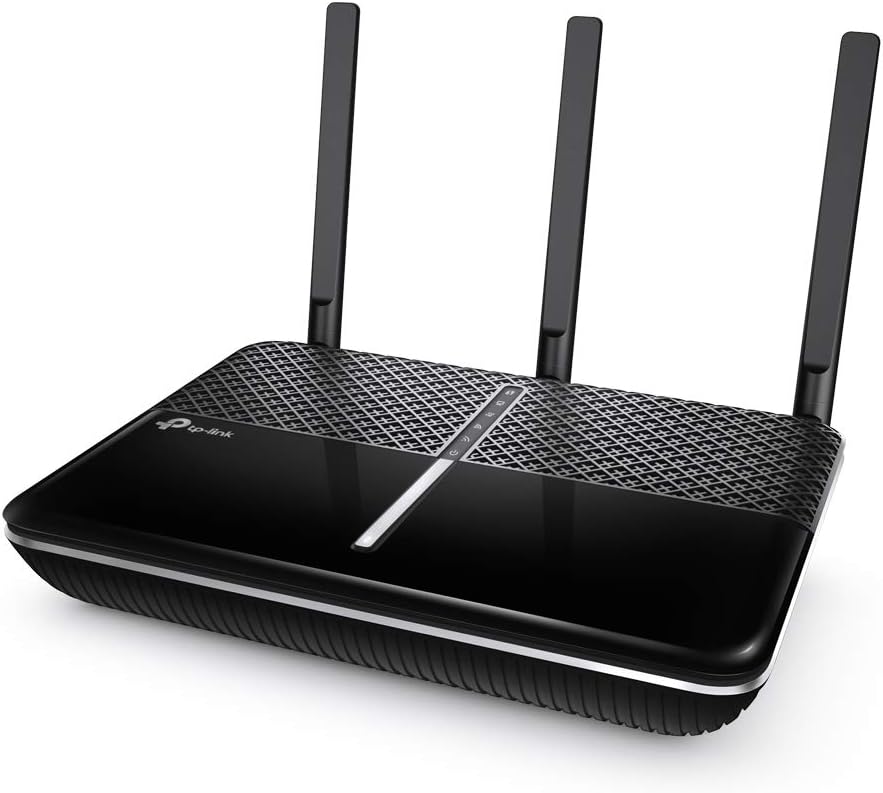
The TP-Link Archer A10 stands out as a top contender in the AC2600 WiFi router category. With a solid rating from users it delivers reliable performance for streaming gaming and everyday browsing across multiple connected devices.
We may earn a commission when you buy through this link, at no additional cost to you.
Its dual band architecture provides high speed connectivity with 1733 Mbps on 5 GHz and 800 Mbps on 2.4 GHz. MU-MIMO and Smart Connect ensure that bandwidth is distributed efficiently preventing bottlenecks even when the network is busy.
While it lacks USB ports which limits local storage sharing the VPN server feature offers secure remote access to your home network. This is particularly useful for users who need to access files or devices while traveling.
For most households seeking a balance of performance and value the Archer A10 is an excellent choice. Its intuitive setup and voice control compatibility make it accessible for both tech savvy and casual users alike.
The Tether app allows quick setup and management of your network settings from any mobile device ensuring you stay connected effortlessly.
Integration with Amazon Alexa lets you control guest Wi-Fi access using simple voice commands adding a layer of modern convenience.
We may earn a commission when you buy through this link, at no additional cost to you.
The NETGEAR Nighthawk X4S is designed for larger homes that require extensive coverage and high performance. It supports up to 45 devices simultaneously ensuring that smart home gadgets and streaming media do not interfere with each other.
We may earn a commission when you buy through this link, at no additional cost to you.
Equipped with a 1.7GHz dual core processor it manages data traffic efficiently. This hardware foundation allows for seamless 4K streaming and online gaming even when multiple users are active on the network at the same time.
One of its standout features is the inclusion of USB 3.0 and eSATA ports which enable easy sharing of storage drives and printers. This versatility adds significant value for users who need local network storage without extra hardware.
While it comes at a premium price the performance and flexibility justify the investment for power users. Those with expansive living spaces or heavy connectivity needs will appreciate the robust capabilities this router offers.
With coverage up to 2500 sq ft it eliminates dead zones in large homes ensuring consistent connectivity in every room.
The multiple USB ports allow you to connect external hard drives and printers creating a flexible personal cloud storage solution.
We may earn a commission when you buy through this link, at no additional cost to you.
The D-Link DIR-2640 offers a compelling entry point into the AC2600 router market without compromising on essential features. It provides sufficient bandwidth for watching movies and video chatting while maintaining a budget-friendly price tag.
We may earn a commission when you buy through this link, at no additional cost to you.
Its dual core processor ensures smooth performance across applications. The enhanced parental controls allow parents to set specific profiles for each family member giving them control over when and how devices access the internet.
Setup is simplified through the D-Link Wi-Fi app which guides users through configuration steps quickly. This ease of use makes it accessible for those who may not be familiar with complex networking settings or terminology.
Ideal for small to medium homes this router balances cost and functionality well. Families looking for reliable connectivity and robust parental oversight will find it meets their needs effectively without breaking the bank.
You can manage internet access for game consoles and TVs easily ensuring safe browsing habits for all family members.
The intuitive app lets you change settings and manage your network in minutes saving time and reducing technical frustration.
We may earn a commission when you buy through this link, at no additional cost to you.
The NETGEAR Nighthawk R7450 delivers speeds up to 2.6 Gbps ensuring that your network keeps up with demanding applications. It is built to handle multiple streams and devices without noticeable lag or performance drops.
We may earn a commission when you buy through this link, at no additional cost to you.
Advanced QoS features prioritize gaming traffic helping to reduce ping and latency. This makes it a strong option for gamers who require a stable and responsive connection during competitive online matches.
Three amplifiers and external antennas work together to extend signal range throughout your home. This hardware configuration ensures that even devices on the outskirts of your network maintain a reliable connection.
While it lacks USB ports the focus on speed and gaming performance is clear. Users prioritizing fast wireless throughput and low latency will find this router meets their specific requirements effectively.
Quality of Service settings ensure gaming data gets priority reducing lag spikes for a smoother online experience.
Multiple amplifiers and external antennas boost signal strength reducing dead zones in larger living spaces.
We may earn a commission when you buy through this link, at no additional cost to you.
The ASUS Blue Cave focuses on network security with AiProtection powered by Trend Micro included for life. This provides robust protection against external threats ensuring connected devices remain safe from malware and hackers.
We may earn a commission when you buy through this link, at no additional cost to you.
It features Intel Wi-Fi technology which enhances network throughput and data speeds. The dual band 4×4 configuration supports speeds up to 2600 Mbps delivering reliable connectivity for streaming and gaming activities.
Alexa integration allows for voice control of your home network making it convenient to manage guest access. The AiMesh compatibility means you can expand your network later without needing a completely new router system.
While user ratings are mixed the security focus is a major benefit. Homeowners who prioritize safety and ease of use will appreciate the included security suite and straightforward app based management system.
AiProtection blocks external threats automatically keeping all devices connected to your network safe from malware and hackers.
Control your home network using voice commands with Alexa adding convenience to managing guest Wi-Fi access easily.
We may earn a commission when you buy through this link, at no additional cost to you.
The TP-Link AXE5400 is a tri-band WiFi 6E router that supports faster speeds and near zero latency. It uses the 6 GHz band to reduce congestion and improve response times for gaming and video chats.
We may earn a commission when you buy through this link, at no additional cost to you.
With speeds up to 5400 Mbps it handles simultaneous transmission to multiple devices efficiently. OFDMA technology increases capacity significantly ensuring that heavy traffic does not slow down other users on the network.
EasyMesh compatibility allows you to extend the range by adding compatible routers or extenders. This feature is ideal for eliminating dead zones across multi-story homes without the need for complex wiring setups.
While it exceeds typical AC2600 specs it remains relevant for users seeking future proofing. Those who want top-tier performance and long term reliability will find this router offers excellent value and features.
WiFi 6E brings more bandwidth and faster speeds allowing for more responsive gaming and video chatting experiences.
EasyMesh compatibility lets you add extenders seamlessly to cover larger areas without dead zones or drops.
We may earn a commission when you buy through this link, at no additional cost to you.
The NETGEAR Nighthawk RS90 brings WiFi 7 technology to the forefront providing up to 3.6 Gbps across 2.4 GHz and 5 GHz bands. It is designed to keep up when everyone is online without slowdowns.
We may earn a commission when you buy through this link, at no additional cost to you.
It covers up to 2000 sq ft supporting up to 50 devices. MU-MIMO and OFDMA allow multiple devices to send and receive data simultaneously enhancing overall network performance and stability.
Multi-gig ready wired connections include a 2.5 Gig WAN port which unlocks faster internet plans. Four 1 Gig Ethernet LAN ports let you connect consoles and storage drives reliably for consistent performance.
This router is best for those ready for the latest tech. If you want the fastest available speeds and future ready security features it delivers advanced performance for modern home networks.
WiFi 7 technology is 1.2x faster than WiFi 6 ensuring your network keeps up with a busy home demand.
The 2.5 Gig WAN port allows you to unlock multi-gig internet plans for maximum broadband utilization.
We may earn a commission when you buy through this link, at no additional cost to you.
The NETGEAR R6700AX delivers fast reliable WiFi across every room of your apartment or small home. It supports speeds up to 1.8 Gbps ensuring that streaming and video calls run smoothly without interruptions.
We may earn a commission when you buy through this link, at no additional cost to you.
Designed to work with existing internet services it pairs with your modem via ethernet seamlessly. Backward compatibility with older WiFi standards ensures your current devices connect without issues or upgrades.
WPA3 encryption and automatic firmware updates protect your data and devices. Security features are enabled out of the box providing peace of mind without needing extra subscriptions or complex configurations.
For those needing a reliable router for small spaces this is a solid choice. Its simplicity and security make it ideal for users who want a strong connection without advanced features they will not use.
WPA3 encryption and automatic updates keep your devices and data protected from potential security threats and risks.
With 1500 sq ft coverage it works perfectly for apartments and small homes needing consistent connectivity.
We may earn a commission when you buy through this link, at no additional cost to you.
The NETGEAR Nighthawk Pro Gaming XR500 is optimized for low ping to minimize lag during online matches. It uses advanced Quality of Service to prioritize gaming traffic and reduce network congestion effectively.
We may earn a commission when you buy through this link, at no additional cost to you.
AC2600 dual-band speeds deliver up to 2.6 Gbps ensuring that gaming streams and voice chats run smoothly. Four 1-Gigabit Ethernet ports provide lag-free wired connectivity for consoles and desktop computers.
Geo-filtering allows you to connect to the closest servers and players. This feature helps you dominate your game by ensuring your connection is optimized for the nearest match locations and servers.
This router is ideal for competitive gamers seeking a reliable connection. If low latency is your top priority the gaming specific features make it a compelling choice for serious online players.
Advanced Quality of Service designates an express lane for gaming traffic reducing lag spikes and jitters effectively.
Geo-filtering helps you connect to the closest servers ensuring faster response times and competitive advantages.
We may earn a commission when you buy through this link, at no additional cost to you.
The TP-LINK Archer C2600 supports high-performance 4-stream AC2600 Wi-Fi for 4K HD video and online gaming. Its dual core processor ensures fast Wi-Fi even during heavy traffic usage times.
We may earn a commission when you buy through this link, at no additional cost to you.
Beamforming technology sends targeted Wi-Fi signals to individual devices improving range and connection stability. Four dual band antennas with high-powered amplifiers further enhance signal strength throughout your home space.
Parental controls allow you to set time limits keeping children safe online easily. The device also comes with a 2-year warranty and 24/7 technical support ensuring assistance when needed.
For a reliable wireless experience at a moderate price this router delivers. It is best for users who want standard high speed connectivity without complex mesh systems or new features.
Targeted Wi-Fi signals boost signal strength to individual devices improving overall connection quality.
A 2-year warranty and 24/7 technical support ensure assistance and peace of mind with your purchase.
We may earn a commission when you buy through this link, at no additional cost to you.
Selecting the right AC2600 WiFi router involves considering several factors beyond just the brand name. Below we break down the key features to look for to ensure you get the performance you need.
AC2600 routers offer combined speeds up to 2600 Mbps across dual bands. Ensure the router supports high speeds on the 5 GHz band for streaming and gaming while maintaining stability on the 2.4 GHz band for broader range.
Look for routers that advertise specific speeds per band such as 1733 Mbps on 5 GHz and 800 Mbps on 2.4 GHz to confirm the AC2600 claim is real.
MU-MIMO allows simultaneous data transmission to multiple devices reducing wait times and improving throughput. Beamforming focuses the signal directly on connected devices rather than broadcasting it in all directions.
These technologies are essential for modern homes with many connected devices as they maintain stability and speed even under heavy load.
The number and quality of external antennas affect how far your signal reaches. Routers with multiple high gain antennas generally provide better range for larger homes compared to those with internal antennas.
Check the square footage coverage rating to ensure the model can reach all rooms in your house including basements and second floors.
A dual core processor helps manage heavy network traffic without slowing down your internet speed. More memory allows the router to handle more simultaneous connections and features without lag.
Look for specs listing 1.7GHz or higher dual core CPUs if you have many smart home devices connected at once.
Check for four Gigabit Ethernet ports to support wired devices like gaming consoles or desktop PCs. Some models offer USB ports for sharing printers or storage drives locally.
Wired connections provide stable speeds for stationary devices freeing up wireless bandwidth for mobile devices.
Built-in security like firewall protection or anti-malware features protects your devices from threats. Look for routers that offer regular firmware updates to patch security vulnerabilities.
Some premium models include lifetime security subscriptions or VPN servers which add layers of protection for your network.
A user friendly mobile app simplifies the setup process allowing you to configure settings quickly. Features like voice control integration can make managing guest networks easier.
Choose a router with intuitive controls if you prefer not to deal with complex web interfaces.
Integration with platforms like Alexa allows voice control of network settings. Compatibility with mesh systems ensures you can expand your network easily as your home grows.
Check if the router supports mesh protocols if you plan to cover a large area with multiple nodes.
Place your router in a central elevated location to maximize signal coverage throughout your home. Avoid placing it inside cabinets or near metal objects that can block Wi-Fi signals and reduce performance.
Regularly update the router firmware to ensure you have the latest security patches and performance improvements. You can enable automatic updates in the admin settings to keep your network protected without manual intervention.
Use parental controls to manage screen time and content access for family members. Periodically review connected devices to ensure no unauthorized users are accessing your network unnecessarily.
AC2600 refers to the combined maximum wireless speeds of a dual band router. It typically offers 800 Mbps on the 2.4 GHz band and 1733 Mbps on the 5 GHz band totaling 2600 Mbps.
Yes a router connects to a modem to provide internet access to your devices. Most internet service providers require a modem to bring internet into your home before the router distributes it.
MU-MIMO allows a router to send data to multiple devices at the same time. This improves performance for homes with many connected gadgets by reducing wait times and congestion.
Most AC2600 routers support between 30 to 45 devices depending on the model. High end models often have better processors to manage heavy traffic from numerous smart home gadgets.
Yes most AC2600 routers offer low latency and QoS features ideal for gaming. Look for models with advanced QoS to prioritize gaming traffic and reduce ping spikes.
AC routers use the 802.11ac standard while AX routers use 802.11ax or WiFi 6. AX routers offer better efficiency and capacity but AC routers remain popular for mid range speeds.
We reviewed ten top AC2600 WiFi routers highlighting their unique features and ideal use cases. Whether you need premium performance for large homes or budget friendly options for small spaces there is a model for everyone.
Prioritize factors like coverage area processor speed and security features when making your decision. Understanding your specific needs helps ensure you select a router that delivers reliability and speed.
Prices and availability can change frequently so always check the current listings before buying. This guide aims to help you navigate the options confidently and find the perfect router for your home network.