
xTool F2 Ultra 60W
4.2Editor score
MOPA fiber laser
Color engraving on metal
Dual AI cameras
Finding the right laser engraver can transform your creative workflow. A 60W model offers enough power for serious cutting and detailed engraving across wood, acrylic, and leather. These machines balance speed and precision for both hobbyists and professionals.
We reviewed ten leading 60W laser engravers available this year. Each model was evaluated on laser output, safety features, software compatibility, and build quality. Our goal is to highlight machines that deliver consistent results for diverse materials and use cases.
Every pick includes key specs and real-world performance insights. Ratings reflect user feedback and expert analysis. Prices vary by retailer and time. Always check current listings before buying to ensure you get the best value and availability for your needs.
4.2Editor score

4.5Editor score

5.0Editor score
As an Amazon Associate we earn from qualifying purchases.
The following table presents a side-by-side overview of the ten best 60W laser engravers. We highlight core specifications, safety ratings, and unique features to help you compare performance and capabilities at a glance.




The Creality Falcon2 Pro 60W stands out as a top choice for serious makers. It delivers commercial grade power with a fully enclosed design ensuring safety during operation. The integrated HD camera simplifies alignment significantly for accurate batch engraving.
We may earn a commission when you buy through this link, at no additional cost to you.
Its dual laser system includes a powerful 60W laser for cutting and a 1.6W laser for precision work. Adjustable power levels let you match output to material thickness reducing waste. Safety features like emergency stop and flame detection add peace of mind.
While the price reflects its professional capabilities it might be steep for casual hobbyists. The size requires dedicated workspace. However the efficiency gains and quality results justify the investment for those running small businesses or demanding projects.
This model is ideal for users needing reliability and versatility. Whether cutting acrylic or engraving metal the Falcon2 Pro handles it with speed and precision. We recommend it for anyone ready to scale their laser engraving production.
The fully enclosed Class 1 design minimizes laser exposure risks while the HD camera ensures precise material positioning for consistent results every time.
Three adjustable power settings allow you to optimize cutting speed and engraving detail without changing hardware for diverse materials like wood and metal.
We may earn a commission when you buy through this link, at no additional cost to you.
This version of the Falcon2 Pro emphasizes speed and automation for batch processes. Users report engraving speeds exceeding 500mm/s which significantly cuts production time. The integrated enclosure keeps smoke and noise contained effectively.
We may earn a commission when you buy through this link, at no additional cost to you.
A built-in camera handles automatic positioning so you skip manual measurements. The drawer system at the bottom simplifies cleanup by collecting debris efficiently. Safety locks and emergency stops ensure safe operation for all skill levels.
Some users find the initial software configuration challenging. Limited warranty terms compared to competitors might be a concern. Despite these issues the speed and ease of use make it attractive for sole traders.
Choose this if you need fast turnaround on multiple items. It handles large production runs well while maintaining safety standards. Just ensure you have technical support handy for setup and maintenance needs.
High engraving speeds combined with intelligent focus features allow you to complete mass production jobs in a fraction of the time required by standard machines.
The dedicated debris drawer lets you clean out waste quickly without disturbing the workspace ensuring the machine runs smoothly between batches.
We may earn a commission when you buy through this link, at no additional cost to you.
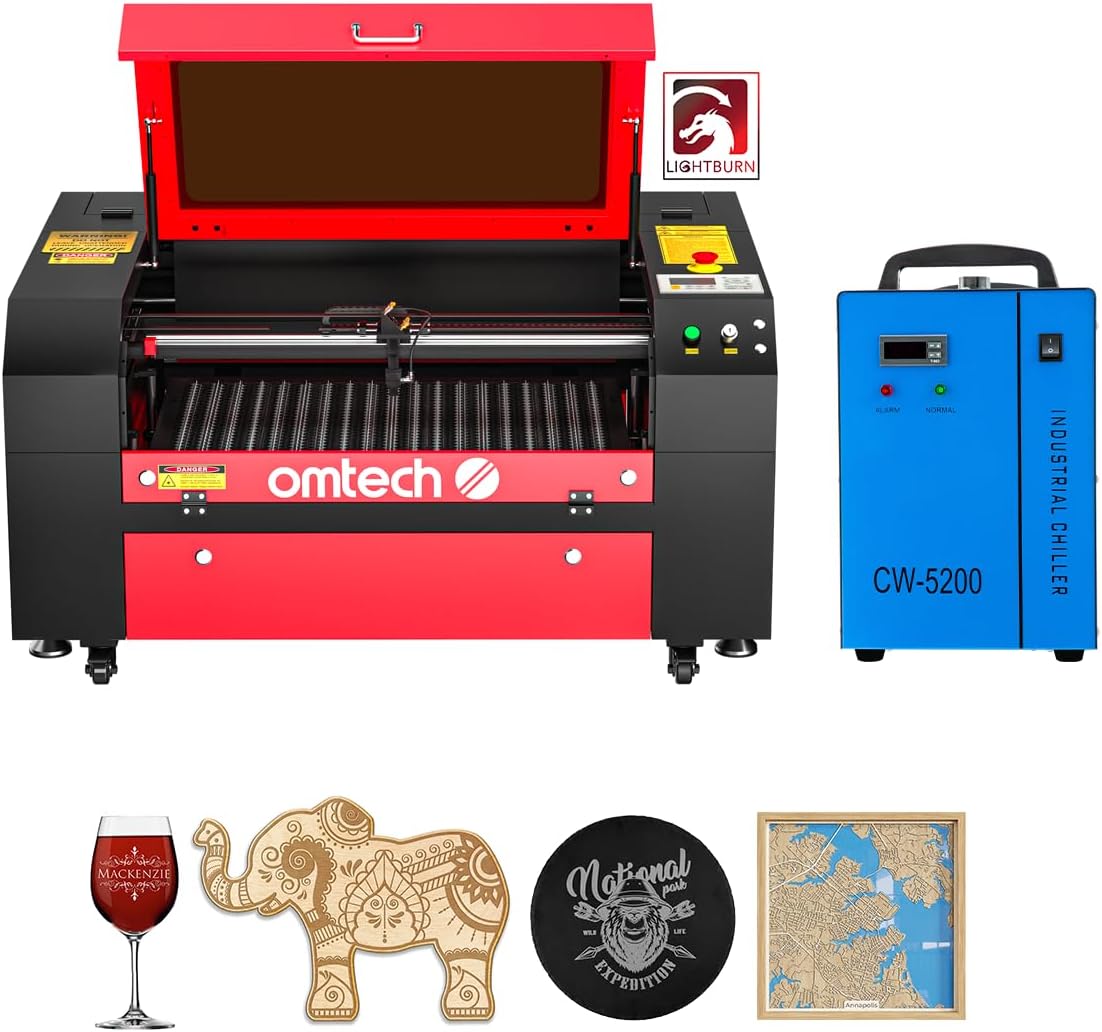
OMTech offers a strong CO2 laser option bundled with essential accessories. The included water chiller ensures stable performance during long runs. LightBurn software is ready to use for intuitive design navigation.
We may earn a commission when you buy through this link, at no additional cost to you.
The large work bed fits bigger projects like signage easily. Four-way pass-through doors allow you to handle long materials without restriction. A widened viewing window provides safe visibility during operation.
Autofocus is a major convenience saving time on setup. Some users prefer manual fine tuning for specific materials. The weight requires a sturdy stand but ensures stability.
This machine suits makers needing a large workspace. The bundle offers value by including chiller and software. Check local support options before purchase to ensure timely assistance.
A spacious bed area combined with pass through doors makes it easy to process oversized items like boards or panels without frequent repositioning.
Inclusion of water chiller and industry standard software means you can start creating immediately upon assembly without buying extra components.
We may earn a commission when you buy through this link, at no additional cost to you.
This desktop unit prioritizes safety with a fire-resistant metal enclosure. Auto stop features prevent accidents when the enclosure opens. Dual laser bundles provide competitive performance for various materials.
We may earn a commission when you buy through this link, at no additional cost to you.
A built-in camera visualizes operations reducing setup time significantly. Air assist ensures cleaner cuts and less smoke. Lifetime technical support adds value for users needing guidance.
Speed exceeds 500mm/s for efficient batch work. You must connect to LightBurn for full camera utility. The price is high but reflects the safety and feature set.
Ideal for small businesses wanting high performance. The safety and speed balance well for daily production. Verify software requirements match your workflow before buying.
Fire resistant materials and auto stop mechanisms protect users from laser exposure ensuring a secure environment for all operation levels.
High speed cutting combined with an exhaust system maintains clean cuts and reduces burn marks for professional quality finishes.
We may earn a commission when you buy through this link, at no additional cost to you.
The xTool F2 Ultra represents the premium end of 60W engravers. It features a 60W MOPA fiber laser and 40W diode laser for unmatched versatility. You can cut metal and wood with one machine easily.
We may earn a commission when you buy through this link, at no additional cost to you.
Over 100 consistent colors on metal are possible thanks to MOPA technology. Speeds reach 15000mm/s reducing production time significantly. Dual AI cameras improve positioning accuracy to 0.2mm.
The cost is significant but justified by industrial grade capabilities. The desktop footprint requires careful planning. Yet the ability to handle gold or stainless steel is rare.
Buy this for complex high-end projects. If you need metal marking and color output the F2 Ultra is unmatched. It transforms creative ideas into reality with speed.
Capable of cutting metal and wood alike this machine eliminates the need for multiple units saving space and cost.
AI powered cameras combined with extreme speeds ensure precise details and rapid turnaround for high volume orders.
We may earn a commission when you buy through this link, at no additional cost to you.
Monport focuses on metal engraving with this compact fiber laser. It handles gold silver and stainless steel effectively. The small working area is optimized for jewelry and small items.
We may earn a commission when you buy through this link, at no additional cost to you.
Galvanometer system ensures speeds up to 10000mm/s. Accuracy reaches 0.01mm for intricate designs. Red dot pointer helps align pieces quickly before marking.
The limited bed size restricts large projects. It is best for dedicated metal marking. However the lifespan of 100000 hours ensures durability over time.
Choose this for jewelry or small metal work. It offers precision in a small package. Verify your project sizes fit the working area before purchase.
Fiber laser technology excels at marking hard surfaces like steel and brass providing deep and lasting results.
Small footprint fits easily on a workbench while maintaining industrial speed and accuracy for professional applications.
We may earn a commission when you buy through this link, at no additional cost to you.
VEVOR offers a spacious CO2 machine at an accessible price. The 24×16 inch bed handles large decor items. Four-way pass-through doors simplify feeding long materials easily.
We may earn a commission when you buy through this link, at no additional cost to you.
Dual beds including honeycomb and blade options offer flexibility. Air assist clears smoke for cleaner cuts. Compatible with popular software like LightBurn for ease of use.
Manual focusing is less convenient than motorized systems. It cuts non-metals well but struggles with raw metal. Despite this it is a great entry into large format engraving.
This is a smart choice for sign makers. Budget and bed size make it unique. Ensure you have space for the machine dimensions.
Spacious bed area allows cutting full sheets of acrylic or wood without complex setups.
Broad compatibility with design tools means you can use existing workflows without learning new interfaces.
We may earn a commission when you buy through this link, at no additional cost to you.
OMTech delivers a commercial bundle with a motorized workbed. Autolift allows quick height adjustments via button press. The 28×20 inch area accommodates massive projects.
We may earn a commission when you buy through this link, at no additional cost to you.
Water chiller ensures stable power output over time. Air assist keeps lenses clear during cutting. LightBurn software comes ready for intuitive navigation.
The machine requires significant space. Assembly takes time but is manageable. It is well suited for businesses needing consistent production.
Buy this for heavy-duty workshop use. The lift feature saves effort daily. Ensure your room can support the footprint and ventilation.
Autolift bed adjusts instantly so you spend more time cutting and less time setting up focus.
Commercial grade tube and chiller ensure reliable operation during long production runs without overheating.
We may earn a commission when you buy through this link, at no additional cost to you.
Aliencell X1 Lite boasts industrial speed with 20000mm/s acceleration. Preview accuracy ensures minimal waste before cutting. It offers a large bed ideal for batch projects.
We may earn a commission when you buy through this link, at no additional cost to you.
Auto focus locks onto material instantly. LightBurn support provides professional design control. SGS certification guarantees high safety standards for enclosed work.
As a newer brand support may vary. High speed requires stable power sources. The large bed suits businesses needing volume.
Choose this for high throughput environments. Accuracy and speed balance well. Verify shipping and warranty terms before committing.
High frequency pulses and fast acceleration enable rapid production without sacrificing image quality.
Multiple certifications and flame sensors ensure a safe working environment for all users.
We may earn a commission when you buy through this link, at no additional cost to you.
Cloudray provides a portable fiber solution with JPT MOPA source. It handles metal engraving and color marking well. Two lens options allow flexibility for small and medium tasks.
We may earn a commission when you buy through this link, at no additional cost to you.
Manual lift column adjusts height for different materials. Lightweight design allows carrying the unit easily. Safety glasses and tools are included for immediate use.
It is optimized for rings and rods. Larger items may need special setup. The portability is a major advantage for on-site work.
Select this for mobile metal marking needs. It offers professional quality in a small case. Check power requirements before travel.
MOPA technology enables vibrant color marks on steel and titanium for personalized jewelry.
Lightweight build makes it easy to transport to job sites or trade shows for demonstration.
We may earn a commission when you buy through this link, at no additional cost to you.
Selecting the right 60W laser engraver requires considering several factors to match your specific needs and environment.
Diode CO2 and fiber lasers serve different materials. Diodes work well on wood and leather. CO2 handles non-metals. Fiber excels on metals.
Choose the type that matches your primary materials.
Enclosed units prevent laser exposure. Look for Class 1 ratings flame detectors and emergency stops. These protect users during operation.
Prioritize models with robust safety mechanisms.
Check if the machine supports LightBurn or RDWorks. Compatible software simplifies design and operation. Proprietary tools can be limiting.
Ensure your preferred software works with the device.
Measure the working area against your project dimensions. Larger beds allow full sheets. Compact units save space but limit size.
Select a bed size that fits your workspace.
Higher wattage cuts faster. Speed ratings affect production time. Balance power with precision requirements.
Review speed specs for your volume needs.
Air assist clears smoke and protects lenses. It improves cut quality significantly. Built-in systems are convenient.
Confirm air assist is included.
Autofocus saves time on setup. Manual focus is cheaper but slower. Electric lifts offer convenience.
Pick based on how often you change settings.
Reliable customer service helps resolve issues. Warranty terms vary by brand. Check community forums for experiences.
Ensure good support is available.
Before starting verify material compatibility and set correct power. Use safety gear. Align material precisely with the camera or ruler.
Run test cuts on scrap to fine tune settings. Clean lenses regularly with soft cloth. Empty waste trays to prevent fire risks.
Store in dry area. Update software for features. Check exhaust filters for airflow. Schedule maintenance every few months.
A 60W laser engraver cuts wood acrylic leather and coated metals. CO2 types handle plastics well. Fiber models target metals. Avoid PVC due to toxic fumes.
Yes if the enclosure is open. Fully enclosed models reduce risk. Always wear appropriate glasses for your laser type to protect eyes from reflection.
Clean lenses gently with lens paper. Remove dust buildup. Check for scratches. Replace if performance drops. Keep covers on when not in use.
Air assist blows air at the beam to clear smoke. It prevents burns and improves cut quality. Many 60W machines include this feature.
Most support LightBurn RDWorks or LaserGRBL. Check specs before buying. Open source tools offer flexibility. Some brands include proprietary apps.
Models with fans and enclosures are quieter. Unprotected units are loud. Use noise dampening covers. Check dB ratings in reviews.
The Creality Falcon2 Pro leads as the top pick for versatility. The xTool F2 Ultra offers premium capabilities. VEVOR provides a large budget option.
Prioritize safety and software compatibility. Speed matters for production. Ensure the bed fits your projects.
Prices and stock change. Check current listings. Select the machine that matches your long term goals.