
FANTECH Maxfit61 60% Mechanical Keyboard
4.6Editor score
Hot swappable 5 pin support
Compact 60 percent layout
Pre-lubed stabilizers included
This guide compares the top 5 pin hot swappable keyboard models for enthusiasts seeking customization without soldering costs or complex assembly requirements.
Finding the right 5 pin hot swappable keyboard means you can change switches easily. This feature lets you upgrade your typing feel without needing special tools or soldering skills to modify the board.
We evaluated ten popular models based on build quality, switch compatibility, and user feedback. Each entry highlights key strengths like layout size, connectivity options, and RGB lighting capabilities for your setup.
Every pick includes real user ratings and detailed specs to help you decide. Prices and availability change often, so check the links for the most current offers before making your final purchase choice.
4.6Editor score

4.7Editor score
4.4Editor score
This side by side comparison helps you see how each model stacks up against the others regarding features, compatibility, and overall value for different user needs.



The Redragon K617 is a highly rated compact keyboard that supports hot swapping without soldering. It offers a clean design with RGB lighting that appeals to gamers needing extra mouse space.
We may earn a commission when you buy through this link, at no additional cost to you.
Its upgraded sockets accept nearly any 3 or 5 pin switch, making it easy to customize the feel. The stock switches are smooth and quiet, which helps in shared workspaces.
While it lacks wireless options, the wired connection ensures stable performance. The software allows deeper customization, though some users may prefer more advanced firmware support.
This model is ideal for beginners wanting to try hot swap features without spending much. It delivers solid performance for daily typing and gaming tasks.
The 60 percent layout frees up desk space for better mouse movement during games.
Swapping switches is simple thanks to the socket design that removes the need for tools.
We may earn a commission when you buy through this link, at no additional cost to you.
This TECWARE keyboard stands out with its wireless capabilities and hot swap support. It bridges the gap between productivity and gaming with a versatile TKL layout.
We may earn a commission when you buy through this link, at no additional cost to you.
Users can switch between Bluetooth and 2.4GHz modes for seamless device switching. The battery lasts for months on a single charge, making it convenient for daily use.
The PBT keycaps and stabilizers contribute to a satisfying typing experience. However, the stock switches are tactile, which might not suit everyone immediately.
It is a great choice for those wanting a wireless mechanical keyboard that allows future switch upgrades. The build quality supports long term reliability.
Three connection modes allow you to pair with multiple devices and switch instantly.
Double shot PBT keycaps ensure durability and resistance to shine over time.
We may earn a commission when you buy through this link, at no additional cost to you.
This specialized keypad is designed for games like OSU where quick key access matters. It features RGB lighting and macro programming for enhanced control.
We may earn a commission when you buy through this link, at no additional cost to you.
Each button can be programmed for different functions without affecting others. The software allows detailed customization to suit specific play styles.
Note that the switches may come loose during shipping and need checking. Despite this, the build is sturdy enough for its intended gaming purpose.
It works well as a secondary device alongside a main keyboard. Users looking for affordable macro support will find this value.
Software installation allows you to program macros that simplify complex in game actions.
HID standard makes it plug and play without needing extra drivers to install.
We may earn a commission when you buy through this link, at no additional cost to you.
Keychron V6 8K delivers high performance with its 8000Hz polling rate for competitive gaming. It includes a programmable knob and hot swap sockets for flexibility.
We may earn a commission when you buy through this link, at no additional cost to you.
The keyboard uses QMK firmware allowing deep customization. Sound absorbing foam ensures a quieter experience compared to standard mechanical boards.
Compatibility spans macOS and Windows, making it versatile for mixed device environments. The PBT keycaps add a premium tactile touch to the typing feel.
While pricey, it offers excellent features for enthusiasts who want speed and control. It is a strong choice for those prioritizing response time.
An 8000Hz polling rate reduces input lag significantly for fast gaming actions.
The included knob allows quick adjustments for volume or other system controls.
We may earn a commission when you buy through this link, at no additional cost to you.
The Keychron C1 is highly rated for its solid construction and compatibility with Mac systems. It offers a clean TKL layout suitable for both work and home use.
We may earn a commission when you buy through this link, at no additional cost to you.
Hot swap sockets allow you to change switches without soldering. The included keycaps cover both Mac and Windows needs for seamless operation.
While it lacks RGB, the white backlight is subtle and functional. The inclined frame helps maintain comfort during long typing sessions.
This model is a top pick for users needing a reliable keyboard that supports customization. It balances cost and quality effectively.
The C1 includes all necessary function keys tailored specifically for macOS users.
Two level adjustable feet ensure you find the ideal typing angle.
We may earn a commission when you buy through this link, at no additional cost to you.
The RK61 offers open source firmware support for enthusiasts who want deep customization. Its compact 60 percent design saves significant desk space.
We may earn a commission when you buy through this link, at no additional cost to you.
It supports QMK and VIA software for key mapping without needing complex setups. The pre-lubed red switches provide smooth strokes out of the box.
RGB backlighting adds visual flair with multiple modes. The anti-ghosting ensures accurate input during intense gaming sessions.
This keyboard is perfect for those wanting full control over their layout. It delivers excellent value for its feature set.
QMK and VIA allow you to create custom layouts that fit your workflow perfectly.
Pre-lubed red switches ensure a smooth linear feel without extra work.
We may earn a commission when you buy through this link, at no additional cost to you.
These switches are designed for keyboards needing a straightforward replacement. They are made from high quality materials ensuring consistent performance.
We may earn a commission when you buy through this link, at no additional cost to you.
The smooth and quiet operation makes them suitable for office environments. They work with most mechanical keyboards, providing flexibility.
Users looking to upgrade existing boards will find this versatile. The build quality ensures they withstand regular use without issues.
This option is ideal for DIYers who want to enhance their current setup. It simplifies the customization process significantly.
Constructed from PA66 and POM materials for lasting durability and performance.
Meticulously lubed to deliver quieter typing for late night sessions.
We may earn a commission when you buy through this link, at no additional cost to you.
The X82 includes a CNC aluminum volume knob for quick control. Its layout balances compact size with essential function keys.
We may earn a commission when you buy through this link, at no additional cost to you.
Translucent characters on keycaps make RGB lighting stand out clearly. The hot swap feature allows users to change switches easily.
Full anti-ghosting ensures all keys work simultaneously. It is a solid option for gamers needing desk space.
This model offers great utility with its media controls. It is well suited for users who value convenience.
A metal volume knob provides instant audio control without leaving the keyboard.
Translucent characters ensure you can see each key clearly even in the dark.
We may earn a commission when you buy through this link, at no additional cost to you.
This FANTECH keyboard is one of the most affordable hot swap boards available. It features a standard 60 percent layout ideal for saving space.
We may earn a commission when you buy through this link, at no additional cost to you.
Pre-lubed stabilizers ensure a rattle-free experience on the larger keys. The RGB modes add a nice touch for gaming setups.
Switch and keycap pullers are included for easy customization. The brightness is adjustable to suit your environment.
It is an excellent starting point for those new to hot swap keyboards. The value provided is hard to beat.
Pre-lubed stabilizers eliminate rattle for smooth enter and shift key presses.
The mini layout creates extra room for mouse movement during competitive gaming.
We may earn a commission when you buy through this link, at no additional cost to you.
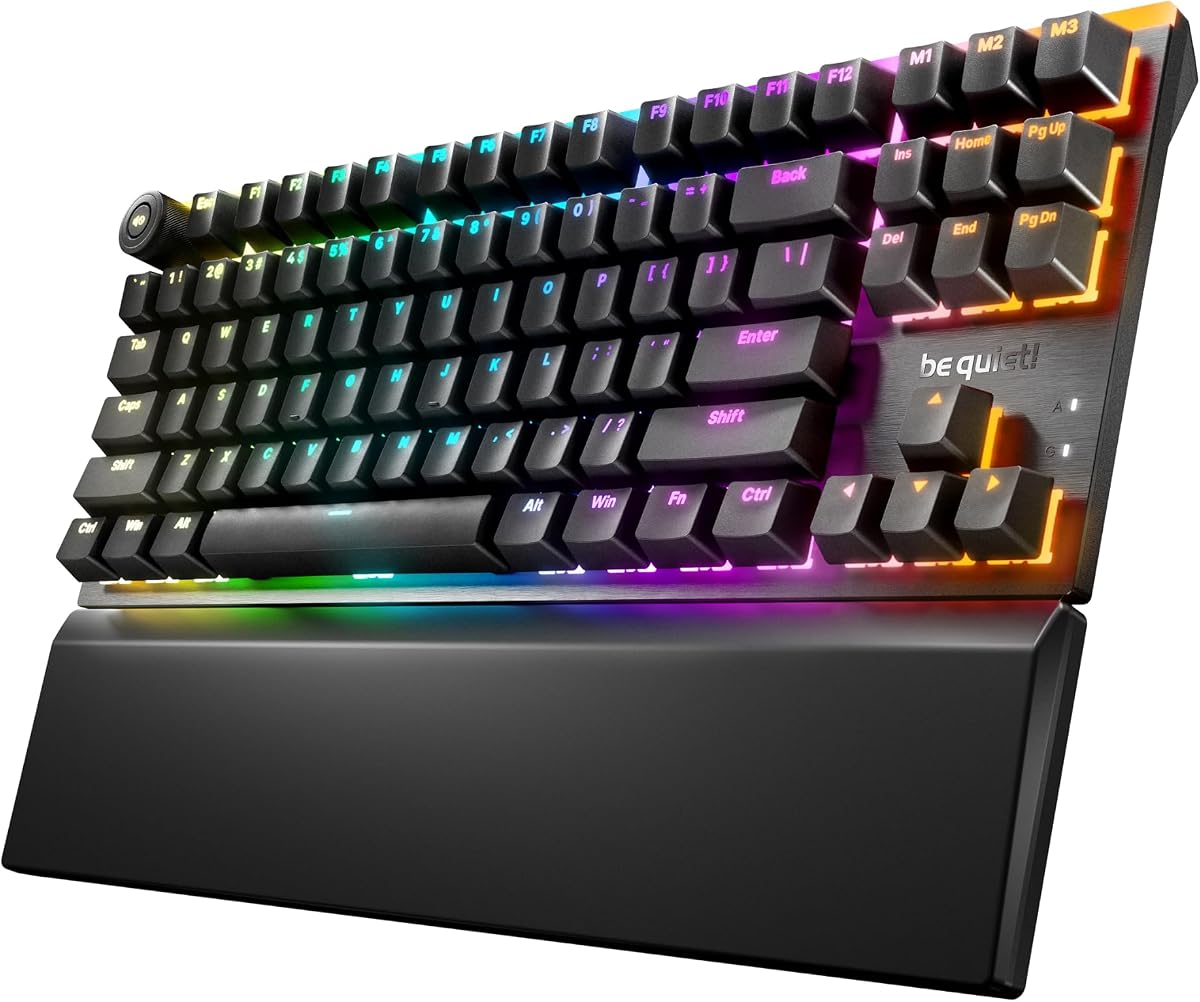
The be quiet! Light Mount TKL offers a premium mechanical experience with silent performance. It is designed for users who value minimal noise.
We may earn a commission when you buy through this link, at no additional cost to you.
Three layers of sound dampening foam reduce noise significantly. The brushed aluminum top plate adds a sleek look to desks.
Hot swap sockets allow you to change switches if desired. The included palm rest ensures comfort during long sessions.
This model is perfect for quiet offices or late night gaming. It justifies its price with top tier features.
Silent V2 switches provide smooth linear strokes with minimal noise.
A brushed aluminum plate and magnetic palm rest ensure durability and comfort.
We may earn a commission when you buy through this link, at no additional cost to you.
Selecting the right keyboard requires understanding layout size, switch types, and features that match your workflow.
Decide between 60 percent, TKL, or full size based on your desk space. Compact layouts free up room for mouse movement which is vital for gaming.
Choose a layout that retains all keys you need for daily productivity.
Verify that the keyboard explicitly supports 5 pin hot swap sockets. Many boards now accept both 3 pin and 5 pin switches for broader selection.
Ensure your preferred switches match the socket type for a secure fit.
Look for boards with metal plates or sturdy plastic to prevent flex during typing. Materials like PBT keycaps resist shine longer than ABS.
Higher quality materials usually mean better sound and longevity.
Consider whether you need wireless Bluetooth or wired USB C. Wireless options offer flexibility but may have battery concerns.
Wired boards guarantee zero latency for competitive gaming tasks.
Check if the keyboard supports open source firmware like QMK or VIA. This allows for extensive customization without needing official software.
Even without open source, dedicated apps should allow lighting and macro settings.
Decide if you need RGB color effects or if single color backlight is sufficient. Per key customization adds a visual layer to your setup.
Some users prefer the subtle look of white or blue light for focus.
If noise is a concern, look for internal foam layers or pre-lubed switches. These features make the typing experience less disruptive.
Silent switches or dampening foam are key for shared spaces.
Budget models may lack wireless or premium materials but still offer hot swap. Higher priced boards often include more accessories and features.
Weigh your budget against the features you will actually use daily.
To swap switches, remove the keycaps using a puller and then gently pull out the old switch with a switch puller. Insert the new 5 pin switch until it clicks into place firmly.
Clean your keyboard regularly with a soft brush or compressed air to remove dust and debris. This keeps the switches moving smoothly without interference.
Store your keyboard in a cool dry place to protect the electronics. Avoid exposure to liquids to ensure the hot swap sockets stay clean and functional.
No, 5 pin switches will not fit 3 pin sockets. You must match the switch pin count to the socket type. Some boards support both types for versatility.
Yes, hot swapping is safer as it requires no soldering tools. It reduces the risk of damaging the board during repairs. It is recommended for most users.
The main benefit is easy customization without technical skills. You can change switches to test different feelings quickly. It allows for future upgrades easily.
Yes, some wireless boards support hot swap. Check the product specs for 5 pin compatibility. Many modern wireless models include this feature now.
Not necessarily as the noise depends on the switch housing and lubrication. Both types can be quiet if they have proper design. Look for silent options specifically.
You only need a switch puller and keycap puller. These are often included with the keyboard. No soldering equipment is needed for the process.
We found that the best pick depends on your specific needs like space and wireless requirements. The FANTECH and Keychron models offer great entry points for most users.
Prioritize build quality and switch compatibility to ensure a good typing experience. These factors often matter more than extra lighting or wireless features.
Always check the latest prices and availability as deals change often. This guide provides a strong baseline for making an informed decision.