
Anycubic Kobra 3 3D Printer Camera
4.5Editor score
Real-time remote monitoring
Ultra-clear resolution
DIY frame customization
This guide compares the top 3D printer cameras for remote monitoring, evaluating resolution, compatibility, and features to help you choose the best model.
Monitoring your 3D printer remotely is essential for ensuring print success and preventing failures. A good camera allows you to check progress, detect issues, and capture time-lapse videos from anywhere using your smartphone or computer.
We evaluated ten leading models based on resolution, compatibility, ease of setup, and additional features like night vision and AI detection. Each product was analyzed for its ability to integrate seamlessly with popular printer ecosystems and provide reliable real-time streaming.
Each pick highlights key strengths and ideal use cases to help you find the right camera for your setup. Prices and availability may change, so please verify current details on the product pages before making a purchase decision.
4.5Editor score

4.3Editor score

4.5Editor score
The following table provides a side-by-side comparison of all ten reviewed cameras. It highlights key specifications, compatibility, and unique features to help you quickly identify the best option for your specific printer model and needs.


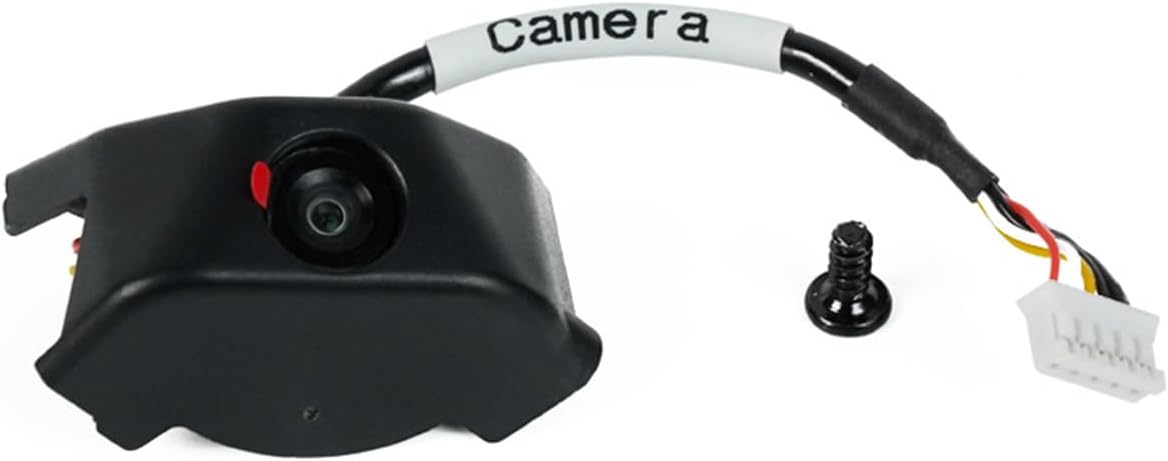


The Anycubic Kobra 3 Camera is a cost-effective solution for users seeking reliable remote monitoring. With a rating of 4.5, it delivers clear images and integrates well with the Anycubic APP for real-time status checks.
We may earn a commission when you buy through this link, at no additional cost to you.
Its standout feature is the customizable frame, allowing users to personalize their setup. It supports Kobra 3 and 2 series printers, as well as Klipper setups, ensuring broad utility. The ultra-clear resolution helps detect filament jams early.
While it lacks advanced AI features, the straightforward setup and affordable cost make it an excellent entry point. Users may need to handle some manual adjustments during installation, but the provided videos simplify this.
Ideal for hobbyists on a budget who need basic remote viewing. This camera offers strong value by balancing performance with affordability and creative flexibility for your 3D printing journey.
The replaceable frame allows users to create unique setups that match their aesthetic preferences.
Monitor progress and identify layer adhesion issues instantly through the Anycubic APP interface.
We may earn a commission when you buy through this link, at no additional cost to you.
Designed specifically for FLASHFORGE Adventurer 5M, 5M Pro, and AD5X printers, this kit ensures seamless integration. It offers high-definition imagery and supports real-time monitoring through the Flash Maker APP.
We may earn a commission when you buy through this link, at no additional cost to you.
Installation is streamlined with dedicated videos and guides, making it accessible for all users. The ability to record printing processes allows for easy sharing and review of your 3D printing experiences.
Its specificity to FLASHFORGE models limits flexibility if you switch printers later. However, for owners of these devices, the convenience and optimized performance are significant advantages.
Best for FLASHFORGE users seeking an official, hassle-free camera solution that enhances the printing workflow with reliable HD monitoring and video recording.
Captures clear details of your print process ensuring you miss no critical moments.
Record and share your printing progress videos easily for community feedback.
We may earn a commission when you buy through this link, at no additional cost to you.
The Creality Nebula Camera stands out with auto-generated time-lapse videos and built-in night vision. It connects via WiFi and is compatible with a wide range of Creality printers including Ender 3 V3 KE and CR-10 SE.
We may earn a commission when you buy through this link, at no additional cost to you.
Setup is effortless with minimal settings required. The embedded code system captures layer images automatically to create smooth time-lapses without extra configuration. Its night vision uses 940nm infrared fill light for clear dark viewing.
While it depends on the Creality Cloud ecosystem, the convenience outweighs the limitation for many users. The company provides 24/7 customer service and lifetime technical support adding further value.
Ideal for Creality users wanting automation and clear monitoring. Its blend of features, compatibility, and support makes it a top choice for most printing setups.
Effortlessly create and share captivating videos of your prints without extra steps.
Keep an eye on prints anytime with night vision preventing filament jams.
We may earn a commission when you buy through this link, at no additional cost to you.
This version of the Nebula Camera offers a manual focus knob for precise image adjustments. It supports 1920*1080 resolution and switches between day and night vision automatically for clear monitoring.
We may earn a commission when you buy through this link, at no additional cost to you.
While it shares compatibility with Sonic Pad and Ender 3 V3 series, it connects directly via USB rather than WiFi. This simplifies setup but limits remote access outside local networks.
Manual focus is useful for users wanting control over image sharpness. However, the lack of wireless connectivity may be a drawback for those needing access away from home.
Best for users prioritizing image clarity and local monitoring. Its adjustable focus and reliable resolution make it a solid choice for detailed print observation.
Rotate the lens knob to adjust focal length for high-definition image quality.
Monitor your printer continuously with automatic day and night vision switching.
We may earn a commission when you buy through this link, at no additional cost to you.
This kit is an official accessory for FLASHFORGE printers offering seamless integration. It enables remote control and monitoring via the Flash Maker App, giving flexibility to manage prints from anywhere.
We may earn a commission when you buy through this link, at no additional cost to you.
The kit includes all necessary components for a quick setup without complex steps. It is designed for simplicity, making it accessible even for those less familiar with printer hardware.
Its lower rating suggests potential variability in performance or user experience. However, official status ensures compatibility and reduces the risk of installation issues.
Recommended for Flashforge owners wanting official support and remote management. It simplifies monitoring tasks while maintaining the integrity of your printer's warranty and function.
View and control your printer from anywhere for added convenience.
Designed specifically for Adventurer 5M and AD5X printers for perfect fit.
We may earn a commission when you buy through this link, at no additional cost to you.
Similar to the first Kobra option, this version supports a broader range including Kobra 2 and Klipper printers. It features ultra-clear resolution and supports DIY frame customization for personalization.
We may earn a commission when you buy through this link, at no additional cost to you.
Installation is quick requiring just a USB connection and insertion into the printer. Technical support and 24/7 service ensure any issues are resolved promptly without delay.
While basic, it covers essential monitoring needs effectively. Users may need to handle frame customization carefully, but the result is a unique setup.
Best for Anycubic users wanting flexibility. Its wide compatibility and solid support make it a reliable choice for diverse printing environments.
Supports multiple printer models including Klipper for broader utility.
Get started in minutes with simple USB connection and insertion steps.
We may earn a commission when you buy through this link, at no additional cost to you.
The Creality K1 AI Camera delivers premium features with 1080P HD quality and AI monitoring capabilities. It supports real-time monitoring on your phone and integrates directly with K1, K1 SE, and K1 Max printers.
We may earn a commission when you buy through this link, at no additional cost to you.
It automatically generates time-lapse videos through your Creality Cloud account for easy sharing. Installation is effortless thanks to a reserved camera interface on supported printers.
Its AI focus adds value for detecting errors automatically. However, being limited to K1 series means less flexibility for other brands.
Best for K1 owners wanting top-tier performance. The combination of AI efficiency and HD quality sets a high standard for modern 3D printing monitoring.
Enhanced efficiency through smart detection of potential printing errors.
Clear 1080P imagery ensures no detail is missed during prints.
We may earn a commission when you buy through this link, at no additional cost to you.
This model emphasizes anomaly monitoring to detect printing errors early and avoid waste. It supports manual focus and connects via WiFi for real-time checks through the Creality Cloud app.
We may earn a commission when you buy through this link, at no additional cost to you.
With built-in night vision and HD resolution, it ensures clear visuals around the clock. The system pauses printing upon detecting issues saving filament and time effectively.
While it offers robust protection, it is limited to specific Creality models. Users must rely on the Cloud app for remote access and features.
Ideal for users prioritizing print safety. Its ability to identify and pause on errors makes it a reliable guardian for your printing projects.
System reminders pause printing when issues arise to avoid filament waste.
Adjust focus manually to realize high-definition image quality easily.
We may earn a commission when you buy through this link, at no additional cost to you.
This version adds advanced spaghetti detection to eliminate waste by alerting you of misprints early. It supports 24-hour real-time monitoring and captures time-lapse videos automatically via WiFi.
We may earn a commission when you buy through this link, at no additional cost to you.
Manual focus ensures you can closely examine prints for quality assurance. The Creality Cloud app provides seamless connectivity for monitoring on any device.
While effective, it remains limited to Creality ecosystems. The detection feature adds significant value for preventing common print failures.
Best for users worried about filament waste. Its smart detection and continuous monitoring offer peace of mind during long printing sessions.
Alerts and alerts help identify and prevent common print errors early.
Seamlessly connect to track status anytime via phone or computer.
We may earn a commission when you buy through this link, at no additional cost to you.
Designed for Adventurer 5M and AD5X printers, this kit offers official support and high-definition process details. It records video files for export to a USB flash drive after printing.
We may earn a commission when you buy through this link, at no additional cost to you.
The longer cable simplifies installation into the 3D printed enclosure. Compatible with the Flash Maker APP for remote checks when away from your printer.
Exporting videos locally is a unique advantage for offline viewing. However, it remains tied to specific models and lacks advanced AI features.
Ideal for Flashforge users needing reliable recording. Its official status and USB export provide straightforward tools for monitoring and sharing prints.
Video files generate after printing for easy export to USB drives.
Same quality as built-in options for seamless integration with printers.
We may earn a commission when you buy through this link, at no additional cost to you.
Selecting the right camera depends on your printer model, desired features, and budget. Below are key factors to consider.
Ensure the camera supports your specific printer brand and model. Most cameras are designed for specific ecosystems like Creality or Flashforge. Check the product description for supported lists.
Always verify compatibility before purchase to avoid connection issues.
Higher resolution like 1080P provides clearer details for detecting filament issues. Look for cameras with adjustable focus or wide-angle lenses for better coverage.
HD quality ensures you see every detail during your print.
WiFi cameras allow remote monitoring from anywhere, while USB models are limited to local LAN access. Decide if you need access outside your home network.
Choose WiFi for true remote monitoring capabilities.
Auto-generated time-lapse videos save effort compared to manual recording. Some cameras embed code to capture images automatically without extra settings.
Look for auto time-lapse to simplify video creation.
Infrared night vision allows clear monitoring in dark rooms. 940nm lights illuminate the print area without disturbing the process.
Night vision is essential for 24-hour monitoring.
AI or spaghetti detection features alert you to failures automatically. This prevents waste of filament and time by pausing prints early.
Consider AI if you want automated error prevention.
User-friendly apps are crucial for remote viewing and settings control. Check if the app is available for both Android and iOS devices.
A good app ensures seamless access to your printer.
Reliable customer support and technical assistance help resolve issues quickly. Many brands offer lifetime technical support and 24/7 service.
Strong support adds value to your purchase.
Install the camera securely on your printer using the provided mount or frame. Connect it to the printer via USB or WiFi following the guide.
Download the companion app and create an account to link your device. Adjust the focus and angle to capture the print bed clearly.
Keep the lens clean to maintain image quality. Regularly check firmware updates to ensure all features work smoothly.
Yes, WiFi is required to view your printer from outside your local network. USB connections only work within your LAN via a PC browser.
Most cameras are optimized for specific printer ecosystems. Check compatibility lists to ensure integration and avoid software conflicts.
Cameras capture images automatically after each layer. These images are compiled into a video without extra settings.
Night vision helps monitor prints in the dark. Infrared lights ensure visibility without affecting the printing process.
Most cameras allow video export via the app or USB. Check specific models for USB drive export options.
Use the manual focus knob to adjust the lens. Clean the lens regularly to remove dust or smudges.
The top picks include the Anycubic Kobra 3 for budget users, the Creality Nebula Camera for all-round features, and the Creality K1 AI Camera for premium AI support.
Prioritize compatibility with your printer model and decide if you need WiFi or night vision for your workflow. Features like time-lapse and AI detection add significant convenience.
Prices and availability change frequently so please check current details on Amazon. These cameras provide powerful tools to enhance your printing safety and quality.