
Thermaltake 200mm Pure 20
4.5Editor score
High air pressure design
Long life sleeve bearing
Easy installation frame
Finding the right cooling solution is crucial for maintaining optimal performance in your computer system. 200mm case fans offer a unique balance of high airflow and low noise, making them ideal for large chassis that need efficient heat dissipation without excessive sound.
We have evaluated ten leading models based on their bearing types, PWM control capabilities, airflow ratings, and acoustic performance. Our comparison focuses on real-world usability, installation flexibility, and long-term reliability to help you make an informed decision.
Each product entry highlights specific strengths and potential trade-offs so you can match a fan to your specific build requirements. Please note that availability and pricing may change over time, so verify current stock before purchasing your chosen component.
4.5Editor score
4.8Editor score

4.6Editor score
As an Amazon Associate we earn from qualifying purchases.
The following table provides a side-by-side overview of the key specifications and features for each of the ten selected 200mm case fans to help you quickly identify the model that best fits your cooling requirements.


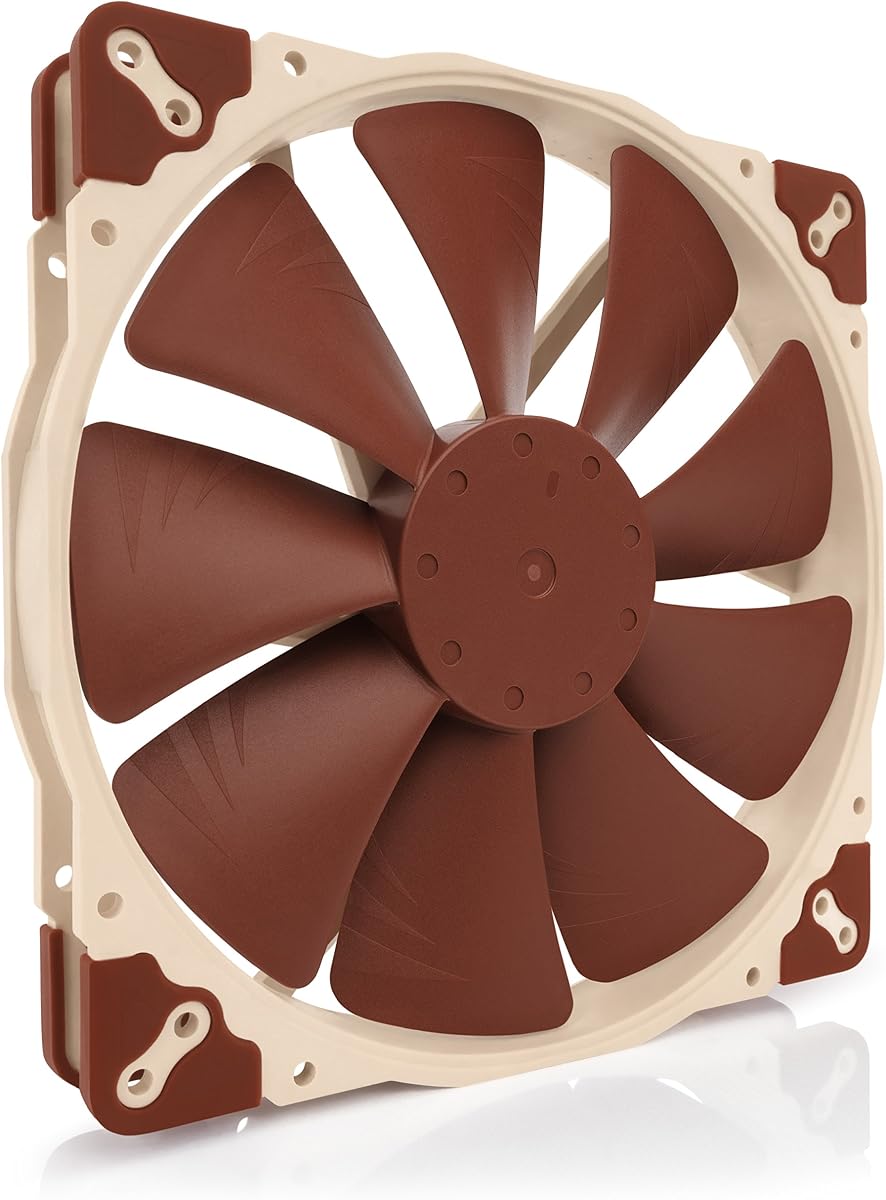
The Noctua NF-A20 PWM stands out as a top contender for users seeking a balance between airflow and silence. It carries an impressive 4.8 rating from users who appreciate its premium build quality and quiet performance characteristics.
We may earn a commission when you buy through this link, at no additional cost to you.
Its Flow Acceleration Channels and Advanced Acoustic Optimisation frame work together to deliver high airflow at extremely low noise levels. The fan operates at a maximum of 800 RPM, ensuring that your system stays cool without becoming a source of distraction.
While the price is higher than budget alternatives, the included accessories like the Low-Noise Adaptor and extension cables justify the investment. The trade-off is mainly financial, but for those prioritizing silence and longevity, it is a worthy expense.
This model is ideal for enthusiasts and professionals who need reliable cooling in a professional environment. It is the recommended choice for anyone looking for a long-term cooling solution that minimizes noise interference.
The advanced frame design reduces turbulence and resonance, resulting in a smoother and quieter airflow experience.
Multiple sets of mounting holes allow this fan to fit a wide variety of case chassis without requiring adapters.
We may earn a commission when you buy through this link, at no additional cost to you.
The Thermaltake Pure 20 Series offers an accessible entry point for users needing a large 200mm fan. With a 4.5 rating, it is praised for its ability to push air efficiently while maintaining a reasonable noise level for the price.
We may earn a commission when you buy through this link, at no additional cost to you.
Its thick 200x30mm design provides high air pressure, which is beneficial for overcoming resistance in radiators or dense dust filters. The shaved frame allows for easier installation, particularly in Thermaltake chassis where spacing is tight.
The main trade-off involves the bearing type, which is a sleeve bearing rather than a more durable hybrid or ball bearing. This might result in a shorter lifespan compared to premium models, but it keeps the cost low for budget builds.
This fan is best suited for budget-conscious builders who still want high performance. It is a practical choice for gaming PCs or workstations where cost efficiency is a priority without sacrificing airflow.
The blade design focuses airflow to create a torrent of air without generating excess noise during operation.
The anti-vibration mounting system simplifies setup and helps reduce vibrations that can cause rattling noises.
We may earn a commission when you buy through this link, at no additional cost to you.
This chromax.black.swap edition of the NF-A20 PWM combines the performance of the original with a sleek all-black design. Users appreciate the ability to swap the anti-vibration pads to match their build aesthetic without compromising on acoustic quality.
We may earn a commission when you buy through this link, at no additional cost to you.
It retains the same superior quiet cooling performance as the standard model, utilizing Flow Acceleration Channels to maximize airflow. The large 20cm diameter ensures that high airflow is achieved at extremely low noise levels for a silent system.
The trade-off is the higher cost compared to other options on the market. However, the customization options and the Noctua reputation for quality make it a strong contender for custom PC builders who value visual consistency.
This model is perfect for enthusiasts who want a clean look and top-tier silence. It is the best choice for high-end builds where appearance and performance are equally important criteria.
Swappable red, black, white, blue, yellow, and green pads allow for color matching to your system components.
The Advanced Acoustic Optimisation frame minimizes turbulence and resonance for a smoother airflow experience.
We may earn a commission when you buy through this link, at no additional cost to you.
The CT200 PWM Fan is designed to complement the existing CT fan lineup while providing robust cooling power. With a 4.3 rating, it is noted for its ability to deliver 131.6 CFM of airflow, which is substantial for a 200mm unit.
We may earn a commission when you buy through this link, at no additional cost to you.
Its optimized 9-blade design pushes air efficiently, and the hydraulic bearing ensures silent operation for extended periods. The daisy chain connectors simplify installation, allowing multiple fans to be connected to a single header on your motherboard.
The trade-off lies in the single-pack packaging which may require buying multiple units for full coverage. Additionally, the noise rating is not as low as premium models, though it remains acceptable for most gaming setups.
This fan is suitable for users building a cohesive system with other CT series components. It is a practical choice for those needing high airflow without the complexity of individual fan cable management.
The design pushes up to 131.6 CFM of airflow and 1.92mm-H20 of static pressure for effective cooling.
Each fan features daisy chainable 4-Pin PWM connectors for quick and tidy installation processes.
We may earn a commission when you buy through this link, at no additional cost to you.
The SickleFlow 200 brings a balance of cooling performance and visual appeal through its advanced ARGB lighting. It has a 4.6 rating from users who value the frosted blade design that creates a vibrant luminous effect.
We may earn a commission when you buy through this link, at no additional cost to you.
The hybrid frame design combines flexibility and stability to minimize noise. The PWM 4-pin header allows you to adjust fan speeds from 0 to 800 RPM to balance noise and airflow as needed for your workload.
The main trade-off is that the visual customization is tied to specific motherboard lighting ecosystems. Users might need additional controllers if their board does not support 5V ARGB synchronization directly.
This fan is a great choice for gamers and streamers who want visible cooling. It is recommended for builds that prioritize aesthetics as much as thermal performance.
The frosted blades enhance the dispersion of ARGB lighting for a uniform and customizable luminous effect.
Hybrid frame design and PWM control ensure stable operation and adjustable speeds for different scenarios.
We may earn a commission when you buy through this link, at no additional cost to you.
The FLX version of the NF-A20 offers a simpler connection option for systems without PWM headers. It maintains the high 4.7 rating associated with Noctua fans, delivering premium quiet performance even without electronic speed control.
We may earn a commission when you buy through this link, at no additional cost to you.
The 3-pin FLX version provides two fixed speed settings via the Low-Noise Adaptor. This allows you to fine-tune the fan for maximum airflow or near-silent operation depending on your specific needs.
The trade-off is the lack of dynamic speed control which PWM versions offer. However, for users who prefer a fixed silent speed or lack PWM headers, this remains a highly effective solution.
This model is ideal for older motherboards or users who prefer simplicity. It is the best pick for those who want reliable quiet operation without complex setup procedures.
The Low-Noise Adaptor allows you to switch between high performance and near-silent operation easily.
The 3-pin Molex connector ensures compatibility with a wide range of power supplies and fans.
We may earn a commission when you buy through this link, at no additional cost to you.
This 5V PWM version allows for unique powering options using USB host ports or power banks. With a 4.7 rating, it brings the same quiet cooling performance of the A-series to versatile power environments.
We may earn a commission when you buy through this link, at no additional cost to you.
It comes with a USB power adaptor cable that enables it to run on devices like smartphones or power supplies. The 5V 4-pin PWM version ensures automatic speed control and includes polarity protection to prevent accidental damage.
The trade-off is that this model requires specific 5V headers or USB power to operate fully. It is not a direct replacement for standard 12V headers without the included adapters.
This fan is perfect for custom projects or mini-PC builds where 12V headers are limited. It is a recommended choice for portable or specialized cooling setups.
The USB power adaptor cable allows the fan to run on devices with USB host ports or power banks.
Included OmniJoin adaptor set allows connection to proprietary fan headers with high flexibility.
We may earn a commission when you buy through this link, at no additional cost to you.
The MF200R RGB offers a mix of performance and visual integration with certified compatibility for major RGB ecosystems. It holds a 4.4 rating for its ability to maintain low noise levels with its silent cooling technology.
We may earn a commission when you buy through this link, at no additional cost to you.
Its hybrid design applies static air pressure without sacrificing airflow. The smart fan sensor automatically stops the motor if jammed by objects, protecting your system from potential damage during operation.
The trade-off is that it requires a separate RGB controller to function fully, which may add to the overall cost. Additionally, the airflow is lower than other models in this category.
This fan is suitable for builds needing RGB integration with minimal noise. It is a solid choice for mid-range systems where visual flair is a secondary priority.
Noise reduction technology and sound absorbing rubber pads work together to minimize operational sound.
The smart fan sensor prevents motor damage by stopping operation if the fan is physically blocked.
We may earn a commission when you buy through this link, at no additional cost to you.
The CHICIRIS 200mm Case Fan delivers high air volume with a hydraulic bearing designed for long life and silent operation. It has a 4.0 rating, reflecting its balanced approach to performance and lighting.
We may earn a commission when you buy through this link, at no additional cost to you.
Its 34 LEDS create a vibrant ARGB lighting experience with both inner and outer circles. The translucent 9 blade fan design optimizes airflow while diffusing light to create a bright and uniform glow.
The trade-off is the lack of independent rated data compared to established brands. However, the inclusion of motherboard sync support and a large air volume make it a competitive option.
This fan is suitable for users who want ARGB lighting on a budget. It is recommended for builds looking for high volume cooling with customizable light effects.
34 LEDS on the fan create a bright, uniform, and soft glow that enhances the visual appeal.
The hydraulic bearing design ensures stable and reliable performance with noise levels as low as 9dBA.
We may earn a commission when you buy through this link, at no additional cost to you.
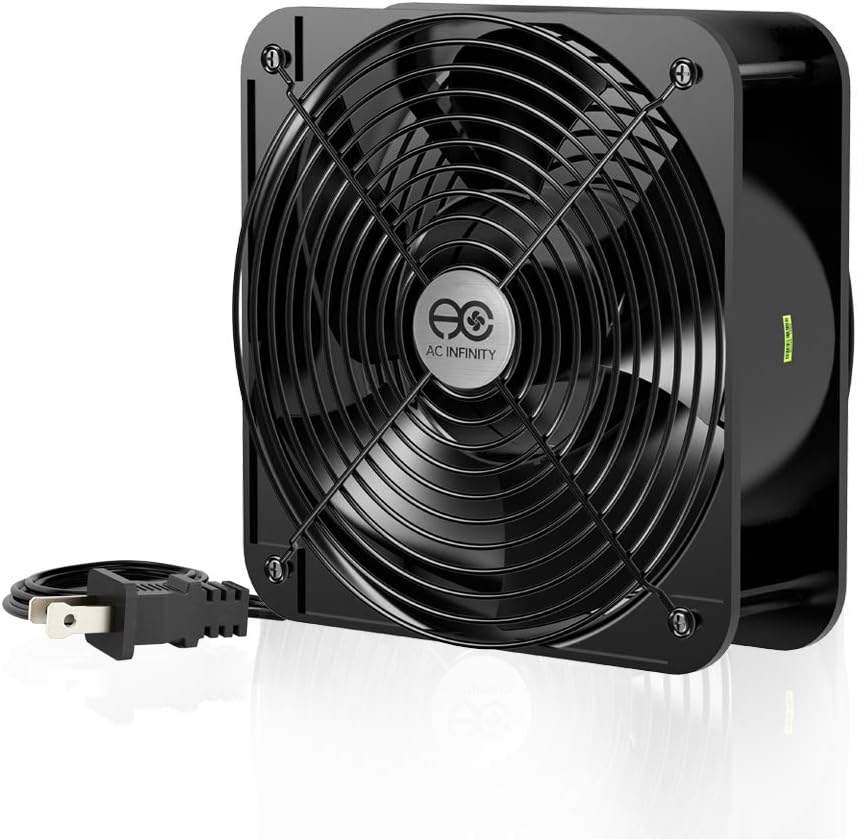
The AC IN AXIAL 2060 is a heavy-duty option designed for projects that require maximum ventilation. It has a 4.5 rating for its robust construction and high-speed performance capabilities.
We may earn a commission when you buy through this link, at no additional cost to you.
It delivers 425 CFM of airflow, which is significantly higher than standard PC case fans. The dual-ball bearings provide a lifespan of 67,000 hours and allow the fan to be laid flat or stand upright.
The trade-off is that it runs on 120V AC and produces high noise levels, which may be unsuitable for standard living spaces. It is designed more for industrial or dedicated equipment cooling.
This fan is ideal for server racks or industrial projects needing high ventilation. It is a recommended choice where noise is secondary to maximum airflow.
This model is designed to maximize airflow with a rate of 425 CFM for intensive cooling needs.
The heavy-duty aluminum fan and dual-ball bearings ensure long life and reliable operation.
We may earn a commission when you buy through this link, at no additional cost to you.
Selecting the right 200mm case fan involves considering several technical factors that affect performance and noise.
Bearing type is a critical factor in the fan. Sleeve bearings are common in budget models and offer quiet operation but have a shorter lifespan. Hydraulic and dual-ball bearings provide greater reliability and longevity, making them ideal for long-term use.
Prioritize hydraulic or ball bearings if you expect the fan to run continuously for years without maintenance.
Airflow measured in CFM indicates how much air the fan moves. High airflow is essential for general case ventilation. Static pressure is more important if the fan will push air through a radiator or dust filter.
For open cases, choose high CFM. For restricted areas, look for higher static pressure ratings to ensure effective cooling.
Noise levels are measured in decibels (dBA). Lower dB ratings ensure a quieter environment, which is crucial for workstations or quiet living rooms. High-performance fans often trade some silence for maximum airflow.
Select a fan with a dB rating that matches your tolerance for background noise.
PWM fans connect to a 4-pin header and allow your motherboard to control speed automatically. Non-PWM fans usually connect to a 3-pin header and run at a fixed speed or with a simple adaptor.
Choose PWM for automatic temperature-based speed control and Non-PWM for simple setups with limited headers.
200mm fans require specific holes in your case. Many models offer multiple sets of mounting holes to fit different chassis standards. Always verify the size of your case before purchasing.
Ensure your case has the correct cutouts to avoid installation issues or the need for custom modifications.
If visual style matters, look for fans with ARGB lighting that syncs with your motherboard. Ensure you have the necessary controllers or software to manage the lighting effects.
Check if the lighting can be turned off if you prefer a cleaner look during professional work.
Most 200mm fans are 25mm or 30mm thick. Ensure your case has enough clearance, especially if you are installing multiple fans or near other components.
Measure the available space carefully to avoid clearance issues during assembly.
Install the fan securely using the provided screws to prevent vibrations. Ensure the rubber pads are fitted correctly to absorb any remaining movement.
Connect the fan to the appropriate header on your motherboard. Use PWM for variable speeds and check BIOS settings for optimal cooling curves.
Dust accumulates on blades over time, reducing airflow. Clean your fans regularly with compressed air to maintain peak performance and silence.
A 200mm fan moves more air at lower speeds compared to a 140mm fan. This makes it ideal for large cases where maximum airflow with minimal noise is desired. However, 140mm fans are more common and easier to fit in standard cases.
Only if your case specifically supports 200mm mounts. Many standard cases support 120mm or 140mm fans. Check your case manual or measure the space before purchasing.
PWM fans use a 4-pin connector to control speed via a signal wire. DC fans use a 3-pin connector to control speed via voltage. PWM offers finer control and is more modern.
High-quality 200mm fans are designed to be quiet because they move the same air at lower RPMs. However, budget models with poor bearings can generate more noise.
If your motherboard supports ARGB, you can connect directly. Otherwise, you will need a separate controller to manage the lighting effects.
Quality fans can last 5 to 10 years. Replace them if they start making noise or fail to cool effectively. Regular cleaning extends their lifespan.
Yes, if they use PWM and come with a Y-cable or daisy chain connector. This allows you to control both fans with a single motherboard header.
The Noctua NF-A20 PWM stands out for its acoustic performance and reliability. For budget builds, the Thermaltake Pure 20 offers high value. The chromax.black.swap edition is the top choice for custom aesthetics.
Prioritize your specific needs such as silence versus airflow. Ensure you measure your case space and check connector types to avoid compatibility issues.
Always verify current availability and pricing before purchasing. These models may vary in stock based on market demand and regional availability.