
Synology RS4021xs+
4.8Editor score
8-core Intel Xeon processor
Up to 6,258 MB/s read speed
Dual redundant power supplies included
Supports up to 40 drive bays
Choosing the right 16 Bay NAS Enclosures is critical for businesses needing massive storage capacity without compromising on speed or reliability. These high-density solutions support numerous drives simultaneously, offering robust protection against data loss through advanced RAID configurations and redundant power systems designed for continuous operation.
Our comprehensive review evaluates ten top-tier options based on processor power, networking capabilities, expansion flexibility, and build quality. We analyzed real-world performance metrics, compatibility with various operating systems, and the ease of installation to ensure you find a solution that meets your specific infrastructure requirements effectively.
Each selection highlights key strengths and potential trade-offs to help you make an informed decision tailored to your workload. Please note that prices and availability can change rapidly, so verify current details before purchasing to ensure you get the best value for your investment today.
4.8Editor score
4.5Editor score

4.5Editor score
As an Amazon Associate we earn from qualifying purchases.
This side-by-side comparison details the specifications of all ten reviewed enclosures to help you quickly identify the model that best fits your storage capacity and performance requirements.


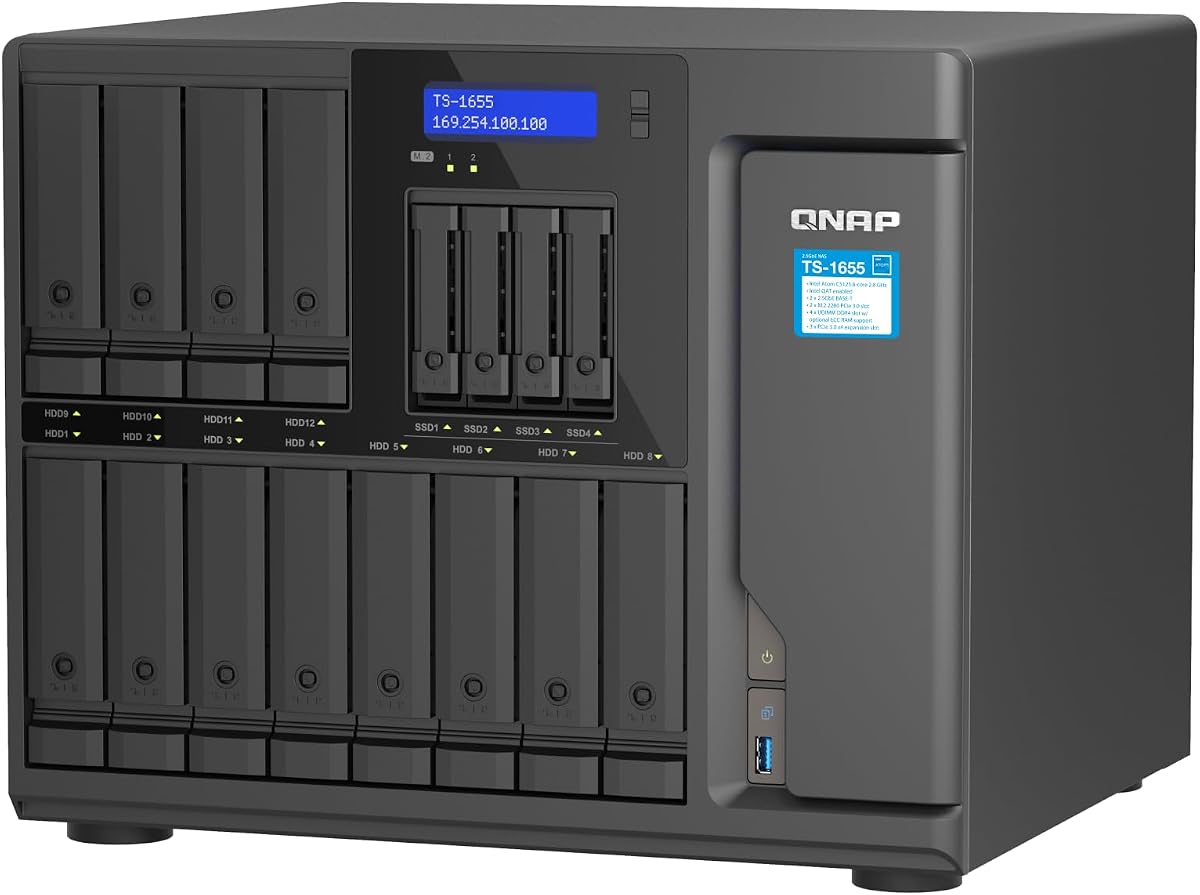
The QNAP TS-1655-8G-US stands out as the top pick for users needing a balance of performance and flexibility. With its Intel Atom C-5125 8-Core processor and support for ECC RAM, it handles demanding workloads like virtualization and database management with ease. This enclosure offers a hybrid drive configuration with 12 bays for 3.5-inch drives and four for 2.5-inch drives, maximizing storage density.
We may earn a commission when you buy through this link, at no additional cost to you.
Its networking capabilities are robust, featuring dual 2.5GbE RJ45 ports that accelerate file access and large backup tasks. The inclusion of dual M.2 NVMe PCIe Gen 3 slots allows for SSD cache acceleration or dedicated storage pools, significantly boosting performance for image recognition and other intensive tasks. The system supports long-term availability, ensuring stability for business environments.
While the lack of dedicated NVMe bays means you must use PCIe slots for cache, the overall performance remains competitive. The price point is higher than basic DAS solutions, but the integrated NAS functionality and enterprise-grade features justify the investment for professional users who need reliability.
This unit is ideal for small to medium businesses seeking a powerful hybrid NAS. Its expandable RAM and versatile drive configuration make it future-proof. If you need a reliable 16 bay NAS enclosure that balances capacity with processing power, the TS-1655-8G-US is our top recommendation for October 2026.
The mix of 3.5 and 2.5-inch bays allows for flexible storage optimization. You can use high-capacity HDDs for cold storage and faster SSDs for active data within the same unit.
Support for Error Correction Code RAM ensures data integrity, which is crucial for mission-critical applications. Upgrading to 128GB provides ample headroom for complex virtualization environments.
We may earn a commission when you buy through this link, at no additional cost to you.
The Synology RS4021xs+ is a powerhouse designed for enterprise environments where performance and uptime are non-negotiable. Its 8-core Intel processor delivers up to 234,698 random read IOPS and 6,258 MB/s sequential read performance. This makes it exceptionally capable of hosting multiple compute-intensive services simultaneously without bottlenecks.
We may earn a commission when you buy through this link, at no additional cost to you.
Reliability is paramount in this model, ensured by two redundant power supplies that keep the system running even if one fails. The unit supports up to 40 drive bays when expanded with two RX1217(RP) units, offering massive scalability. It also includes two PCIe expansion slots for M.2 NVMe cache adapters or high-bandwidth network cards.
While the performance is top-tier, the cost is significant. For small home users, this may be overkill. Additionally, achieving 10GbE networking requires purchasing an additional PCIe network card. However, for businesses needing robust virtualization and storage performance, it justifies the expense through stability and speed.
We recommend this for large enterprises needing a high-performance NAS. The 5-year warranty adds significant peace of mind. If you need a 16 bay NAS enclosure that can grow to 40 bays and handle heavy server workloads, the RS4021xs+ is the premium choice for 2026.
The 8-core processor allows this unit to act more like a server than a simple storage box. It can host virtual machines and applications directly on the NAS efficiently.
Supporting up to 40 bays means you can start with 16 and grow as needed. The expansion units integrate seamlessly, maintaining the unified Synology management interface.
We may earn a commission when you buy through this link, at no additional cost to you.
The QNAP TL-D1600S is an excellent choice for those who already have a capable host system and just need extra storage capacity. This 16-bay JBOD enclosure supports 12 3.5-inch and four 2.5-inch drives, offering high performance via SATA 6Gbps. Unlike many competitors, it comes with a QXP-1600eS PCIe SATA card included, saving you the cost of buying one separately.
We may earn a commission when you buy through this link, at no additional cost to you.
It is versatile, working with QNAP NAS devices as well as Windows and Linux computers and servers. The 4x SFF-8088 ports provide flexible connectivity options. Since it is a direct-attached storage unit, it relies on your host machine for processing power, which allows you to keep costs down while still getting massive storage expansion.
The main trade-off is that you need a host computer. If you want a standalone NAS, this is not it. However, for expanding a local workstation or an existing NAS unit, the cost-to-capacity ratio is unbeatable. The included card ensures you can plug and play without hunting for compatible hardware.
This is our top budget pick for expanding storage on a budget. It is perfect for content creators or IT departments needing to bulk up storage on existing servers. If you need a reliable 16 bay NAS enclosure that connects to a PC or existing NAS, the TL-D1600S is the best value option available.
Having the PCIe card included reduces total cost and complexity. This ensures immediate connectivity without needing to source compatible hardware separately from third-party vendors.
Works seamlessly with Windows, Linux, and QNAP NAS units. This broad compatibility means you can integrate it into mixed environments without worrying about OS-specific limitations.
We may earn a commission when you buy through this link, at no additional cost to you.
If you already own a Synology DiskStation, the DX1222 is the most logical way to expand storage without buying a new main unit. This 12-bay expansion unit connects directly to compatible Synology models, adding significant capacity while keeping everything managed through Synology DSM. The unified tools allow you to configure new storage in minutes.
We may earn a commission when you buy through this link, at no additional cost to you.
The integration is seamless; the drives appear as part of the existing volume or storage pool. This maintains data integrity and makes management effortless. The build quality is consistent with Synology's other products, ensuring reliability and durability. It is designed specifically to work with select Synology diskstation units.
While it is not a standalone solution, its purpose is specific and effective. You cannot use it without a compatible host Synology unit. However, for existing Synology owners, it is the only way to scale without migrating data or changing workflows. The 5-year warranty ensures long-term support.
This is the best expansion unit for Synology ecosystems. It simplifies the process of adding capacity to your existing NAS. If you are a Synology user needing to expand your storage footprint, the DX1222 is a straightforward and reliable choice for increasing capacity.
All drives are managed through the same DSM interface. This avoids the complexity of multiple storage interfaces and keeps administration centralized and simple.
Synology DSM allows you to set up storage in minutes. You do not need complex RAID setups; the system handles the configuration automatically for you.
We may earn a commission when you buy through this link, at no additional cost to you.
For DIY enthusiasts wanting a custom build, the Generic ZhenLoong Full Tower offers incredible flexibility. It supports 15 hot-swap hard drives and is compatible with motherboards from ITX to EATX. This allows you to build a powerful custom NAS or workstation exactly to your specifications. The chassis supports redundant power supplies, ensuring reliability for 24/7 operation.
We may earn a commission when you buy through this link, at no additional cost to you.
With eight PCI full-height expansion slots, you can add multiple network cards or GPUs for transcoding. The panel includes essential ports like USB 3.0 and various LED indicators. The build uses 1.0mm SGCC material, which is durable and suitable for server-grade use. It weighs 16kg, indicating its solid construction.
The main drawback is the shipping time, which can take 30 to 40 days by sea. Also, you must assemble and configure the hardware yourself, which requires technical knowledge. However, for those wanting a custom server that isn't limited by proprietary restrictions, this is an excellent foundation.
This is ideal for tech-savvy users building a home lab or small business server. It offers maximum hardware flexibility. If you need a 16 bay NAS enclosure chassis that supports custom hardware choices and redundant power, the ZhenLoong tower is a strong choice for a custom project.
Supporting everything from ITX to EATX means you can choose any motherboard form factor. This allows for high-end builds with large CPUs and memory capacity.
The 15 hot swap bays mean you can add or remove drives without shutting down the server. This is essential for maintenance in always-on environments.
We may earn a commission when you buy through this link, at no additional cost to you.
The Asustor Lockerstor 10 Gen3 targets high-performance users who need ultra-fast connectivity. It includes dual 10GbE and dual 5GbE ports, ensuring you can saturate your bandwidth with enterprise-grade speeds. The AMD Ryzen V3C14 processor is designed for continuous 24/7 operation. Workloads like virtualization and database management. It also features USB4 40Gbps ports for professional workflow integration.
We may earn a commission when you buy through this link, at no additional cost to you.
Data integrity is handled by the 16GB ECC DDR5 RAM, which protects against corruption. The four M.2 NVMe PCIe 4.0 SSD slots allow for fast caching or storage pools. While it offers 10 bays rather than 16, the speed and modern connectivity make it a compelling option for 4K/8K media editing and creative studios.
The limitation is the bay count compared to others in this roundup. However, for those prioritizing network speed and cache performance over raw drive count, it stands out. It is optimized for virtualized environments and containerized apps, making it future-proof for modern computing needs.
This is best for professional creatives and virtualization users. If you need high-speed data transfer and enterprise-grade RAM, the Lockerstor 10 Gen3 is a top choice. For high-performance networking and cache flexibility, this model is highly recommended for 2026.
Dual 10GbE ports mean you can connect directly to high-speed switches. This eliminates bottlenecks for multiple users accessing files simultaneously.
USB4 support allows for connection to external displays and storage at 40Gbps. This is rare in NAS devices and aids in professional content creation workflows.
We may earn a commission when you buy through this link, at no additional cost to you.
The Synology DS3622xs+ is built for businesses needing massive scalability. It hosts over 260,000 4K random read IOPS and allows scaling to 36 drive bays with two DX1222 units. This makes it suitable for centralized backup and surveillance systems. The 6-core Intel Xeon processor handles virtual machines and video management systems effectively.
We may earn a commission when you buy through this link, at no additional cost to you.
You can leverage up to 48 GB of memory to boost read and write speeds. It supports 10/25GbE networking and Fibre Channel for enterprise integration. The NVMe SSD Cache support ensures that frequently accessed data remains fast. This unit is designed to host backup and video systems efficiently.
The rating is slightly lower than other models, possibly due to the premium price. However, its expandability is unmatched in its class. It is a workhorse for large file sharing and data management. If you need a solution that can grow significantly over time, this fits the bill perfectly.
This is ideal for growing businesses. The ability to expand to 36 bays means you can start with what you need now. For scalable enterprise storage and high IOPS performance, the DS3622xs+ is a reliable solution for serious users.
Expanding to 36 bays provides plenty of room for growth. This reduces the need to migrate to new hardware as data accumulates.
Over 260k random read IOPS mean responsive performance even under load. This is critical for database applications and virtual machines.
We may earn a commission when you buy through this link, at no additional cost to you.
The QNAP TL-R1600PES-RP is designed for server racks with space constraints. Its short depth design makes it easy to install in small media cabinets or areas with lots of cabling. It supports 16 3.5-inch SATA drives and uses the Mini-SAS HD interface for high-speed data transfer. Redundant power supplies ensure service continuity and stable power.
We may earn a commission when you buy through this link, at no additional cost to you.
This unit is flexible and economically expands storage space of a QNAP NAS to petabyte-level capacity. The space-efficient design saves rack real estate. While it comes with redundant power, the rail kit is sold separately, which is a minor inconvenience. The 5-year warranty provides standard protection for business use.
The short depth is a significant advantage for dense server rooms. It offers the capacity of a 3U rackmount without taking up as much depth. If you have limited cabinet space, this is an excellent solution for expanding storage without compromising on redundancy.
This is best for rack space-limited environments. It offers massive capacity in a compact footprint. If you need a 16 bay NAS enclosure that fits tight cabinets without sacrificing power redundancy, the TL-R1600PES-RP is the top recommendation.
The short depth allows it to fit in small media cabinets. This ensures you can expand storage without needing a larger rack enclosure.
Redundant power supplies mean a power failure does not stop your storage. This ensures service continuity for critical business applications.
We may earn a commission when you buy through this link, at no additional cost to you.
The CENMATE Aluminum 12 Bay is a direct-attached storage solution ideal for personal or enterprise use. It supports 2.5/3.5-inch HDDs and SSDs with up to 240TB capacity. It uses USB A/C 3.0 for transfers up to 5Gbps, which is ten times faster than USB 2.0. The enclosure is built with aluminum-alloy materials and includes three 2.7-inch fans for cooling.
We may earn a commission when you buy through this link, at no additional cost to you.
It supports daisy chain expansion, allowing you to expand to 720TB storage with up to 3 devices. The interface is plug and play on Windows, Mac OS, and Linux without needing drivers. It uses a DC 12V20A power adapter to ensure stable power for high-speed transmission. This makes it a reliable external storage system.
Since it lacks network connectivity, you cannot access data remotely without a host. Also, troubleshooting drives in a daisy chain can be tricky if one fails. However, for high-capacity local storage on a budget, it is a strong contender. The tool-free design makes loading drives easy.
This is best for users needing local DAS storage. It offers massive capacity without the cost of a full NAS. If you need a reliable 16 bay NAS enclosure alternative for direct connection to a PC, the CENMATE is a solid value option.
The USB HOST port allows you to add more drives. This means you can scale your storage capacity by adding more enclosures as needed.
The aluminum alloy construction and fans keep drives cool. This ensures data security even when running multiple high-capacity drives simultaneously.
We may earn a commission when you buy through this link, at no additional cost to you.
The QNAP TS-1655-8G-US (variant) focuses on long-term availability for business planning. It shares the same core specs as the TS-1655, including the Intel Atom 8-core processor and hybrid drive configuration. This ensures that businesses can rely on consistent product availability. The system includes dual 2.5GbE ports for accelerating large backup and restoration tasks.
We may earn a commission when you buy through this link, at no additional cost to you.
It supports ECC memory expansion up to 128GB. which is critical for data integrity. The dual M.2 NVMe PCIe Gen 3 slots allow for SSD cache acceleration or image recognition via Coral accelerators. This unit is designed for intensive file access and multimedia transfer without bottlenecks.
The long-term availability is a key differentiator for enterprise customers who need to plan years ahead. While it mirrors other models in specs, the commitment to availability makes it suitable for large deployments. The hybrid approach ensures you get both capacity and speed.
This is ideal for enterprise IT planning. If you need a 16 bay NAS enclosure with reliable supply chain support, this is a strong choice. For hybrid workloads and high availability, the TS-1655-8G-US is a recommended option for 2026.
Businesses can plan deployments knowing the product will be available. This prevents supply chain disruptions for critical infrastructure projects.
The slots support Coral M.2 accelerators for faster image recognition. This enables AI workloads directly on the NAS unit.
We may earn a commission when you buy through this link, at no additional cost to you.
Selecting the right 16 Bay NAS Enclosures requires careful consideration of performance needs, connectivity, and expansion capabilities. This section breaks down the key factors to help you decide which model best suits your infrastructure requirements.
For demanding tasks like virtualization or database hosting, look for multi-core processors like Intel Xeon or AMD Ryzen. RAM capacity should be expandable to handle heavy multitasking. ECC RAM support is recommended for data integrity in critical business environments.
Prioritize a processor with high IOPS capabilities and ensure the RAM can be upgraded to 32GB or higher for future-proofing.
Network speed is crucial for multi-user environments. Models with 2.5GbE, 10GbE, or 25GbE ports provide faster access to stored data. Link aggregation support allows you to combine multiple ports for increased bandwidth.
Select a model with at least dual 2.5GbE ports to ensure your network does not become a bottleneck for data transfers.
Check the mix of drive bays. Some models offer 16 bays for 3.5-inch drives, while others provide hybrid options for 2.5-inch SSDs. Hot-swap capability is essential for maintenance without shutting down the system.
Ensure the model supports your preferred drive types and includes hot-swap bays for easier maintenance and data recovery.
If you anticipate growing storage needs, choose a model that supports expansion units. Look for daisy chain support or the ability to connect to additional JBOD enclosures. Scalability is key for businesses expecting rapid data growth.
Verify that the unit can support up to 36 drive bays or more through expansion units to accommodate future growth needs.
For critical business continuity, redundant power supplies are essential. They ensure the system stays online even if one power supply fails. This is standard in enterprise-grade units but optional in budget models.
Always choose a model with dual redundant power supplies if uptime is a priority for your business operations.
Consider the interface used for connectivity. USB 3.0 is common for DAS, while Mini-SAS HD offers better reliability for JBOD units. Ensure compatibility with your host OS like Windows, Linux, or NAS operating systems.
Look for Mini-SAS HD or PCIe interfaces for more reliable and faster data transfer than standard USB connections.
M.2 NVMe slots allow for SSD caching, which accelerates performance for frequently accessed data. Some models support PCIe SSDs for direct storage pools. This is vital for creative workflows involving large media files.
Prioritize units with M.2 NVMe slots to enable caching and boost overall read and write performance significantly.
A longer warranty, such as 5 years, indicates manufacturer confidence and provides peace of mind. Technical support availability is also important for troubleshooting. Check the brand's reputation for customer service.
Choose a model with a 5-year warranty to ensure long-term reliability and protection against hardware defects.
When installing hard drives, handle them with care and ensure they are properly seated in the trays. For hot-swap models, you can insert drives without powering down the system, but it is recommended to back up data first to prevent corruption.
Regularly monitor the system logs for drive health and error reports. Use the manufacturer's software tools to run maintenance routines like SMART tests and firmware updates. This helps catch failing drives early before data loss occurs.
Keep the unit in a well-ventilated area to maintain optimal cooling. Clean dust from the intake fans regularly to prevent overheating. If using redundant power, ensure both supplies are connected to separate power sources for true redundancy.
A NAS (Network Attached Storage) includes its own processor, operating system, and network interface, allowing remote access and file sharing. A JBOD (Just a Bunch of Disks) enclosure relies on a host computer to manage data and typically uses USB or PCIe interfaces for connection.
Yes, many models offer hybrid bays that support both sizes. However, always check the specifications to ensure the drive trays are adjustable or specifically designed to accommodate both 2.5 and 3.5-inch hard drives without issue.
You can use expansion units like the DX1222 or JBOD enclosures that support daisy chaining. These units connect to the main NAS and allow you to add 12 or more drives per unit, scaling capacity to hundreds of terabytes.
For general home use, non-ECC RAM is usually sufficient. However, for business or mission-critical data, ECC RAM helps prevent silent data corruption. It is recommended if you run databases or virtual machines on your NAS.
Most NAS devices support RAID 0, 1, 5, 6, and 10. Some enterprise models also support RAID 50 or 60. Always verify supported RAID configurations in the user manual to ensure data protection meets your needs.
Use units with built-in cooling fans and place the device in a well-ventilated area. Ensure intake vents are not blocked by cables or walls. Regularly clean dust from fans to maintain airflow and prevent overheating.
Hot-swapping allows you to remove or insert drives without powering down the system. It is safe if supported by the unit and you follow the manufacturer's removal procedure. Always ensure you backup data before removing drives to avoid accidental loss.
Yes, if multiple users need to access the NAS simultaneously, a gigabit switch is recommended. Connect your router to the switch, and then connect all client computers and the NAS to the switch for efficient data sharing.
We recommend the QNAP TS-1655-8G-US for its balanced hybrid configuration and robust performance, while the Synology RS4021xs+ stands out for premium enterprise reliability. The QNAP TL-D1600S offers the best value for those needing simple expansion without a standalone NAS OS.
Prioritize power redundancy and network speed if you run critical applications. Ensure you have enough RAM for your workload and check compatibility with your existing infrastructure. Selecting a unit with expansion support will save you from migrating data in the future.
Prices and stock levels fluctuate regularly. Always double-check current pricing and availability on the product pages before purchasing to ensure you secure the best deal for your specific needs in October 2026.