
10Gtek 10Gb Dual RJ45 Port Network Card
4.1Editor score
Intel X540 controller chip
Dual copper RJ45 ports
Supports Windows and Linux
This guide compares the top 10GB Ethernet Card models for speed and compatibility to help you choose the best network adapter for your setup.
Choosing the right 10GB Ethernet Card can transform your network performance significantly. These adapters enable faster data transfers and smoother online experiences for demanding tasks.
We evaluated each product based on speed, compatibility, build quality, and user feedback. Our list covers a range of options from budget-friendly to premium enterprise solutions.
Each pick highlights key strengths and potential limitations to help you decide. Please note that availability and pricing may vary over time on retailer sites.
4.1Editor score

4.2Editor score

4.6Editor score
Here is a side-by-side comparison of all ten network adapters to help you evaluate their specs and features quickly.




The TP-Link 10GB PCIe Network Card TX401 stands out as a top choice for users seeking high-speed connectivity. With a rating of 4.2, it offers reliable performance for both internet access and local data transmissions. Its latest 10GBase-T Technology ensures smooth data flow without bottlenecks.
We may earn a commission when you buy through this link, at no additional cost to you.
This adapter supports a wide range of data rates from 10 Gbps down to 100 Mbps. The QoS technology helps prioritize performance for gamers, avoiding network congestion during critical moments. Additionally, the included CAT6A cable maximizes the card's potential up to 10 Gbps.
While it requires a PCIe slot, the inclusion of both low-profile and full-height brackets makes it versatile for different case sizes. The comprehensive system support ensures it works with various Windows versions and Linux distributions. However, using standard cables may limit performance to 1 Gbps.
Ideal for gamers and power users needing faster connections, this card balances performance and value. Its industry-leading 2-year warranty and free technical support add peace of mind. We recommend it for those upgrading from standard Gigabit Ethernet to 10GB speeds.
The card's design focuses on stability and ease of installation. Users appreciate the automatic negotiation between different speeds which simplifies setup with existing network equipment. The low latency ensures responsive interactions for online activities. Overall it remains a strong contender in the market.
Prospective buyers should ensure their system has a compatible PCIe slot and sufficient power. The included accessories reduce the need for additional purchases. Support from TP-Link provides a reliable safety net for any issues that arise. It is a practical solution for modern networking needs.
Delivers extreme speeds of up to 10 Gbps which is ten times faster than typical Gigabit adapters.
Fully compatible with Windows 10 through 7 and various Linux versions to meet diverse operating system needs.
We may earn a commission when you buy through this link, at no additional cost to you.
The 10Gtek 10Gb Dual RJ45 Port Network Card offers robust features at an affordable price point. Rated 4.1, it uses the Intel X540 controller to make servers more stable through intelligent offloads. It supports dual copper RJ45 ports for flexible connectivity options.
We may earn a commission when you buy through this link, at no additional cost to you.
Compatibility extends to Windows Server versions and Linux systems along with ESX ESXi environments. The card fits into PCI Express 2.1 slots with an X8 lane configuration suitable for X8 and X16 slots. It includes brackets for standard and low-profile installations.
Users on Windows 11 must note that manual setup is required so contacting support is advised before purchase. The absence of hot swapping means the server must be powered down for installation. These minor limitations are outweighed by the reliable performance and long warranty period.
This adapter is perfect for users building budget-friendly high-speed networks or upgrading existing servers. The inclusion of additional brackets ensures it fits small form factor cases easily. Lifetime technology support adds value beyond the initial purchase price.
Performance is consistent for data center environments where stability is critical. The intelligent offloads help reduce CPU usage during heavy data transmission tasks. It connects well with Category-6A cabling for optimal range up to 100 meters.
Prospective buyers should verify their motherboard slots and OS requirements before ordering. The return policy provides flexibility if the card does not meet specific needs. Overall it represents a solid investment for those needing dual port 10GbE capability without premium costs.
Equipped with original Intel X540 controller chip which supports Intelligent Offloads and make the servers more stable.
With profile bracket and additional low profile bracket that makes it easy to install the card in a small form factor case.
We may earn a commission when you buy through this link, at no additional cost to you.
The Synology 2-Port 10GbE RJ-45 PCIe Network Adapter E10G30-T2 is designed specifically for Synology NAS users. With a high rating of 4.6, it ensures seamless integration and high-performance storage applications. Its dual ports provide redundancy and increased throughput for critical data.
We may earn a commission when you buy through this link, at no additional cost to you.
This adapter automatically negotiates between 10 Gbps and 1 Gbps to adapt to different network devices. It is purpose-built for Synology systems ensuring compatibility and stability. The 5-year warranty offers significant peace of mind for long-term storage solutions.
Users must ensure their DSM version is 7.1.1 or above for proper functionality. While it excels with Synology hardware it may not be the first choice for non-Synology environments. However for those invested in the ecosystem it is a premium choice.
Ideal for professionals needing reliable network attached storage with high-speed access. The dual port design allows for link aggregation or failover scenarios. It significantly enhances the capabilities of existing NAS units without requiring a full system upgrade.
Installation is straightforward on supported Synology devices with minimal configuration needed. The adapter is tested rigorously to ensure it meets Synology quality standards. Support from Synology is readily available for any compatibility questions that may arise.
Prospective buyers should check their current DSM version before purchasing to avoid delays. The warranty period is among the best in the industry for such accessories. Overall it delivers top-tier performance and reliability for Synology NAS owners.
Two 10GbE ports support high-performance storage applications designed for Synology NAS units.
Comes with a 5-year warranty providing excellent protection for your investment in storage hardware.
We may earn a commission when you buy through this link, at no additional cost to you.
The VIMIN 10G PCI-E Network Card delivers high speeds with two 10Gbps RJ45 ports. Rated 4.5, it uses the Intel X540-T2 chipset controller for reliable performance and stability. It is ideal for servers and high-end devices needing consistent network connections.
We may earn a commission when you buy through this link, at no additional cost to you.
Compatibility covers Windows Windows server Linux and VMware to meet diverse network needs. The card works with both PCI Express x8 and x16 slots offering flexible deployment options. It includes both standard and slim brackets for various device heights.
Users should note that 2.5Gbps and 5Gbps speeds are not supported so lower speed devices may drop to 1Gbps. However, the heat sink ensures optimal temperature levels during heavy usage. The well-designed gold finger interface reduces interruption risks effectively.
This adapter is a solid choice for environments requiring dual port redundancy at 10Gbps. The stability under load makes it suitable for data transmission requirements in busy networks. Installation is versatile across different slot configurations and system types.
Performance is stable even during extended periods of high traffic due to effective cooling. Users in virtualization environments find the VMware compatibility particularly useful for managing multiple VMs. The design prioritizes durability and consistent network performance.
Prospective buyers should verify their switch supports 10Gbps directly to avoid compatibility issues. While it lacks multi-gig support it excels at its designated 10Gbps target. Overall it offers a robust solution for dual port 10GbE connectivity.
Utilizing the Intel X540-T2 chipset controller this card offers reliable performance for high-speed data transmission.
Features a heat sink to maintain optimal temperature levels during heavy usage ensuring device stability.
We may earn a commission when you buy through this link, at no additional cost to you.
The Asus Network Card NADACA0140 provides hyper-fast 10Gbps networking for bandwidth-demanding tasks. Rated 4.1, it delivers up to 10X-faster data-transfer speeds compared to standard Ethernet. Full compatibility with current network standards ensures seamless backward integration.
We may earn a commission when you buy through this link, at no additional cost to you.
Support includes Windows and Linux with flexible OS integration for various users. The RJ45 port allows easy upgrades of desktops to 10Gbps networking using standard copper cables. Built-in Quality-of-Service technology helps prioritize bandwidth and supported data packets effectively.
Linux users should note specific kernel requirements ranging from 4.4 down to 3.2 for proper driver support. While it offers a single port this limitation is common for consumer grade adapters. The QoS feature enhances online experience by managing traffic efficiently.
This card is suitable for users looking for a straightforward upgrade to 10Gbps on a single link. The ease of use with standard cables simplifies the installation process for many. Performance remains stable during typical desktop usage scenarios.
It is particularly useful for content creators needing faster file transfers to local storage. The backward compatibility allows smooth integration with older network devices. Asus quality control ensures reliable operation over time.
Prospective buyers should check their motherboard and switch capabilities to confirm support. The OS compatibility is broad but verifying Linux kernel specifics is recommended. Overall it is a dependable choice for upgrading desktop networks.
Delivers up to 10X-faster data-transfer speeds for bandwidth-demanding tasks like video editing and backups.
Built-in Quality-of-Service technology allows you to prioritize bandwidth for a smooth online experience.
We may earn a commission when you buy through this link, at no additional cost to you.
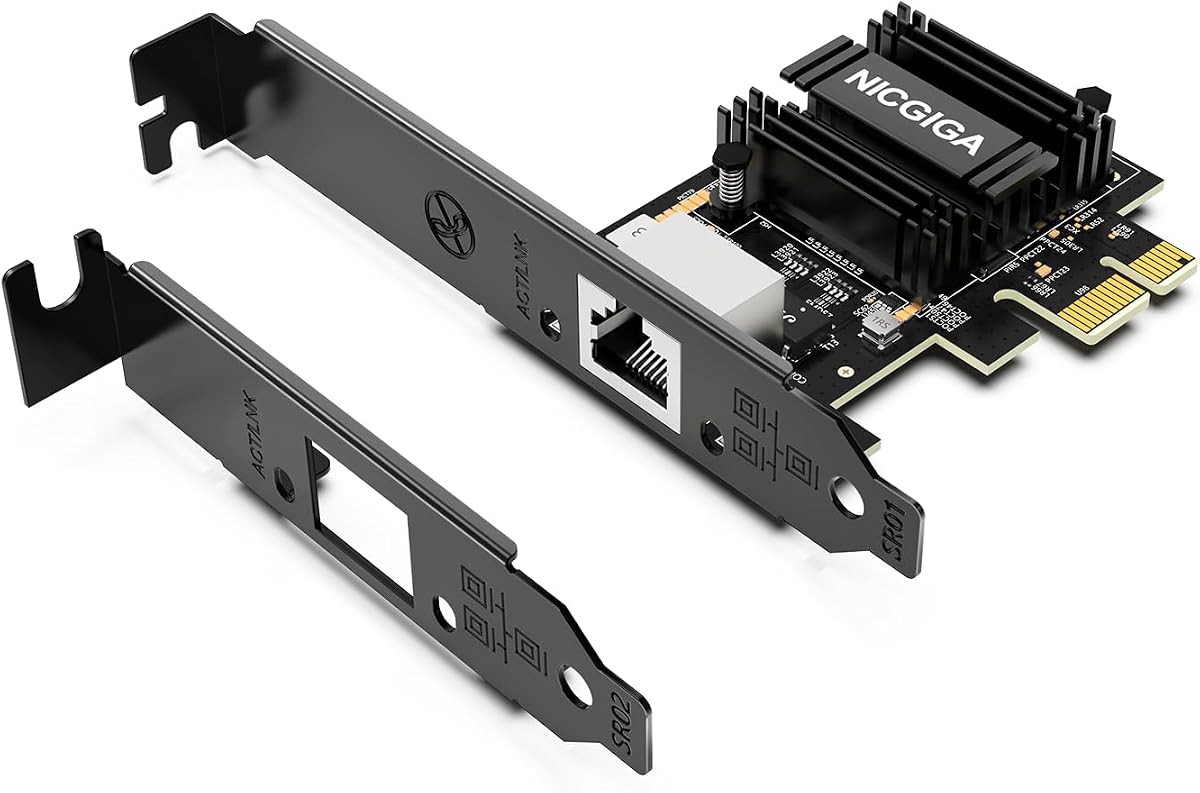
The NICGIGA 10Gb PCIe 4.0 x1 Network Card utilizes the Realtek RTL8127 controller for high performance. Rated 4.3, it delivers blazing-fast speeds up to 10Gbps with extreme stability. Multi-Gig Auto-Negotiation ensures compatibility with routers and switches across multiple speeds.
We may earn a commission when you buy through this link, at no additional cost to you.
Its PCIe 4.0 x1 interface makes it ideal for Mini PCs and ITX builds without occupying GPU lanes. Broad OS support includes Windows 11 10 and Server versions plus modern Linux distributions. It consumes minimal power and generates significantly less heat than older chips.
Linux users on kernels 5.x may need to drive the card via Realtek official source code manually. The card is not for PCI slots so verify your motherboard slots carefully. The ultra-efficient chipset ensures non-stop stability for home labs and NAS.
This adapter is perfect for compact workstations needing high-speed connectivity without heat issues. The included brackets allow easy installation in both slim and full-size desktop towers. Wake-on-LAN support adds convenience for remote management tasks.
Performance is consistent with NAS storage and gaming due to stable packet delivery. The low power consumption is a benefit for energy efficient builds. Users appreciate the modern driver support for current operating systems.
Prospective buyers should ensure their system supports PCIe 4.0 for full functionality. The heat efficiency reduces cooling requirements in tight spaces. Overall it is a versatile choice for modern compact computer builds.
Ultra-efficient Realtek RTL8127 chipset consumes minimal power and generates less heat ensuring non-stop stability.
PCIe 4.0 x1 interface fits x1 x4 x8 and x16 slots making it ideal for compact systems.
We may earn a commission when you buy through this link, at no additional cost to you.
The VunLink 10GbE RJ45 Ethernet Card provides stable low-latency networking for various environments. Rated 4.3, it is powered by the Realtek RTL8127 chipset for reliable performance. Supports multiple speeds including 10Gbps 5Gbps and 2.5Gbps for flexibility.
We may earn a commission when you buy through this link, at no additional cost to you.
Designed with a PCIe 4.0 x1 interface it maximizes slot efficiency in compact systems. Windows Linux and Server Compatibility ensures broad usability across different platforms. The energy-efficient design produces reduced heat output compared to traditional solutions.
Driver installation may be required depending on the specific operating system version used. The actual link speed depends on connected equipment and cabling quality so setup varies. Dual brackets allow flexible installation in full-height and compact desktop systems easily.
This adapter is well-suited for home labs and gaming PCs needing modern connectivity. The multi-gig negotiation handles transitions smoothly between different speed devices. It serves as a reliable upgrade path for older network infrastructure.
Consistent performance for NAS servers and cloud storage is reported by users. The advanced chipset ensures stable connectivity during heavy transfers. Setup is generally straightforward on modern Windows installations.
Prospective buyers should confirm their switch supports the desired speed for best results. The energy efficiency helps in low-power builds. Overall it offers a balanced approach to modern 10GbE networking.
Supports 10Gbps 5Gbps 2.5Gbps speeds with automatic negotiation for seamless integration with routers.
Advanced RTL8127 controller is engineered for lower power consumption and reduced heat output.
We may earn a commission when you buy through this link, at no additional cost to you.
The Asus XG-C100F network adapter delivers blazing fast 10 Gbps speeds with fiber support. Rated 4.3, it is capable of 10x the speeds of Gigabit Ethernet for all networking tasks. Compatible with latest fiber optic technology which carries high speed transmissions over greater distances.
We may earn a commission when you buy through this link, at no additional cost to you.
It features a built-in cooling aluminum heatsink that keeps the card cool during high performance tasks. The Sfp+ cage allows for both fiber optic and direct-attach copper connections giving flexibility. Operating temperature ranges from 0 to 40 degrees Celsius for reliability.
Automatic prioritization via QoS technology automatically boosts bandwidth to important streams or games. Users should note that the SFP+ cage requires specific transceivers which may add cost. This makes it more expensive than copper-only adapters but offers higher distances.
This adapter is ideal for environments needing long-distance connections or higher bandwidth stability. The heatsink design ensures consistent performance even under sustained load. It is a powerful choice for professional and enthusiast setups requiring fiber.
Setup involves selecting appropriate transceivers for your network infrastructure requirements. The card handles various optical modules to suit different cabling needs. Its design focuses on maintaining speed without thermal throttling.
Prospective buyers should consider their cabling needs before choosing SFP+ over RJ45. The cooling technology ensures longevity during intense usage. Overall it is a premium option for fiber connectivity in desktop environments.
Compatible with the latest fiber optic technology which carries high speed transmissions over a much greater distance.
Built-in cooling aluminum heatsink keeps the XG-C100F cool during high performance tasks.
We may earn a commission when you buy through this link, at no additional cost to you.
The TRENDnet 10G PCIe Network Adapter TEG-10GECTX is NDAA TAA compliant for government needs. Rated 4.1, it offers a 10Gbps RJ-45 Ethernet port with support for multiple speeds. Manufactures stand by quality with 3 years of Manufacturer Protection backing.
We may earn a commission when you buy through this link, at no additional cost to you.
Compatible Operating Systems include Windows Server 2022 and 2019 among others. The 2.5G BASE-T SUPPORT supports 2.5G and 5G speeds over standard Cat5e cables up to 100m. Reliable tech support is available during normal business hours for all needs.
Users should ensure their specific OS version is listed for compatibility especially for Server setups. The single port limits redundancy but suits single link upgrades well. The included brackets support most installations and low-profile systems.
This adapter is suitable for users needing compliance with government standards for procurement. Performance is reliable with clear LED indicators for status monitoring. The 2.5G support allows flexibility with existing cabling infrastructure.
Setup is straightforward with plug and play drivers on modern Windows versions. The manufacturer protection adds confidence in long term usage. It is a secure choice for regulated environments.
Prospective buyers should verify compliance requirements and OS support before purchasing. The cable compatibility is a useful feature for older networks. Overall it is a trustworthy choice for compliant networking.
With our NDAA and TAA compliant Network Adapters you can plan and install networking solutions that Government customers demand.
2.5GBASE-T specification supports 2.5G and 5G speeds over standard Cat5e cables at distances up to 100m.
We may earn a commission when you buy through this link, at no additional cost to you.
The Cable Matters USB C to 10Gb Ethernet Adapter offers fast wired networking without PCIe slots. Rated 3.9, it supports auto-negotiation for broad compatibility with various devices. It is great for NAS access large backups and content workflows efficiently.
We may earn a commission when you buy through this link, at no additional cost to you.
Powered by Realtek RTL8159 USB 10G controller for efficient power use and minimal heat. The design addresses heat concerns common with some adapters with a rugged aluminum housing. Compatible with Thunderbolt 3 4 5 and USB4 ports for Macs.
Note that real-world Windows throughput is typically ~7Gbps depending on setup. On Macs macOS may report a 5Gb link rate depending on the model and network. Installation is plug-and-play on latest macOS and Windows without extra software.
This adapter is perfect for mobile workstations needing a quick connection to fast networks. The braided USB-C pigtail cable adds strength and flexibility for daily use. It delivers cool and reliable performance in a compact design for travel kits.
Users appreciate the durable housing that withstands scuffs impacts impacts daily wear. The setup process is simple for most modern operating systems. It bridges the gap for devices without built-in high-speed Ethernet.
Prospective buyers should ensure their USB port is USB 3.2 Gen 2×2 for best speeds. The aluminum housing helps maintain safe temperatures during use. Overall it is a practical portable solution for 10GbE needs.
Upgrade to fast wired networking with this USB C to 10Gb Ethernet adapter supporting broad compatibility.
Delivers cool and reliable performance in a compact design with a heat sink to help dissipate heat.
We may earn a commission when you buy through this link, at no additional cost to you.
Selecting the right 10GB Ethernet Card involves considering your hardware, OS, and network needs to ensure optimal performance.
Check your motherboard for available PCIe slots and ensure your network infrastructure supports 10Gbps speeds. Using a card with incompatible slots can limit performance or prevent installation entirely. Verify if your switches and routers support the speeds you are aiming for.
Ensure your hardware has the correct slot type and your network devices support the target speeds.
Different cards have varying driver support for Windows Linux and macOS. Some may require manual driver installations or specific kernel versions for full functionality. Always check the manufacturer's compatibility list before purchasing to avoid software issues.
Verify that the card supports your specific operating system and any required driver updates.
Decide if you need a single port or dual ports for redundancy or link aggregation. Dual port cards are useful for servers requiring failover capabilities while single ports suffice for most desktops. Consider the physical space inside your case for multiple ports.
Choose a port configuration that matches your redundancy needs and physical space constraints.
10Gbps speeds typically require Cat6a or Cat7 cables for optimal performance over distances. Using older cables may limit speed to 1Gbps or 2.5Gbps depending on the standard. Ensure your existing cabling infrastructure meets the necessary specifications for the chosen card.
Confirm that your network cabling meets the standards required for your desired speed.
Prices vary significantly across models with budget options offering basic features and premium ones providing extended support. Look for warranties of at least two years to protect your investment against defects. Consider long-term support availability for drivers and updates.
Balance initial costs with warranty terms to ensure a secure long-term purchase decision.
High-speed cards can generate heat requiring adequate airflow or built-in cooling solutions like heatsinks. Power consumption should be checked to ensure your power supply can handle the additional load. Compact systems may benefit from low-profile designs to maintain airflow.
Ensure your system has adequate airflow and power to handle the card's thermal and electrical demands.
Install the card in an available PCIe slot on your motherboard ensuring the slot is clear of dust and debris. Secure the card firmly and attach the brackets properly to prevent movement. Connect a compatible Ethernet cable to the port on the card.
Install the latest drivers from the manufacturer's website to ensure full functionality and stability. Verify the connection status in your operating system settings to confirm the link speed is correct. Monitor the connection for any signs of instability or overheating.
Regularly check for driver updates to maintain compatibility with new operating system versions. Keep the internal components of your system clean to avoid dust buildup which can affect cooling. If using multiple ports, configure them according to your network redundancy or aggregation needs.
A 10GB Ethernet Card significantly increases data transfer speeds allowing faster file transfers and smoother online experiences. It reduces network congestion and improves performance for demanding tasks like video editing or gaming.
Standard Cat5e cables typically support up to 1Gbps speeds so they will limit your performance. For 10Gbps speeds you should use Cat6a or higher rated cables to ensure optimal data transfer rates and reliability.
Most modern operating systems may recognize these cards automatically but installing official drivers ensures full performance. Check the manufacturer's website for the latest compatible drivers for your specific operating system version.
Compatibility depends on your motherboard having an available PCIe slot and your system supporting the necessary power requirements. Verify your motherboard and power supply specifications before purchasing to ensure proper installation and operation.
PCIe 4.0 offers higher bandwidth which may improve overall performance for high-speed data transfers. PCIe 2.0 cards are generally sufficient for basic 10G speeds but newer standards provide better future-proofing and efficiency.
You need to check if your router and switch support 10Gbps ports or multi-gig speeds. Contact your network equipment manufacturer or consult their product documentation to confirm supported connection speeds.
It can improve local data transfer speeds but internet speed depends on your internet service provider's plan. If your internet connection is slower than 10Gbps the card will primarily benefit local network performance.
This guide highlighted the top 10GB Ethernet Card options from budget-friendly choices to premium solutions. Each model offers distinct strengths suitable for different users and environments.
Prioritize compatibility with your existing hardware and operating system to avoid installation issues. Consider your specific needs such as port count or fiber support when making your selection.
Remember to check current availability and prices as they can vary over time on retailer sites. Selecting the right card ensures a smooth and efficient network upgrade experience.