
SCRIB3D P1 3D Printing Pen with Display
4.4Editor score
Stepless speed control for precision
Adjustable temperature for PLA or ABS
Includes three starter filament colors
This guide compares the top 3D printing pens for kids based on safety features, ease of use, filament compatibility, and creative potential for young makers
3D printing pens allow children to bring their drawings to life by extruding heated plastic that hardens instantly. These tools foster creativity, spatial reasoning, and fine motor skills through hands-on play without screens.
We evaluated ten leading models focusing on safety mechanisms like low-temperature nozzles, build quality, included accessories, and user feedback. Our analysis prioritizes pens that balance beginner-friendly operation with durable construction for growing artists.
Each selection highlights specific strengths such as adjustable speed, compatible filament types, and bundled projects. Please note that product availability and pricing may change over time, so verify current details before purchasing.
4.4Editor score
4.4Editor score
4.5Editor score
The following table provides a quick overview of key specifications across all ten models to help you identify the right tool for your child's skill level and creative goals.


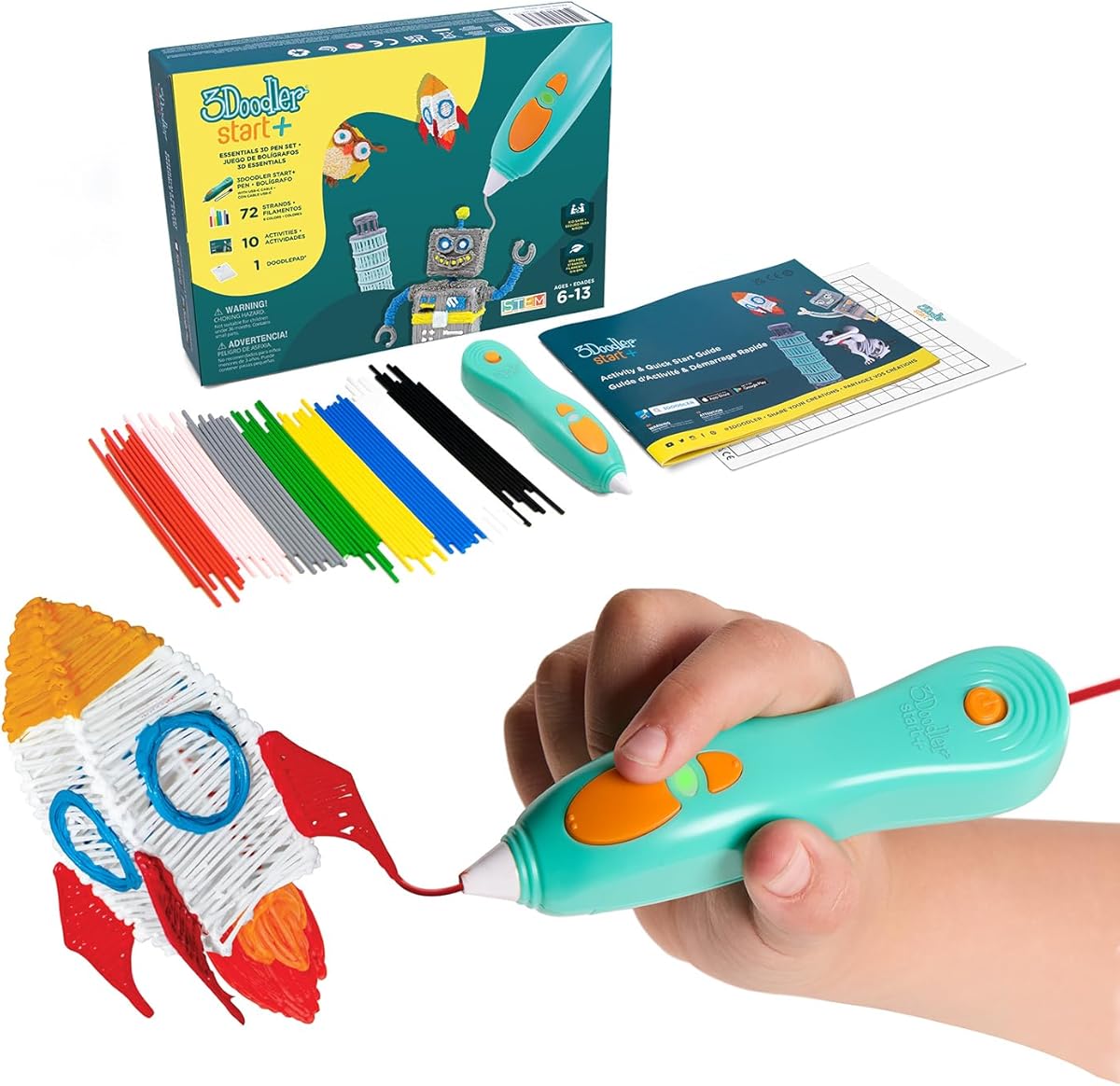
The 3Doodler Start+ Essentials set earns our Editor's Choice award for its unmatched safety profile and educational focus. With a rating of 4.4, this pen eliminates burn risks entirely by using low-temperature extrusion technology safe for direct touching.
We may earn a commission when you buy through this link, at no additional cost to you.
Key strengths include the inclusion of 72 mixed-color strands, a DoodlePad, and ten stencils to jumpstart creativity immediately. The upgraded charging speed and sleep-by mode make it convenient for sustained creative sessions without frequent plug-in interruptions.
While the pen is expensive and uses proprietary filaments, the safety features justify the cost for parents worried about heat. The trade-off ensures children can explore 3D art independently under supervision without immediate adult intervention for temperature checks.
This pen is ideal for children aged six and up who are new to 3D drawing. It provides a secure foundation for learning STEM concepts through tactile play while minimizing parental anxiety regarding hot surfaces and burn hazards.
The nozzle and plastic are touch-safe with no hot parts, allowing kids to handle the pen immediately after use.
Ten new stencils and a 50% increase in filament strands ensure hours of unblocked creative play.
We may earn a commission when you buy through this link, at no additional cost to you.
The SCRIB3D P1 offers exceptional value as a budget-friendly option without sacrificing core functionality. Its 4.4 rating reflects reliable performance for beginners who need a straightforward tool to start their 3D printing journey effectively.
We may earn a commission when you buy through this link, at no additional cost to you.
This model features a visible display and a stepless speed slider that allows precise control over material flow. The ability to switch between PLA and ABS filaments provides flexibility as skills grow beyond basic projects into more complex designs.
The warm-up time of two to three minutes is a minor inconvenience compared to its price benefits. Users trade some immediacy for significant savings, making it accessible for families testing interest in 3D drawing before investing in expensive kits.
Best for cost-conscious buyers, this pen works well for older children and adults seeking a practical tool. The included power adapter and guide ensure you can start creating almost immediately after opening the package without needing extra accessories.
Adjustable temperature settings accommodate both PLA and ABS filaments expanding your material options significantly.
The stepless speed slider allows optimal adjustment for intricate work or faster infill tasks seamlessly.
We may earn a commission when you buy through this link, at no additional cost to you.
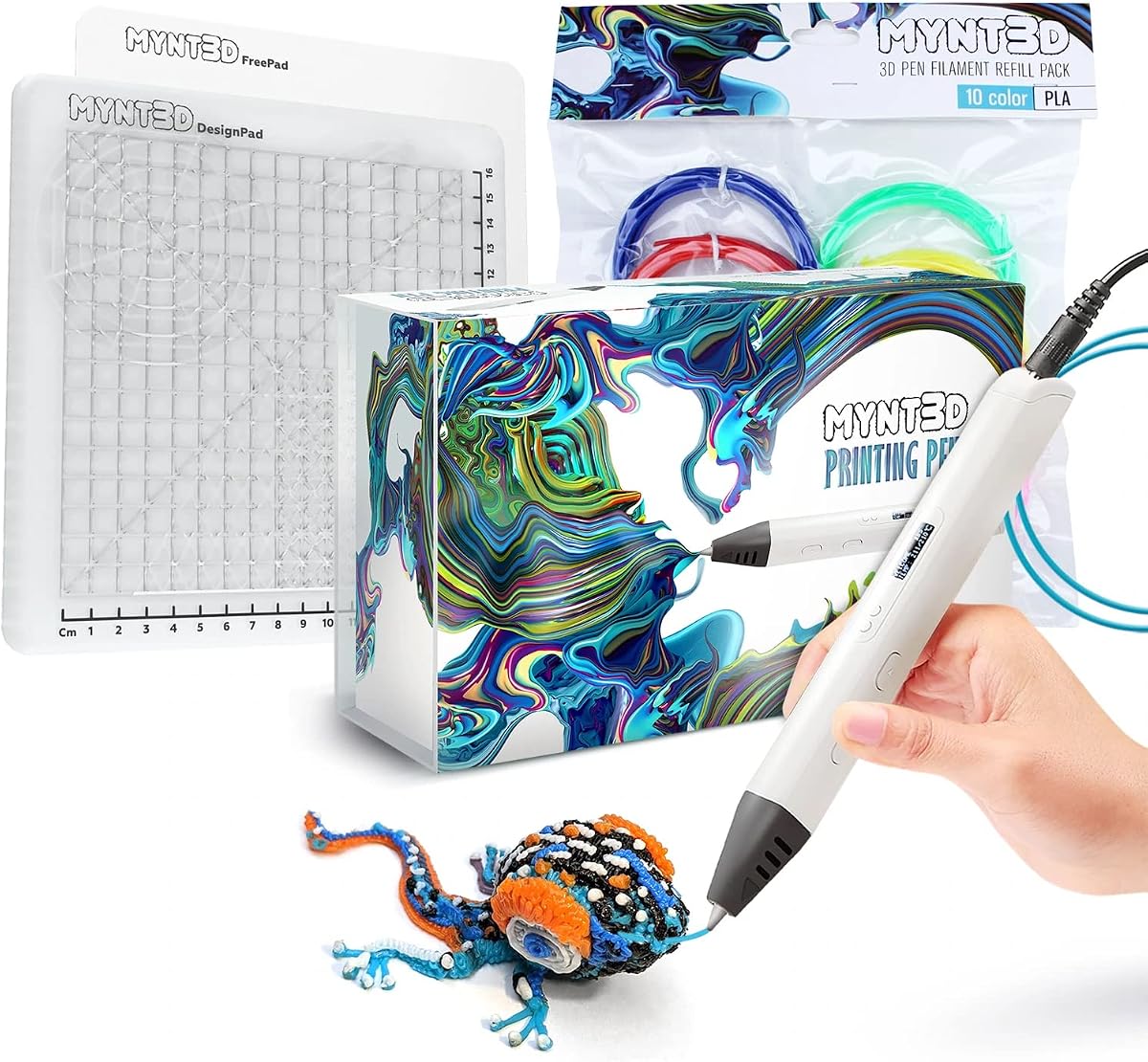
The MYNT3D Pro kit stands out as our Best Premium choice with the highest 4.5 rating among all options reviewed. It delivers professional-grade features like a replaceable sealed nozzle that ensures consistent performance over many years of creative use.
We may earn a commission when you buy through this link, at no additional cost to you.
Key features include the DesignPad mat which helps create perfect geometric shapes and precise traces. The inclusion of ten colors allows for complex multi-colored projects right out of the box without needing additional purchases immediately.
While the price is high, the durability and included accessories justify the investment for serious creators. The unlimited customer service access provides peace of mind for troubleshooting technical issues that may arise during complex design attempts.
This kit is ideal for older kids and adults who want precision and reliability. It supports advanced projects beyond simple doodles, encouraging intricate design work and technical skill development through its high-quality engineering and included mats.
The DesignPad mat features channels for creating geometric shapes with consistent alignment and precision.
Replaceable sealed nozzle design ensures clog-free operation and extended lifespan for long-term creative use.
We may earn a commission when you buy through this link, at no additional cost to you.
The MYNT3D Professional pen is a strong contender for those prioritizing control through its OLED display. With a 4.4 rating, this model allows users to monitor temperature in real-time ensuring optimal flow for various creative applications consistently.
We may earn a commission when you buy through this link, at no additional cost to you.
The standout feature is temperature adjustability in 1-degree increments from 140 to 230 degrees Celsius. This precision allows fine-tuning for different filament types and environmental conditions making it suitable for varied experimental projects.
A trade-off is the smaller accessory package compared to newer bundles. You get fewer colors and mats, so users might need to buy additional supplies separately to achieve the same scope of creativity as premium kits.
Best for technical enthusiasts, this pen offers professional-level control. It is perfect for those who want to experiment with temperature variables and need exact monitoring capabilities without relying on automatic presets or fixed settings.
The large OLED display lets you monitor material temperature accurately to achieve a wide variety of effects.
Adjustable feed regulation gives optimal control over material while drawing to avoid waste or clogs.
We may earn a commission when you buy through this link, at no additional cost to you.
The MYNT3D Super 3D Pen focuses heavily on durability and clog prevention with its ultrasonic sealed nozzle. Its 4.3 rating indicates consistent reliability for users who need a sturdy tool that can handle regular use over time.
We may earn a commission when you buy through this link, at no additional cost to you.
The sealed nozzle technology provides market-leading durability by preventing the common issue of clogged tips. This feature is particularly valuable for children who might accidentally leave the pen plugged in or mishandle the tip during active play.
While it lacks a temperature display, it still offers stepless speed control for material regulation. The trade-off of missing visual feedback is balanced by the physical reliability and robustness of the pen itself for daily creative sessions.
This pen is ideal for households where durability is a primary concern. It works well for kids who might be rough with tools or for artists who require consistent extrusion without frequent maintenance or cleaning interruptions.
The ultrasonic sealed nozzle is nearly clog-proof providing market-leading durability for extended use.
Compatible with 1.75mm ABS and PLA filaments ensuring flexibility for different project requirements.
We may earn a commission when you buy through this link, at no additional cost to you.
The SCRIB3D Advanced 3D Printing Pen brings a step up in control with its large LCD screen for heat monitoring. With a 4.3 rating, it provides an excellent balance between comfort and precision for users ready to move beyond basic drawing.
We may earn a commission when you buy through this link, at no additional cost to you.
The soft touch ergonomic surface is designed for optimal comfort during extended doodling sessions. Combined with eight speed options, it allows precise control over line thickness which is crucial for detailed designs or small structures.
While it lacks some automated safety features like sleep modes, the ergonomic design compensates for user fatigue. The trade-off is manageable for those who prefer manual control over automatic settings to maintain consistency in their workflow.
Best for intermediate users seeking detail, this pen supports accurate models and structures. It is a practical choice for kids aged ten and up who need the extra control to execute complex designs with high precision and stability.
The soft touch surface and curvature fit your hand for the most comfortable 3D drawing experience.
Eight speed options let you regulate flow for optimal control of line thickness while creating.
We may earn a commission when you buy through this link, at no additional cost to you.
This bundle combines the reliable Super pen with extensive accessories like ten color refills and a DesignPad mat. It carries a 4.4 rating reflecting strong satisfaction from users who appreciate the all-in-one nature of the package.
We may earn a commission when you buy through this link, at no additional cost to you.
The kit includes both a DesignPad for geometric shapes and a FreePad for tracing favorite patterns. This versatility supports a wide range of creative styles from structured architecture to free-form art without needing extra purchases.
The learning curve is steeper due to the number of accessories and settings. Beginners might feel overwhelmed, but those with some experience will find the variety of options encourages exploration and rapid skill development without delays.
Ideal for gift-giving, this bundle offers high value. It is perfect for families ready to commit to 3D printing as a hobby, providing the tools and materials needed to start creating immediately upon opening the box.
Includes DesignPad for shapes and FreePad for tracing supporting diverse artistic styles easily.
Everything you need to create like a pro with refills and mats ready out of the box.
We may earn a commission when you buy through this link, at no additional cost to you.
The 3Doodler Flow is designed for teens and adults who need a more robust tool for various projects. With a 4.1 rating, it emphasizes practical utility and portability for users who want to create on the go effectively.
We may earn a commission when you buy through this link, at no additional cost to you.
Its integrated LCD provides real-time temperature monitoring to ensure smooth 3D printing. Compatible with 1.75 plastic filaments such as PLA and ABS and wood, it offers broad material options for advanced home repairs or detailed craft work.
The lightweight design makes it easy to carry anywhere. This portability trades some ruggedness for convenience, making it suitable for casual users who want a reliable tool without the bulk of heavier professional printers.
Best for teenagers and adults, this pen serves as both a creative tool and a practical repair device. It is ideal for those who need a compact pen for home DIY projects or school presentations with minimal setup time.
The pen is compact and lightweight so you can take your Flow on-the-go for immediate projects.
Compatible with 1.75mm filaments including wood and ABS for versatile project creation.
We may earn a commission when you buy through this link, at no additional cost to you.
This bundle adds a practical silicone mat to the P1 pen, creating a complete creative workspace. While specific ratings are currently unavailable, the mat design offers significant value for beginners learning to trace and practice consistently.
We may earn a commission when you buy through this link, at no additional cost to you.
The mat features built-in shapes and patterns to guide designs. It is heat-resistant and reusable, meaning you can wipe it clean after messy projects and keep using it without wearing out quickly during heavy creative sessions.
The flexibility of the mat helps prevent slipping and provides a smooth surface for tracing. While the bundle costs more than the standalone pen, the added accessory extends the usable life of your creative setup significantly.
Ideal for structured learning, this bundle supports consistent 3D pen work. It is perfect for beginners who need visual guides to improve accuracy and build confidence before moving to freehand drawing entirely.
Built-in shapes and patterns guide designs and support more consistent 3D pen work for beginners.
The mat is easy to wipe clean and built to handle repeated use during drawing and tracing sessions.
We may earn a commission when you buy through this link, at no additional cost to you.
This bundle extends the popular Start+ pen with massive filament refills totaling over 1250 feet. While no ratings are available yet, the sheer volume of plastic supports years of creative play without needing frequent additional purchases.
We may earn a commission when you buy through this link, at no additional cost to you.
The set includes the DoodlePad mat and ten stencils to maximize the creative possibilities immediately. Combined with the safety features of the Start+ pen, it ensures a secure environment for kids to explore 3D design independently.
The high upfront cost is justified by the long-term savings on refills. While it requires a larger initial investment, it removes the need to constantly buy small packs which can be costly over time for avid users.
Best for committed households, this bundle offers unmatched longevity. It is perfect for families who want a complete set that lasts through multiple creative phases without interruptions for running out of materials or accessories.
Over 1250 ft. of additional plastic filament in this bundle for more 3D doodling fun.
Compatible with the free 3Doodler app which provides stencils templates and step-by-step instructions.
We may earn a commission when you buy through this link, at no additional cost to you.
Selecting the right 3D pen involves balancing safety, ease of use, and the creative potential it offers. This guide breaks down the essential factors to consider before making a purchase.
The most critical factor for kids is safety. Look for pens that are rated as low-temperature or have no hot parts to prevent burns. Models like the 3Doodler Start+ are designed specifically for this with touch-safe nozzles.
Safety should always be your first priority. Choose a pen that minimizes burn risks so children can focus on creativity without constant supervision or accidents during play.
Pens come with proprietary or standard filaments. Some models like the 3Doodler Start+ use specific plastic that is safer but restricts you to buying branded refills. Others support standard 1.75mm PLA or ABS.
Check if the pen uses proprietary or standard filaments. Standard options offer more flexibility while proprietary ones often ensure safer materials for younger children.
Beginner-friendly pens often feature automatic loading, simple speed control, and clear instructions. Models with LCD or OLED displays can help monitor temperature but add complexity for younger users.
Opt for simple controls and clear indicators if the child is new to 3D printing. Features like auto-feed buttons make the learning curve much smoother.
A good bundle includes stencils, mats, and starter filament. Accessories like DesignPads or DoodlePads provide a better surface for drawing and reduce the need to buy extra supplies immediately.
Look for bundles that include mats and stencils. These tools enhance the creative process and keep young hands occupied longer with structured activities.
Adjustable speed is crucial for precision. Stepless sliders allow for smooth transitions between slow and fast flows, while fixed options limit what the child can create.
Choose a pen with adjustable speed control to allow for both quick projects and detailed work. This flexibility helps children grow their skills over time.
Most quality pens come with a 1-year warranty. Customer service access can be vital if you encounter clogs or technical issues during the learning process.
Check for warranty coverage and support access. Reliable customer service ensures you can get help quickly if the pen stops working or malfunctions.
Kids may not always be gentle with tools. Pens with sealed nozzles or robust bodies are less likely to clog or break under stress.
Prioritize durable designs with sealed nozzles or strong build quality. A pen that withstands drops and heavy use saves money in the long run.
Budget models offer great entry points but may lack features like displays or mats. Premium bundles cost more but include enough filament and tools for extensive use.
Compare the price against what is included in the box. A higher upfront cost might be worth it if it includes a year's worth of filament and accessories.
To start, plug in the pen and wait for it to warm up. Indicators like lights or screens will show when the nozzle is ready. Do not touch the nozzle until the indicator confirms it has cooled down.
Insert the filament from the back of the pen and press the forward button until plastic extrudes. Adjust the speed slider if available to match your project needs. Always keep the pen on a safe stand when not in use.
Care for your pen by unplugging it after every session. Wipe the nozzle with a soft cloth if needed and store it in a dry place. Regular cleaning prevents clogs and ensures consistent performance for the next creative session.
Yes, many pens like the 3Doodler Start+ are designed specifically for kids with no hot parts. However, always supervise usage and check temperature settings before letting children use the device independently.
Most pens are recommended for children aged six and older. Younger children may lack the motor skills to control the pen safely, while older kids can enjoy the complex creative potential it offers.
No special skills are needed as most pens are beginner-friendly with easy loading and intuitive controls. Instructions and guides included in the box help you get started with simple projects immediately.
Not all pens support standard filament. Some require proprietary materials for safety. Always check the product specifications to ensure the filament type matches your pen before purchasing refills.
Most pens take between two to five minutes to reach the working temperature. During this time, keep the pen on a stand away from flammable objects to ensure a safe heating process.
If the pen clogs, try using the reverse button to pull the filament back out. If that fails, wait for the pen to cool and gently clean the nozzle with a soft cloth or cleaning tool provided.
Unplug the pen and let it cool completely before cleaning. Use a soft cloth to wipe the exterior and nozzle. Avoid using water or harsh chemicals that could damage the electrical components.
Yes, several brands offer free apps like the 3Doodler app. These provide templates and tutorials that guide you through specific designs and techniques for a more structured learning experience.
We recommend the 3Doodler Start+ Essentials for its unmatched safety and educational features. It offers a secure entry point for children aged six and up while encouraging creative thinking through tactile play.
For budget-conscious families, the SCRIB3D P1 delivers excellent value without compromising on core functionality. It is a solid choice for those who want a reliable tool that supports growth and skill development over time.
Always verify current pricing and availability before purchasing as these details change frequently. The right pen depends on your child's age and your specific safety needs, so review the options carefully.