
HP OfficeJet Pro 8125
3.9Editor score
Fast color printing speeds
Dual band Wi-Fi connectivity
HP AI formatting optimization
This guide compares the top ten AI printers for home and office use, evaluating speed, quality, and smart features to help you choose the right model.
AI printers are transforming how we handle daily document tasks by integrating smart features that streamline printing scanning and copying for modern users everywhere.
We evaluated these models based on performance, connectivity, smart AI capabilities, and user feedback to ensure you find a reliable device that fits your specific needs.
Each pick highlights key strengths and ideal use cases so you can make an informed decision quickly since prices and availability change often on major online marketplaces.
3.9Editor score

4.7Editor score

4.2Editor score
The following table provides a quick side-by-side look at the core specifications and capabilities of each printer to help you narrow down your options efficiently.



The HP OfficeJet Pro 8125 is a versatile all-in-one printer designed for home offices that need reliable performance without breaking the bank. With a rating of 3.9 stars it stands out for its ability to handle professional documents with efficiency and ease of use. The standout qualities include its AI capability which optimizes print formatting to ensure web pages and emails print precisely as intended without wasting paper.
We may earn a commission when you buy through this link, at no additional cost to you.
Key strengths of this device include its fast color printing which reaches up to 20 pages per minute for black documents and 10 for color. The dual band Wi-Fi ensures stable connections while the large 2.7 inch touchscreen provides a phone-like interface for simple navigation. The included three month trial of Instant Ink helps manage supply costs effectively for the initial period of use.
However there are trade-offs such as the strict requirement for original HP chips which may limit cartridge options for some users. Additionally the color print speed is slower than the black speed which might impact heavy photo printing needs. These compromises are acceptable given the affordable price point and the convenience of smart features like HP AI that reduce formatting errors.
This printer is ideal for home office workers who need to print reports and flyers regularly without investing in expensive hardware. Its secure features like HP Wolf Essential Security add peace of mind against cyber threats. We recommend the 8125 for anyone seeking a balanced mix of performance and smart efficiency at a budget-friendly price.
HP AI easily removes unwanted content from web pages and emails so your prints are just the way you want without wasted pages.
Stay connected with reliable dual band Wi-Fi that automatically detects and resolves connection issues for seamless wireless printing.
We may earn a commission when you buy through this link, at no additional cost to you.
The HP Smart Tank 5003 is an excellent choice for users who want to avoid the high costs of traditional cartridges. With a rating of 4.1 stars it offers reliable printing with up to three years of ink included right out of the box. This model emphasizes savings and convenience making it perfect for home users who print frequently and want to minimize maintenance.
We may earn a commission when you buy through this link, at no additional cost to you.
Its key strengths lie in the mess-free refill system where you simply plug ink bottles into the tank and let them drain without squeezing or spilling. The device supports wireless printing and scanning allowing for easy mobile access. It also produces borderless prints and rich colors ensuring quality output for everyday documents and photos without extra effort.
On the downside this printer lacks a fax function and does not have the same high speed as professional models. It is designed for home use rather than heavy office environments so speed is secondary to cost efficiency. However for most household needs the convenience of long-term ink supply outweighs these limitations effectively.
This printer is best for home users who prioritize low operating costs over high-speed performance. If you want to set up your printer once and print with confidence for years without frequent refills this is a great option. We recommend the 5003 for anyone looking to eliminate cartridge hassle and save money on ink in the long run.
Get up to three years of HP ink included in the box for low cost high volume printing without frequent cartridge replacements.
Replenish ink with an easy-access mess-free system that lets you plug bottles into the tank and let them drain effortlessly.
We may earn a commission when you buy through this link, at no additional cost to you.
The Bambu Lab P2S Combo is a powerful 3D printer that brings professional-grade capabilities to makers and hobbyists alike. With a high rating of 4.7 stars it is renowned for its speed and precision which are enhanced by advanced AI features. This product is unique in this roundup as it focuses on 3D printing rather than traditional document output offering limitless creativity.
We may earn a commission when you buy through this link, at no additional cost to you.
Its standout strengths include the ability to print at speeds up to 600 millimeters per second while maintaining exceptional accuracy through active flowrate compensation. The AI failure detection system ensures that prints succeed by monitoring the process closely. The AMS 2 Pro system enables seamless multi-color printing which expands design possibilities significantly for complex projects.
While this printer offers incredible capabilities it does come with a higher upfront cost compared to standard inkjet printers. It is also specialized for 3D tasks so it may not suit general document printing needs. These trade-offs are acceptable for those seeking to create physical prototypes or artistic pieces with high speed and reliability.
This printer is ideal for engineers designers and hobbyists who need a reliable machine for prototyping and creative projects. The easy setup in fifteen minutes and smart air flow system make it accessible even for beginners. We recommend the P2S Combo for anyone ready to dive into advanced 3D printing with minimal learning curve.
Print up to 600 mm/s while maintaining exceptional accuracy with servo extruders that ensure every layer stays sharp and smooth.
Use AI to detect issues early and avoid failed prints ensuring professional results even for beginners starting their 3D journey.
We may earn a commission when you buy through this link, at no additional cost to you.
The HP Envy 6155 is tailored for home users who want vibrant color prints and reliable performance for everyday documents. It holds a rating of 4.2 stars and distinguishes itself with True-to-Screen technology that ensures photos and docs look as they do on your monitor. This model is compact and stylish fitting well in residential spaces.
We may earn a commission when you buy through this link, at no additional cost to you.
Key strengths include the intuitive 2.4 inch touchscreen and dual band Wi-Fi that maintains a stable connection for wireless tasks. The HP AI tool optimizes formatting to reduce waste while Instant Ink support helps manage supply costs. Additionally it is built with at least 60 percent recycled plastic supporting sustainability goals without compromising quality.
While it is not as fast as office-grade models it performs well for standard home tasks like homework and casual photos. The input tray is smaller which means frequent refills for large jobs. These limitations are minor for typical home usage where print quality and ease of use take precedence over raw speed.
This printer is perfect for families and home users who value color accuracy and eco-friendly design. It handles homework and photos with flair while staying easy to navigate via the touch screen. We recommend the 6155 for anyone needing a compact and colorful printing solution that integrates smoothly into home life.
Print documents and photos that look as vibrant as they do on your screen with HP's P3 color technology.
Made with at least 60 percent recycled plastic content reducing environmental impact while maintaining durability and quality.
We may earn a commission when you buy through this link, at no additional cost to you.
The HP OfficeJet Pro 9135 is designed for small offices that need high performance and robust connectivity for demanding tasks. With a rating of 4.0 stars it delivers fast printing speeds and professional quality for brochures and presentations. Its comprehensive feature set includes faxing and large paper handling to meet busy workflows.
We may earn a commission when you buy through this link, at no additional cost to you.
Its key strengths include a speed of up to 25 pages per minute for black text and 20 for color making it one of the faster models in this guide. The dual 250 sheet trays reduce downtime and the 4.3 inch touchscreen simplifies navigation. HP Wolf Pro Security ensures that your data remains protected during network printing.
The trade-offs include the requirement for original HP chips which may limit cartridge choices and a higher initial cost. However these are justified for business environments where efficiency and security are paramount. The included Instant Ink trial offers immediate savings while setting up operations smoothly for teams.
This printer is ideal for small businesses and workgroups needing speed and reliability without constant interruptions. It handles high volumes well and secures data effectively with advanced protection. We recommend the 9135 for anyone needing a dependable office workhorse that balances speed with security features.
Print up to 25 ppm black and 20 ppm color for professional quality documents that keep your office moving efficiently.
Protect your data with HP Wolf Pro Security which bolsters security and helps keep your network safe from cyber threats.
We may earn a commission when you buy through this link, at no additional cost to you.
The HP Smart Tank 7603 is built for home offices that require high volume printing without frequent maintenance interruptions. With a rating of 3.9 stars it offers up to three years of ink included in the box which is a major plus for cost-conscious users. It supports faxing and scanning providing a complete suite of office functions in one device.
We may earn a commission when you buy through this link, at no additional cost to you.
Key strengths include the ability to print up to 8000 color pages right out of the box and a mess-free refill system that simplifies ink management. The magic touch control panel ensures easy operation while wireless features keep you connected. This model is designed to be the last printer you need for a long time.
While it is effective for high volume it can be bulkier than standard printers and still uses proprietary chips. However for home offices needing both fax and print capabilities without cartridge costs these are minor inconveniences. The value of long term ink savings makes it a compelling choice for steady workloads.
This printer is ideal for home professionals who need reliable fax and print services without buying separate machines. It saves money on ink over time and handles heavy workloads efficiently. We recommend the 7603 for anyone wanting a versatile and economical printing station for daily office tasks.
Get up to 8000 color pages right out of the box for low cost high volume printing without frequent interruptions.
Print copy scan and fax in one device eliminating the need for separate machines to handle diverse office tasks.
We may earn a commission when you buy through this link, at no additional cost to you.
The HP OfficeJet Pro 8139 is a solid option for home offices that value extended support and convenience. With a rating of 4.0 stars it offers a one year trial of Instant Ink which is longer than most standard three month trials. This extended support helps keep costs low while you set up your workflows.
We may earn a commission when you buy through this link, at no additional cost to you.
Key strengths include printing speeds of up to 20 ppm for black and 10 for color along with fax and ADF capabilities. The 2.7 inch touchscreen and dual band Wi-Fi ensure easy navigation and connection. HP AI optimizes formatting so you get precise prints without wasted pages or awkward layouts.
While it uses proprietary chips and has average speeds compared to faster models it excels in convenience and support duration. These trade-offs are acceptable given the long-term ink savings. The included trial period offers peace of mind for new users transitioning to smart printing solutions.
This printer is ideal for home office users who want to avoid running out of ink during the critical first year. It balances speed and features well for general business documents. We recommend the 8139 for anyone needing reliable fax and print capabilities with extra supply support.
Get one year of Instant Ink trial included in the box to save up to 50 percent on ink without interruption.
Print professional-quality color documents like business reports and flyers with speed and precision suited for home offices.
We may earn a commission when you buy through this link, at no additional cost to you.
The HP Smart Tank 7603 D34 variant offers similar robust features for home offices needing volume and fax capabilities. With a rating of 4.0 stars it includes up to three years of ink included making it economical for long-term use. It handles faxing and scanning alongside printing to meet diverse daily needs.
We may earn a commission when you buy through this link, at no additional cost to you.
Its key strengths include a capacity of up to 8000 color pages and a mess-free refill system that avoids spills. The magic touch control panel simplifies navigation while borderless printing adds flair to photos. This model is built to be durable and reliable for steady workloads.
While it is larger than basic printers and uses proprietary chips it saves significant money on ink over time. These are acceptable trade-offs for users prioritizing volume and fax support. The device ensures you spend less on supplies and more on work productivity.
This printer is ideal for home professionals who need fax and print services without separate machines. It saves money on ink and handles heavy workloads efficiently. We recommend this variant for anyone wanting a versatile and economical printing station for daily office tasks.
Replenish ink with an easy-access system that lets you plug bottles into the tank and let them drain.
Create borderless prints and mobile wireless printing options to enhance your creative documents effortlessly.
We may earn a commission when you buy through this link, at no additional cost to you.
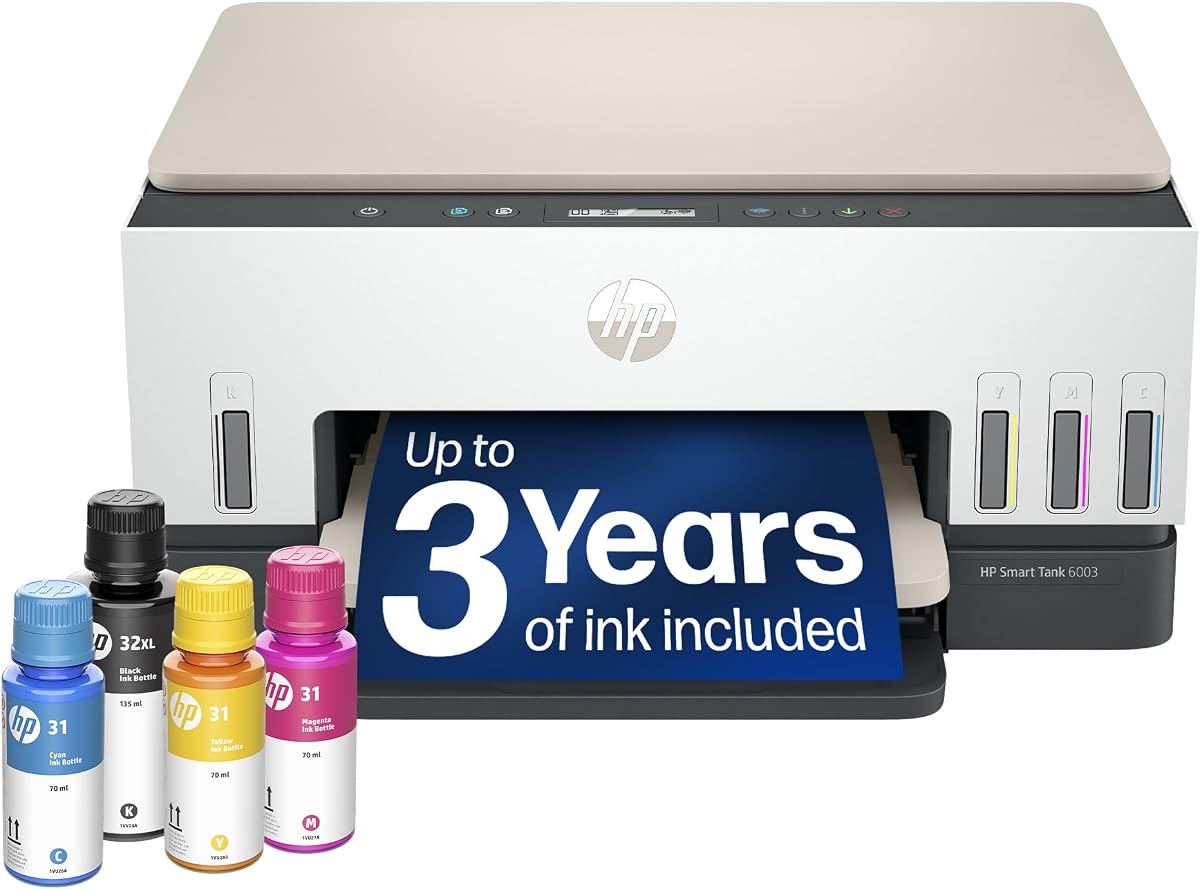
The HP Smart Tank 6003 is a great entry level model for home users who want low maintenance and cost savings. With a rating of 3.8 stars it includes up to three years of ink and supports cartridge-free refill. This simplifies daily tasks while ensuring vibrant output for photos and documents.
We may earn a commission when you buy through this link, at no additional cost to you.
Key strengths include a capacity of up to 8000 color pages and borderless printing for professional photos. The wireless features allow easy mobile printing and the refill system prevents messes. This device focuses on simplicity making it accessible for all household members without technical knowledge.
While it lacks fax capabilities and is slower than professional models it offers excellent value for casual printing needs. These limitations are minor for users not needing fax. The low maintenance design ensures you spend less time refilling and more time creating.
This printer is ideal for families and casual users who prioritize cost and simplicity over advanced features. It saves money and offers vibrant prints for photos and homework. We recommend the 6003 for anyone seeking a reliable and economical home printer.
Get up to three years of HP ink included in the box for low cost high volume printing without frequent cartridge replacements.
Create borderless prints and mobile wireless printing options to enhance your creative documents effortlessly.
We may earn a commission when you buy through this link, at no additional cost to you.
The Liene PixCut S1 is a unique device designed for DIY creators who want to make custom stickers and labels. With a rating of 4.2 stars it integrates photo printing and precise die cutting into one seamless workflow. This tool is perfect for crafters looking to bring their ideas to life without complex machinery.
We may earn a commission when you buy through this link, at no additional cost to you.
Its standout strengths include the AI image extraction feature that automatically recognizes and extracts subjects from your photos. The high-precision cutting system follows every edge with pinpoint accuracy ensuring flawless results. The thermal dye-sublimation technology delivers vibrant true-to-life colors with 16.7 million options for rich visual output.
While it is specialized for stickers and labels it offers no subscription fees and includes thousands of free templates. The only downside is the need for app control and specialized paper but the quality makes it worthwhile. This device is built to be durable and waterproof making your creations last longer.
This printer is ideal for crafters and small business owners selling custom designs. It simplifies the creation process and ensures professional quality. We recommend the S1 for anyone wanting to make durable custom stickers and gifts with ease.
Unleash your creativity with the AI image extraction feature that automatically recognizes and extracts subjects from your photos.
Create waterproof and scratch-resistant stickers thanks to the four-layer thermal dye-sublimation technology that automatically laminates during printing.
We may earn a commission when you buy through this link, at no additional cost to you.
Choosing the right AI printer depends on several key factors that impact performance and usability in your specific environment.
When evaluating an AI printer consider how quickly it produces documents and whether it can handle your expected volume. For home offices speeds of around 20 ppm may suffice while businesses often require higher rates to avoid bottlenecks. High volume usage also points to tank models which reduce maintenance interruptions significantly.
Look for models that balance speed with quality so you do not sacrifice resolution for faster output times.
Modern AI printers come with smart features like auto layout correction and image extraction to save time. These tools ensure that web pages and emails print correctly without awkward layouts or wasted pages. Advanced models may also offer failure detection for 3D printing or smart auto-cutting for craft projects.
Prioritize printers that use AI to simplify your workflow rather than just as a marketing buzzword.
Operating costs are a major consideration when buying a printer so check the ink supply method and expected lifespan. Tank systems generally offer lower costs per page but require more space and upfront investment. Subscriptions or Instant Ink trials can help manage costs but be aware of long term fees after trials end.
Calculate the total cost of ownership including ink and maintenance before making your purchase.
Ensure the printer supports the connectivity options you need such as Wi-Fi Ethernet or Bluetooth. Look for features like dual band Wi-Fi for stable connections and mobile apps for easy printing from smartphones. Integration with cloud services or specific ecosystems can also streamline your daily workflow effectively.
Choose a model that connects seamlessly with your existing devices to avoid frustration during setup.
Check the input tray capacity and whether the printer supports specific paper sizes or types. Large trays reduce the frequency of refills which is crucial for high volume users. If you need to print on different media such as labels or thick cardstock ensure the machine supports those formats.
Adequate paper handling ensures uninterrupted printing and flexibility for different document types.
For business or sensitive data security features are essential to protect against unauthorized access and threats. Look for printers with built-in security protocols that encrypt data during transmission and storage. These features safeguard your information from cyber threats ensuring that your network remains protected while printing.
Prioritize security features if you handle confidential documents to prevent data breaches effectively.
Consider the physical footprint of the printer to ensure it fits comfortably on your desk or designated space. Larger models may offer more features but can consume valuable room in smaller environments. Measure your available space carefully before purchasing to avoid cluttering your workspace with a bulky device.
Choose a size that balances functionality with space efficiency to maintain an organized area.
Start by setting up your printer according to the instructions which often includes connecting to Wi-Fi and installing the companion app. This ensures all smart features work correctly and you can manage tasks remotely. Once connected check the settings to optimize for your typical document types and frequency.
Regular maintenance involves cleaning the printheads and ensuring the ink levels are monitored to avoid clogs or dry-outs. For tank models refill ink carefully to prevent spills and ensure the bottles are secure before use. Periodic firmware updates from the manufacturer will keep the AI features running smoothly and securely.
For best results print a test page after installing new ink or moving the printer to ensure alignment. If you use specialized paper types adjust the settings to match so quality remains high. Proper care extends the life of your printer and ensures consistent performance for all your printing needs.
An AI printer uses artificial intelligence to optimize tasks like formatting and layout to save paper. These models analyze documents before printing to remove unwanted content and improve quality automatically. This technology helps users reduce errors and improve efficiency without manual intervention.
While HP is a major provider AI features are increasingly found in various brands like Liene and Bambu Lab. These other brands use AI for specialized tasks like image extraction or failure detection. Always check the product details to confirm what smart features are included.
Tank printers use refillable ink tanks instead of expensive cartridges reducing cost per page significantly. They often come with enough ink for years so you pay less over time. This system is ideal for high volume users who want to minimize recurring supply costs.
Most HP printers are designed to work only with original chips so non-HP ink may be blocked. This ensures quality but limits options for cheaper alternatives. Check specific model policies if you plan to use third party supplies effectively.
Yes most modern AI printers support AirPrint and dedicated apps for Apple devices. This allows seamless wireless printing from Mac and iPhone without complex setups. Check compatibility lists before buying to ensure it fits your ecosystem.
Instant Ink is a subscription service that delivers ink to you before you run out automatically. It helps manage supply costs and prevents downtime. Trials are often included with new printers but you cancel or renew after the trial ends.
We have reviewed ten top AI printers ranging from budget home options to premium 3D solutions. Each offers unique strengths tailored to different needs whether it is high volume office work or creative crafting.
Prioritize what matters most to you such as speed ink costs or smart features before making a final decision. Choosing the right model ensures you maximize productivity and minimize long term costs effectively.
Remember that prices and availability can change so verify current details before purchasing. We hope this guide helps you find the perfect AI printer for your needs.