
Sound Blaster Play! 3
4.5Editor score
24-bit 96kHz resolution
Plug and play setup
Compatible with all headsets
This guide compares ten top audio converters for Mac, covering DACs, capture cards, and interfaces to help you find the right digital audio solution.
Finding the right audio converter for your Mac can transform your listening experience significantly. Whether you need to digitize old tapes or connect high-end headphones, the right hardware ensures clarity and fidelity. This guide explores the best options available today for seamless integration.
We compared these products based on compatibility, sound quality, build durability, and user feedback from verified buyers. Our team analyzed technical specifications like sample rates, bit depth, and connectivity options to ensure each pick meets professional standards for Mac users seeking reliable performance.
Each pick highlights key features, pros, and cons to help you decide quickly. Note that prices and availability change frequently, so always check the latest listing before purchasing. We aim to provide honest insights so you can invest confidently in your audio setup.
4.5Editor score

4.3Editor score

4.5Editor score
The following table provides a side-by-side comparison of all ten products to help you evaluate key specifications and features at a glance.
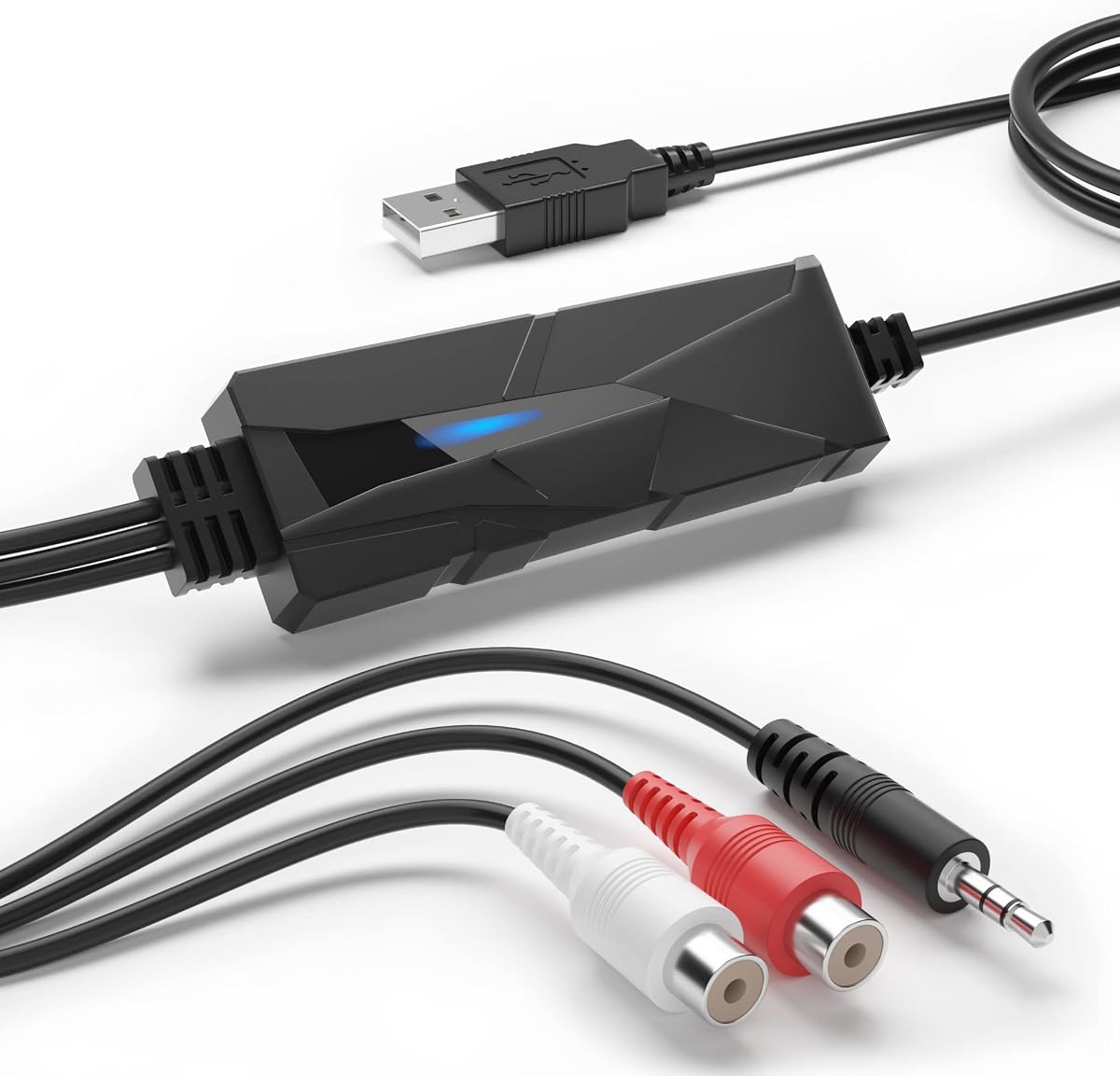


The DriverGenius AudioXfer is a dedicated USB audio capture card designed to help Mac users preserve old analog memories. It scores a 4.2 rating from users who appreciate its straightforward approach to digitizing cassette tapes and vinyl records. This device acts as a bridge between legacy analog gear and modern digital storage, allowing you to save precious audio clips.
We may earn a commission when you buy through this link, at no additional cost to you.
Its standout quality lies in its ability to convert analog signals into digital formats like MP3 and WAV effortlessly. The unit features both 3.5mm and RCA connectors, making it compatible with a wide range of source devices such as boomboxes and turntables. It also comes with software options that facilitate editing and saving your recordings on your Mac.
One trade-off is the reliance on external software adjustments for Mac users, specifically requiring specific Audacity versions for optimal performance. While the sound quality is functional, it may not satisfy audiophiles seeking high-fidelity conversion. However, for preserving memories, the price point and simplicity make these limitations acceptable for most casual users.
If you need to digitize old cassettes or LPs without breaking the bank, this is a strong choice. It fits well for Mac setups needing basic analog conversion. We recommend checking the latest compatibility notes before purchase to ensure smooth integration with your current OS version.
This card lets you convert old tapes and records into digital files so you can listen to them anywhere on your Mac or mobile device.
The LED indicator and plug-and-play design mean you do not need complex software installation to start recording audio immediately.
We may earn a commission when you buy through this link, at no additional cost to you.
The Fosi Audio K5 Pro stands out as a versatile Mini-to-Analog converter and headphone amplifier tailored for Mac users seeking high-quality audio. It holds a 4.3 rating thanks to its robust internal components and flexibility. This device replaces the standard audio port on your Mac with a dedicated external card, offering a cleaner signal path for headphones and speakers.
We may earn a commission when you buy through this link, at no additional cost to you.
It converts USB Type-C, Optical, and Coaxial signals into RCA or 3.5mm AUX outputs with low distortion. The Texas Instruments NE5532 op-amp chip ensures a clean sound with low noise, ideal for gaming or listening to music on your Mac. Users appreciate the physical volume and tone controls that give immediate access to adjustments.
A minor trade-off is that it is primarily a headphone and speaker driver rather than a full DAC recorder. It does not record audio, which might limit use for content creators needing capture capabilities. However, for playback enhancement, its performance and build quality make it a top contender for desktop setups.
If you want to upgrade your Mac headphone sound without complex configurations, this is the ideal pick. It works seamlessly with Mac and gaming consoles alike. Check the latest compatibility notes to ensure your specific headphones and ports align perfectly with this unit.
The NE5532 chip provides high fidelity with low noise so you hear more detail in your tracks.
Multiple inputs allow you to connect your Mac, console, or TV directly without needing extra adapters.
We may earn a commission when you buy through this link, at no additional cost to you.
The PROZOR 192KHz DAC delivers premium digital-to-analog conversion for Mac users who rely on optical audio outputs. It earns a 4.4 rating for its consistent performance and robust build quality. This device is ideal for converting digital signals from MacBooks or Apple TVs into analog signals for amplifiers or headphones.
We may earn a commission when you buy through this link, at no additional cost to you.
It supports up to 192kHz and 24bit audio, ensuring high-resolution playback for immersive listening. The aluminum alloy housing provides excellent heat dissipation and electromagnetic shielding, which keeps the audio signal pure. Gold-plated connectors ensure a secure connection that resists corrosion over time.
One limitation is that it does not include a volume knob, so volume control must be managed via the source device settings. Additionally, a specific power adapter is required for optimal performance. Despite these points, its sound clarity and durability make it a reliable choice for home cinema or desktop audio setups.
If you need a solid optical DAC for high-resolution output from your Mac, this is a strong contender. It is easy to install and works well with most digital sources. Verify power requirements before purchasing to ensure smooth operation with your existing setup.
Up to 192kHz support means you enjoy detailed sound even with high-end audio files.
The aluminum case protects internal parts from heat and interference for consistent performance.
We may earn a commission when you buy through this link, at no additional cost to you.
The Douk Audio U2PRO is a specialized USB to optical adapter that transforms USB audio into high-quality digital outputs. Rated 4.1 by users, it excels in reducing jitter and maintaining signal integrity for audiophiles using Mac. It serves as a bridge to convert USB signals into Optical, Coaxial, or I2S formats for external DACs.
We may earn a commission when you buy through this link, at no additional cost to you.
Equipped with the XMOS XU316 chip, it supports PCM up to 32bit/768kHz and DSD512, ensuring pristine lossless audio. The UAC mode switch allows plug-and-play compatibility or high-resolution support. Real-time indicators help you monitor sample rates easily, adding a layer of transparency to your audio chain.
While it delivers excellent signal quality, it may be overkill for casual listeners who do not need high-resolution formats. The compact design is great for portability but requires careful cable management to avoid stress on ports. For those seeking the highest digital clarity, these trade-offs are often worth it.
If you are an audiophile building a Mac audio system with external DACs, this is a great upgrade. It ensures your digital signal remains clean before conversion. Check your DAC compatibility before buying to ensure it supports the output formats this unit provides.
The reclocker technology ensures your digital audio arrives at the DAC without timing errors.
Support for 768kHz PCM means you can play the highest quality files without downscaling.
We may earn a commission when you buy through this link, at no additional cost to you.
The SMSL SU-1 is a dedicated DAC decoder designed for high-resolution audio enthusiasts using Mac. It holds a 4.2 rating for its ability to decode MQA formats natively, restoring studio-quality sound from digital streams. This unit focuses purely on converting digital USB input into high-quality analog output.
We may earn a commission when you buy through this link, at no additional cost to you.
It utilizes the AK4493S DAC chip which offers extremely low distortion levels, ensuring a clean signal. Support for MQA CD and DSD512 makes it a powerful tool for audiophiles who want to hear the original studio details. The USB input allows seamless connection to Mac systems running various OS versions.
One trade-off is that it may require specific drivers on certain Windows setups, though it is generally driverless on Linux and iOS. Its compact design limits expandability, meaning it works best as a standalone component. For MQA listeners, these minor setup steps are a small price for high fidelity.
If you stream MQA music or want to restore CD quality, this is a top choice for Mac. It ensures your music sounds as intended by the producers. Check your specific OS requirements to confirm driver needs before integrating it into your setup.
It decodes MQA signals to restore the original high-resolution studio audio for true listening.
The AK4493S chip ensures minimal distortion so your music remains pure and clear.
We may earn a commission when you buy through this link, at no additional cost to you.
The SMSL PO100 PRO is a compact USB digital interface that supports MQA decoding for Mac users on the go. With a high 4.6 rating, it is praised for its portability and ability to handle high-resolution formats. It serves as a digital transport, converting USB input into Optical or Coaxial digital outputs.
We may earn a commission when you buy through this link, at no additional cost to you.
It features the XMOS XU316 chip and supports PCM 32bit/768kHz and native DSD64. The device allows you to play MQA audio directly without extra software, making it a streamlined solution for streaming. Its small size fits easily in bags, making it great for travel with portable DACs.
A potential issue is that users must ensure the correct USB mode is selected before use to avoid connectivity issues. If handled roughly, the compact design might be more prone to damage than larger units. For users needing high-quality digital transport, these are minor concerns compared to its performance.
If you need a portable MQA decoder for your Mac or phone, this is an excellent option. It ensures high-quality digital transport to your DAC. Verify the mode switches match your DAC's requirements to get the best audio experience possible.
Its small size means you can easily carry it in a backpack for audio on the move.
Native MQA support allows you to stream high-quality audio without extra processing steps.
We may earn a commission when you buy through this link, at no additional cost to you.
The Sound Blaster Play! 3 is a simple USB audio adapter designed to give Mac users a reliable digital output. It holds a 4.5 rating for its ease of use and compatibility with standard headsets. This small device adds a high-quality audio port to your Mac without requiring any driver installation.
We may earn a commission when you buy through this link, at no additional cost to you.
It supports 24-bit 96kHz resolution, which is a solid standard for most listening needs. The unit is compatible with single and split stereo/mic connectors, meaning you do not need a Y-splitter. Downloadable software provides basic audio enhancements and optimized profiles for different earphone brands.
While it offers excellent value, it lacks advanced features like optical input or separate line-out ports. The sound profile is functional but might not satisfy audiophiles looking for critical listening. However, for casual listening or travel, its simplicity and affordability are unmatched in the market.
If you want a straightforward audio fix for your Mac, this is the top budget pick. It is perfect for students or travelers needing reliable audio on the go. Check if your headsets are compatible with the splitter before buying to ensure full functionality.
It works immediately when plugged in so you do not need to install any software.
It works with almost any headphone, including mobile earbuds and studio gear.
We may earn a commission when you buy through this link, at no additional cost to you.
The iFi Audio Go Link Max is a portable headphone amplifier and DAC dongle for Mac users seeking balanced sound. It holds a 4.5 rating for its high dynamic range and compact design. This device converts USB-C signals into balanced analog outputs, delivering high-resolution audio to your headphones.
We may earn a commission when you buy through this link, at no additional cost to you.
It features dual ESS Sabre DAC chips and supports PCM 32-bit/384kHz and DSD256. The balanced 4.4mm output provides up to 241mW power, which is sufficient for many high-impedance headphones. Dynamic Range Enhancement technology ensures details are clear even at low volumes.
A trade-off is the premium price point compared to basic dongles, which may be high for casual users. The flexible cable is durable but requires careful handling to avoid stress on the USB-C socket. For users who value balanced audio, these minor issues are acceptable for the performance gained.
If you need a high-quality portable DAC for your Mac, this is a top option. It delivers studio-grade sound in a pocket-sized device. Verify your headphones have a 4.4mm or standard jack to ensure compatibility with the provided adapter.
The balanced circuit ensures noise cancellation for a cleaner signal to your headphones.
Dynamic Range Enhancement makes quiet tracks sound clear without increasing background noise.
We may earn a commission when you buy through this link, at no additional cost to you.
The Fosi Audio Q6 is a compact desktop DAC designed for Mac users needing high-resolution audio conversion. It holds a 4.6 rating for its robust performance and clean output. This unit connects to your Mac via USB-C and outputs analog signals to amplifiers or powered speakers.
We may earn a commission when you buy through this link, at no additional cost to you.
It supports PCM 32bit/768kHz and DSD512, ensuring crystal-clear audio for immersive listening. The aluminum alloy housing provides durability and heat dissipation, keeping performance stable during long sessions. Multiple inputs like Optical and Coaxial make it versatile for various sources.
One trade-off is that it does not drive headphones directly, so you need an external amp for personal listening. The setup requires proper power and cable management to avoid clutter. For desktop audiophiles, these limitations are small compared to the high-fidelity output it provides.
If you want a reliable desktop DAC for your Mac setup, this is a strong contender. It delivers high-fidelity sound without breaking the bank. Check your amplifier inputs to ensure they match the RCA outputs before connecting.
Support for 768kHz PCM means you hear the full detail in your music files.
Multiple digital inputs let you connect your Mac or TV easily without adapters.
We may earn a commission when you buy through this link, at no additional cost to you.
The Shure MVX2U Gen 2 is a premium XLR-to-USB-C interface for professional audio needs on Mac. It holds a 4.5 rating for its clean audio path and professional processing features. This device allows you to connect XLR microphones directly to your Mac for high-quality streaming or recording.
We may earn a commission when you buy through this link, at no additional cost to you.
It includes onboard DSP with Auto Level Mode and Real-Time Denoiser, ensuring consistent audio without manual tweaking. The interface provides up to +60 dB clean gain and 48V phantom power, making it suitable for any dynamic or condenser mic. It works instantly with no drivers needed.
A trade-off is that it is designed primarily for microphones and not general audio playback like DACs. The price is higher than standard USB adapters, which may not fit every budget. For podcasters or streamers, the professional features make this a worthwhile investment for clarity.
If you need to record professional audio on your Mac, this is the top choice. It streamlines your setup with reliable processing. Check your microphone type to ensure it is compatible with the XLR inputs before purchasing.
Onboard processing ensures consistent volume and clarity without complex setup steps.
It works instantly with Mac and mobile devices for zero-latency recording.
We may earn a commission when you buy through this link, at no additional cost to you.
Selecting the right audio converter for your Mac depends on your specific needs and budget. This guide outlines key factors to consider before making your purchase.
Ensure the device matches the ports available on your Mac. Look for USB-C if your Mac lacks USB-A or audio jacks. Check if you need Optical, Coaxial, or 3.5mm outputs for your existing headphones or speakers.
Verify the device supports the exact ports you need to avoid buying adapters that compromise audio quality.
For high-quality sound, look for converters supporting at least 24-bit/96kHz resolution. Audiophiles should aim for 32-bit/768kHz or DSD support for lossless audio. Higher resolution ensures your music retains its original detail and clarity.
Prioritize high-resolution specs to ensure your Mac can output the best audio quality possible.
Choose devices with metal casings like aluminum alloy for better heat dissipation and shielding. Plastic bodies may be cheaper but are prone to overheating and interference. Check connector materials to ensure gold-plated contacts for longevity.
A durable build protects your investment and ensures consistent audio performance over time.
Always verify that the converter is compatible with your Mac's current OS version. Some devices require drivers for high-res support, while others are plug-and-play. Check user reviews for notes on specific OS versions to avoid frustration.
Confirm compatibility with your current Mac OS to ensure a smooth setup process.
Some units require external power adapters, while others run solely on USB. If you need portability, choose USB-powered models. Ensure you have the right wall outlet or adapter available to power the unit correctly.
Check power needs to ensure you can use the device wherever you plan to set it up.
Look for features that reduce jitter and noise, such as high-quality DAC chips. Devices with independent op-amps provide cleaner sound than integrated circuits. This ensures your audio is converted without adding unwanted hiss or distortion.
Prioritize models with clean signal paths to maintain the integrity of your recordings.
If you plan to record audio, check if the device includes editing software or supports your preferred apps. Some capture cards bundle tools like Audacity, which simplifies digitizing analog media. Ensure software is compatible with Mac to avoid extra purchases.
Verify included software compatibility to streamline your workflow and avoid extra costs.
Determine your budget but consider long-term value over cheap upfront costs. High-end converters may cost more but offer better durability and performance. Weigh features like MQA decoding or balanced outputs against what you truly need.
Invest in a unit that offers features you will actually use to get the best value.
To begin using your audio converter, connect it to your Mac via the recommended port. Ensure any external power adapters are plugged into a stable outlet. Allow the device a few seconds to initialize before playing audio.
For optimal sound, configure your Mac's sound settings to recognize the converter as the default output. Use the provided software or control panels to adjust volume and tone. Keep connections secure to prevent signal dropouts.
To maintain performance, keep the device in a well-ventilated area to prevent overheating. Avoid placing heavy objects on cables to prevent strain on the connectors. Regularly clean the ports with a soft cloth to remove dust and debris.
Most basic converters are plug-and-play and do not require drivers. However, high-resolution units may need specific drivers. Check the product page for your OS version. Always keep your system updated for compatibility.
Most DACs are for playback only and cannot record audio. For recording, you need an audio interface or capture card. Verify if the product supports input capabilities before purchasing. Some units allow both but at a higher cost.
Balanced outputs reduce noise and interference, delivering cleaner sound to headphones. They are ideal for high-fidelity listening. Not all headphones support this, so check your gear compatibility. It adds value for critical listening setups.
Many units with USB-C inputs work with iOS devices. Some may require a camera adapter or specific power supply. Always check manufacturer notes for mobile compatibility. It is a convenient feature for portable use.
First, check if the device is set as the default output in system preferences. Verify all cables are securely connected. Restart the device and Mac if needed. Ensure you are using the correct power source for the unit.
MQA is a high-resolution audio format used by streaming services. If you use Tidal, it can enhance sound quality. For general listening, it is not essential. Prioritize it if you already subscribe to MQA services.
It is possible but may cause conflicts or latency. Most users prefer one main interface. If you need multiple outputs, look for units with multiple ports. Avoid stacking devices to keep your audio signal clean.
Optical inputs are useful if your TV or console lacks USB. They offer a clean digital connection. If you only use Mac, USB-C may suffice. Consider your whole setup when deciding on optical support.
We have reviewed ten top audio converters ranging from budget-friendly options to professional interfaces. Each product offers unique features to suit different listening and recording needs. From high-resolution DACs to portable dongles, there is a pick for every user.
Prioritize compatibility and sound quality to ensure the device fits your workflow. Consider build quality and power needs for long-term reliability. The right converter can transform your Mac into a powerful audio hub for music or streaming.
Always check current prices and availability before buying to get the best deal. Prices can fluctuate and stock may vary by region. We hope this guide helps you make an informed choice for your audio journey.