
75% Retro Mechanical Keyboard Gasket with Knob
4.6Editor score
Gasket mount design for better typing
Affordable price point for entry users
Pre-lubed linear switches included
This guide compares the top 75 percent mechanical keyboards for 2026, evaluating features, switches, connectivity, and value for gamers and professionals.
Finding the perfect typing experience often leads enthusiasts to the 75 percent mechanical keyboard form factor. This layout strikes an ideal balance between compactness and functionality, retaining essential function and arrow keys while saving valuable desk space for mouse movement and ergonomic positioning.
We have rigorously evaluated ten standout models available in the current market to help you make an informed decision. Our comparison considers build quality, switch feel, connectivity options, customization potential, and overall value to ensure you find a board that matches your specific workflow and gaming needs.
Each selection below highlights unique strengths, from budget-friendly wired options to premium wireless configurations with advanced features like integrated screens. Please note that availability and pricing fluctuate frequently, so verify current details before purchasing to ensure you get the best deal available at the time of buying.
4.6Editor score

4.6Editor score

4.6Editor score
This detailed comparison table breaks down the key specifications of each featured mechanical keyboard to help you quickly identify which model aligns best with your specific requirements and budget constraints.


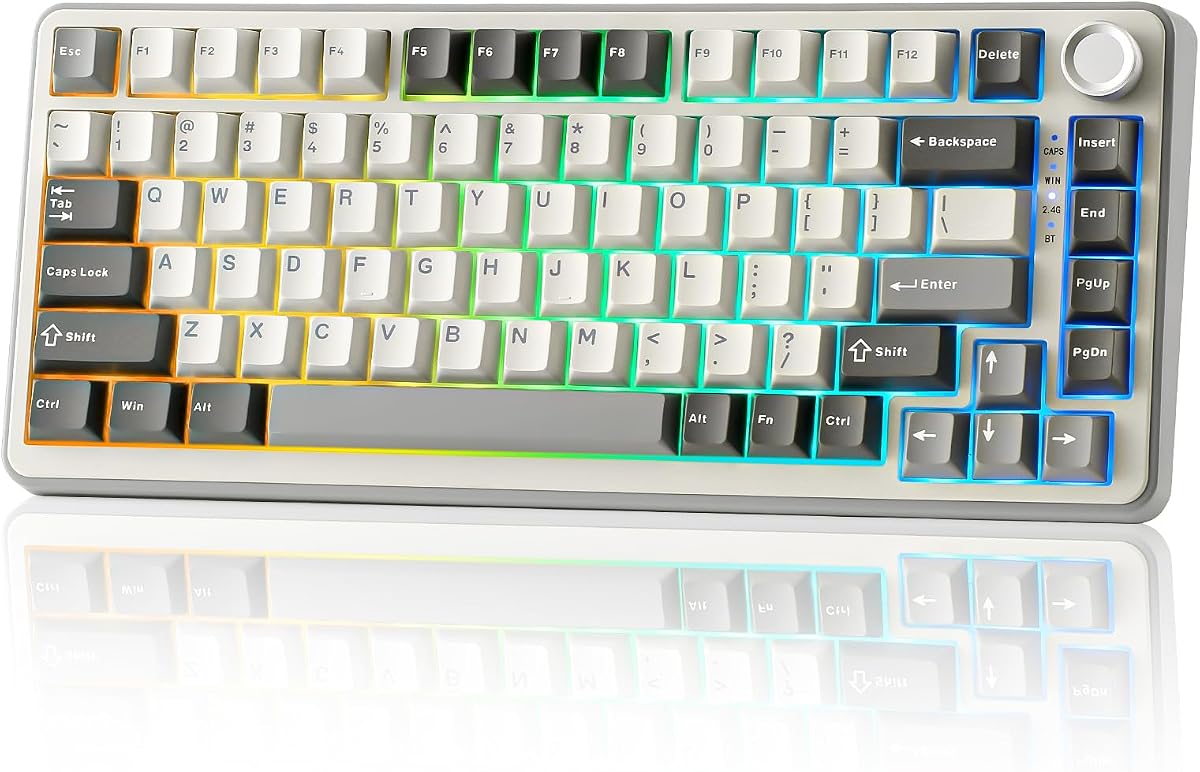


The AULA F75 Pro stands out as a top contender in the modern mechanical keyboard market. With a rating of 4.6 stars, users appreciate its seamless blend of wireless flexibility and wired stability. The inclusion of pre-lubed switches and a robust gasket-like structure ensures a satisfying typing experience right out of the box.
We may earn a commission when you buy through this link, at no additional cost to you.
This keyboard shines due to its tri-mode connectivity, allowing you to pair up to five devices via Bluetooth 5.0, 2.4GHz wireless, or USB-C. The PCB slotting and silicone pads significantly reduce vibration and noise, creating a solid thocky feel that is rare at this price. The side-printed PBT keycaps add a unique aesthetic while resisting wear and tear over time.
While the driver is Windows-only, the hardware itself is universally compatible. The only minor drawback is the price being slightly higher than basic wired options, but the feature set justifies the cost. If you need a versatile board for work and gaming, this is an excellent investment.
Buyers looking for a premium wireless experience without spending four figures should prioritize this model. The battery life and switch quality make it a standout choice for productivity and entertainment alike.
The combination of Bluetooth 5.0 and low-latency 2.4GHz ensures stable connections across multiple devices without lag.
Silicone pads and foam filling work together to dampen hollow sounds, delivering a deeper and more resonant typing tone.
We may earn a commission when you buy through this link, at no additional cost to you.
The RK ROYAL KLUDGE R75 brings the gasket mount experience to the budget-conscious segment. It offers triple connectivity modes and a creamy typing feel thanks to pre-lubed linear switches. This keyboard is an excellent entry point for those wanting to experiment with wireless mechanical boards without breaking the bank.
We may earn a commission when you buy through this link, at no additional cost to you.
Users enjoy the ability to swap switches easily thanks to the hot-swap PCB. The gasket mount helps dampen vibrations, offering a smoother keystroke compared to traditional plate-mounted boards. The metal knob adds a premium tactile element for volume control. Despite the lower price, the build feels sturdy enough for daily use.
The RGB lighting is functional but lacks the intensity found in higher-end models. Additionally, some users report the case can feel a bit hollow despite the internal foam. These are acceptable trade-offs given the competitive pricing and feature set offered by Royal Kludge.
This model is ideal for gamers and typists who want wireless freedom on a strict budget. If you value the gasket feel and hot-swap capability above all else, the R75 delivers exceptional value for money in 2026.
Hot-swap sockets allow you to personalize the typing experience by installing different switches without soldering any components.
A 4000mAh battery ensures over a week of usage, meaning you rarely need to interrupt your workflow for charging.
We may earn a commission when you buy through this link, at no additional cost to you.
This retro-themed mechanical keyboard offers a gasket mount experience at an incredibly low price point. It features five layers of padding to dampen noise and vibration, making it an excellent choice for shared workspaces. The linear switches are pre-lubed for a smooth and quiet typing experience.
We may earn a commission when you buy through this link, at no additional cost to you.
The 75% layout retains essential arrow and function keys while freeing up desk space for mouse movement. Full-key macro programmability allows users to set up complex macros for productivity tasks. The RGB lighting adds a modern touch to the vintage-inspired aesthetic.
The lack of wireless connectivity is the main limitation, but for users focused on reliability and cost, it is a minor issue. The design is functional but lacks the premium finish of more expensive boards. However, the typing performance rivals boards costing twice as much.
If you are looking for your first gasket-mounted keyboard without spending a fortune, this is the definitive choice. It proves that you do not need to break the bank to enjoy a high-quality, custom-like typing feel.
Multiple layers of foam absorption ensure minimal noise transmission, making it ideal for quiet office environments.
The 75% footprint maximizes desk real estate without sacrificing the arrow keys essential for gaming and navigation.
We may earn a commission when you buy through this link, at no additional cost to you.
The MageGee 75% is a straightforward gaming keyboard focused on simplicity and affordability. It uses red linear switches for fast response times, perfect for rapid key presses during intense gaming sessions. The blue backlighting adds a cool visual effect without the complexity of full RGB customization.
We may earn a commission when you buy through this link, at no additional cost to you.
Its compact TKL design is robust, featuring a metal top plate for durability. The double-shot ABS keycaps ensure legends do not fade easily. Plug-and-play functionality means no drivers are needed, making it ready to use immediately upon unboxing.
The ABS keycaps may develop a shiny patina over heavy use, and the lack of advanced features like macros or N-key rollover on wireless is a limitation. However, for a strict budget, it provides the core mechanical keyboard experience reliably.
This keyboard is best for casual gamers or students who need a reliable wired board without extra bells and whistles. It is a no-nonsense tool that gets the job done without demanding extra investment.
Linear red switches offer minimal resistance for rapid actuation, which is crucial for competitive gaming performance.
No software installation is required; simply connect via USB and start typing instantly without any configuration hassle.
We may earn a commission when you buy through this link, at no additional cost to you.
This gasket-mounted keyboard focuses on providing a premium typing feel in a wired configuration. The inclusion of sound-absorbing pads and PBT keycaps ensures a clean, durable, and satisfying typing experience. The hot-swap feature allows for easy switch changes without technical skills.
We may earn a commission when you buy through this link, at no additional cost to you.
The anti-ghosting technology ensures that every keystroke is registered accurately, even during complex gaming combos. The software allows for RGB customization and macro programming, giving users some control over their setup. The build quality feels solid and reliable for daily heavy use.
While the software is not as advanced as larger brands, it covers the basics well. The lack of wireless options means it is best for stationary desktops. However, the gasket mount at this price point is a significant value proposition.
Ideal for enthusiasts who want a gasket feel and hot-swap capability on a wired setup. It balances affordability with the features needed to enjoy a custom mechanical keyboard experience.
High-quality PBT keycaps resist oil and shine, ensuring the keyboard looks and feels new for years of use.
The gasket mount isolates the plate from the case, providing a softer and more elastic typing sensation.
We may earn a commission when you buy through this link, at no additional cost to you.
The AULA S75 PRO introduces an innovative LCD screen to the mechanical keyboard scene. This feature allows you to customize GIFs and view system status, adding a unique interactive layer to your setup. The keyboard combines this with tri-mode connectivity and a premium build quality.
We may earn a commission when you buy through this link, at no additional cost to you.
Sound and feel are optimized with five layers of foam and silicone pads. The hot-swap PCB supports both 3 and 5-pin switches, making it highly adaptable. The side-engraved PBT keycaps shine through perfectly with the south-facing LEDs, creating a vibrant and uniform lighting effect.
Setting up the screen requires Windows software and a wired connection, which might be a hurdle for Mac users. The weight is higher than non-screen models due to the display hardware. However, these trade-offs are minor compared to the customization potential.
If you want the most modern and feature-rich mechanical keyboard available, the S75 PRO is the top choice. It is perfect for streamers or tech enthusiasts who want to personalize every aspect of their desk.
The integrated LCD allows for personalized GIFs and real-time stats like battery and volume, enhancing the desktop aesthetic.
Extensive acoustic dampening ensures a deep and solid typing sound that enthusiasts love for typing and gaming.
We may earn a commission when you buy through this link, at no additional cost to you.
The Keychron K2 is a staple in the mechanical community, renowned for its dual compatibility with macOS and Windows. It offers a reliable wireless experience with a robust battery that lasts up to 72 hours of typing. The Super Red switches provide a smooth linear feel.
We may earn a commission when you buy through this link, at no additional cost to you.
It features a solid aluminum frame and high-quality keycaps that withstand daily use. The layout includes function keys and arrow keys, making it versatile for both coding and gaming. The ability to pair with three devices via Bluetooth makes it a great productivity tool.
The lack of gasket mounting means the typing feel is firmer than newer models, and the LED lighting is limited to white. However, the reliability and brand reputation make it a safe choice for professionals who need consistent performance.
Mac users looking for a reliable wireless keyboard should consider the K2 first. Its design respects the Mac ecosystem while offering the tactile benefits of a mechanical switch.
Specific function keys and keycaps are included for Mac users, ensuring a seamless experience across Apple devices.
The large 4000mAh battery ensures weeks of use on a single charge, even with backlighting enabled.
We may earn a commission when you buy through this link, at no additional cost to you.
The YUNZII B75 PRO offers a premium wireless experience with a focus on smoothness. The Cocoa Cream V2 switches are known for their buttery feel, supported by precision-tuned stabilizers. The gasket mount adds to the comfort, making long typing sessions pleasant.
We may earn a commission when you buy through this link, at no additional cost to you.
Its software supports macro programming and RGB customization, giving users control over their layout. The multi-function knob allows quick volume and backlight adjustments. With a 4000mAh battery, it is ready for long work days or gaming marathons.
The driver support is limited to Windows, which is a drawback for Mac users. Additionally, switch consistency can vary slightly between batches. However, the overall typing quality and features make it a strong contender in the market.
This keyboard is perfect for typists and gamers who want a smooth and comfortable wireless experience. It brings high-end features to a mid-range price point effectively.
Cocoa Cream switches are pre-lubed and tuned to reduce scratchiness for a fluid and silent typing experience.
Precision-tuned stabilizers ensure that larger keys like spacebar and shift feel smooth and rattle-free.
We may earn a commission when you buy through this link, at no additional cost to you.
The Newmen GM326 is a portable wired option designed for users on the go. It features a detachable USB-C cable and a compact footprint that fits easily into backpacks. The RGB backlighting offers multiple modes to suit different environments.
We may earn a commission when you buy through this link, at no additional cost to you.
Its hot-swap sockets allow for future customization if your preferences change. The ergonomic stepped keycaps and adjustable tilt legs help maintain a comfortable wrist angle during long use. The multi-function knob simplifies volume control for media tasks.
The build materials are more basic compared to premium models, and it lacks wireless functionality. However, for a budget-friendly portable board, it offers solid features and comfort. It is a great travel companion for professionals.
Ideal for frequent travelers or students needing a compact mechanical board. The hot-swap feature adds future-proof value that is rare in this price range.
The detachable cable and lightweight design make it easy to pack and transport without adding bulk to your gear.
Two-stage adjustable legs allow you to set the perfect height for your desk and wrist comfort.
We may earn a commission when you buy through this link, at no additional cost to you.
The Womier SK80 is another strong contender for those wanting a multimedia display. It features a color screen for status updates and GIFs. The gasket mount design and south-facing switches provide a clean light diffusion and solid typing feel.
We may earn a commission when you buy through this link, at no additional cost to you.
The software allows for full customization of RGB and macros. Music sync lighting adds a dynamic visual element to gaming sessions. The detachable Type-C cable ensures easy maintenance and cable management. It supports both Mac and Windows systems seamlessly.
Setting up the screen may require driver installation and wired connection initially. While the switches are good, specific aftermarket options might be limited compared to major brands. However, the overall package is feature-rich and visually appealing.
This keyboard is best for gamers who want visual flair and a solid typing foundation. The display adds a functional layer that is often reserved for much more expensive boards.
The color display provides immediate visual confirmation of system status and battery life without cluttering your screen.
Music sync lighting creates a dynamic atmosphere by reacting to the rhythm of your audio output.
We may earn a commission when you buy through this link, at no additional cost to you.
Selecting the right mechanical keyboard involves weighing several critical factors to ensure it meets your specific needs for typing, gaming, and aesthetics.
Mechanical switches define the typing experience. Linear switches like Reds are smooth and fast, ideal for gaming. Tactile switches have a bump for feedback, while clicky switches offer audible feedback. Choose based on your noise tolerance and preference.
Consider pre-lubed options for a smoother feel out of the box.
Decide between wired and wireless. Wireless offers freedom and reduces desk clutter but requires battery charging. Wired provides zero latency and constant power. Many modern boards offer tri-mode connectivity for the best of both worlds.
Prioritize low-latency Bluetooth 5.0 or 2.4GHz for gaming needs.
Build quality affects durability and acoustics. Gasket mounts provide a softer and quieter feel compared to traditional screw-in mounts. Look for aluminum cases and PBT keycaps for better longevity.
A solid build ensures the keyboard lasts through heavy daily use.
Hot-swap PCBs allow you to change switches without soldering. This future-proofs your investment and lets you experiment with different switch types easily. It is a vital feature for enthusiasts.
Ensure the PCB supports both 3-pin and 5-pin switches.
For wireless models, battery life is crucial. Aim for at least 4000mAh capacity to ensure the keyboard lasts a week or more between charges. Battery efficiency depends on RGB usage and connection mode.
High capacity batteries reduce charging interruptions.
The 75% layout retains arrow keys and function keys while removing the numpad. This is ideal for saving desk space without losing essential navigation keys. Check if it fits your desk dimensions comfortably.
This layout balances portability and functionality well.
Look for features like programmable keys, RGB lighting, and control knobs. Software support allows macros and custom layouts. Some boards even include screens for GIFs and status updates.
Customization adds value and personalization to your workflow.
Prices vary significantly. Budget models offer basic features while premium ones include gasket mounts and hot-swap support. Determine what features are non-negotiable to find the best value.
High price does not always mean better performance.
When setting up your new keyboard, ensure the drivers are installed if needed for full customization. If using wireless, connect via the appropriate mode using the device switch and pairing button. For tri-mode boards, save device profiles to switch quickly between your PC and phone.
Clean the keyboard regularly by removing dust with a soft brush or compressed air. For deep cleaning, remove keycaps to wash them in warm soapy water, ensuring they are completely dry before reattaching. Avoid harsh chemicals that might damage the plastic or paint.
To maintain optimal performance, avoid drinking beverages near the keyboard to prevent liquid damage. Store it in a dry place and do not expose it to extreme temperatures. If you do not use it for extended periods, power it off to save battery life.
The primary advantage is the space-saving design while retaining essential keys like arrows and function keys. This layout is perfect for maximizing mouse movement area on smaller desks without sacrificing functionality.
Gasket mount keyboards generally offer a softer, quieter, and more ergonomic typing experience. They use layers of padding to isolate the plate, reducing vibration and hollow sounds compared to rigid mounting.
Most mechanical keyboards work on both operating systems. However, some models like the Keychron K2 are optimized for Mac layouts. Others include toggle switches or keycap sets to switch between OS standards easily.
You can typically switch modes using a physical toggle on the side or through a key combination like Fn + B. Once paired via Bluetooth or 2.4GHz, you can switch back and forth using dedicated shortcuts.
Yes, hot-swap is highly useful for beginners because it allows you to try different switches without soldering. It lowers the barrier to entry and lets you customize the feel and sound of your keyboard later.
Mechanical switches usually last between 50 to 100 million keystrokes. This durability ensures that the keyboard remains responsive for years of daily use without significant wear or failure.
Look for batteries with at least 4000mAh capacity, which generally lasts a week or more. Check if the manufacturer rates battery life with RGB off for better accuracy on standby times.
Yes, the tactile feedback and faster actuation of mechanical switches can improve typing speed and accuracy. The key travel and reset points are designed to be responsive, aiding in quicker input.
We reviewed ten exceptional mechanical keyboards ranging from budget-friendly wired options to premium wireless models with advanced screens. Each offers unique strengths like gasket mounts, hot-swap support, and tri-mode connectivity to suit various user needs.
Prioritize build quality and switch type to ensure comfort during long sessions. Wireless connectivity and hot-swap capabilities are significant value add-ons that future-proof your setup against changing preferences.
Prices fluctuate frequently, so verify current pricing and availability before purchasing. These keyboards offer excellent value and performance for enthusiasts and professionals seeking a modern and efficient input solution.