
FLASHFORGE AD5X
4.4Editor score
Multi-color IFS technology
High-speed 600mm/s
Large build volume size
Discover the top 3D printer for figurines and models. This guide compares speed, precision, multi-color features, and reliability for creating detailed
Creating detailed 3D figurines and models requires a printer that balances speed with high precision. Whether you are a hobbyist or a professional, choosing the right machine impacts your final output quality significantly.
We have evaluated ten leading FDM printers based on their ability to handle intricate designs and multi-color tasks. Our analysis focuses on build volume, calibration ease, and advanced features that enhance the modeling workflow.
Each selection highlights unique strengths suitable for different user needs and project scales. Please note that product availability and pricing may fluctuate, so verify current details before making your final purchasing decision today.
4.4Editor score

4.7Editor score

4.5Editor score
This side-by-side comparison highlights the key specifications and capabilities of the top ten 3D printers for figurines and models. Reviewing these details helps you identify the machine that best fits your specific creative needs and technical requirements.






The Bambu Lab A1 stands out as a top choice for creating detailed figurines and models due to its exceptional precision and speed. With a rating of 4.7, it delivers reliable results for both beginners and experienced users who demand high-quality outputs consistently.
We may earn a commission when you buy through this link, at no additional cost to you.
Its high-speed precision allows for rapid printing without sacrificing detail, thanks to acceleration up to 10,000 mm/s². The active flow rate compensation ensures smooth surfaces and accurate extrusion, which is critical for intricate model features and figurines.
While the open frame design may limit some advanced materials, the ease of use and auto-calibration make it highly accessible. Users can focus on creativity rather than technical setup, as the system handles Z-offset and bed-leveling automatically.
This printer is ideal for hobbyists seeking a balance of performance and simplicity. It supports multi-color printing with an optional AMS lite, making it versatile for colorful figurines and artistic models without requiring complex configurations.
High acceleration and active flow control ensure detailed prints are completed quickly.
Full auto calibration removes manual setup hurdles for consistent first layers.
We may earn a commission when you buy through this link, at no additional cost to you.
The Bambu Lab P2S Combo offers professional-grade capabilities for users who need speed and reliability. Rated 4.7, it combines the P2S printer with AMS 2 Pro to enable efficient multi-color printing suitable for complex figurines.
We may earn a commission when you buy through this link, at no additional cost to you.
Its high-speed precision reaches up to 600 mm/s while maintaining sharp corners and smooth layers. The PMSM Servo Extruder and Active Flowrate Compensation ensure consistent extrusion, reducing errors in detailed model geometries.
The Adaptive Airflow System balances cooling and heat retention, which helps with overhangs and advanced materials. This feature, combined with built-in filament drying, ensures every spool is ready for flawless prints without manual intervention.
Ideal for advanced users, this setup supports over a million models on MakerWorld with a unified workflow. The AI failure detection and quick-swap nozzles minimize downtime, keeping your creative process uninterrupted and efficient.
AMS 2 Pro enables seamless color changes with built-in filament drying.
Adaptive airflow supports engineering-grade materials by maintaining optimal chamber temps.
We may earn a commission when you buy through this link, at no additional cost to you.
The FLASHFORGE Creator 5 Pro is designed for industrial engineering and advanced multi-material printing needs. With a rating of 4.0, it offers unique features like independent toolheads and a near-zero waste system for efficient production.
We may earn a commission when you buy through this link, at no additional cost to you.
Featuring four independent toolheads and a 7-second FlashSwap changer, this printer switches nozzles without flushing filament. This drastically reduces operational overhead and material costs while achieving up to 5X faster multi-color printing speeds.
The fully enclosed frame with an active heated chamber up to 65°C prevents warping in advanced filaments like ABS and PC. The CoreXY motion structure delivers rapid speeds without sacrificing accuracy, eliminating ghosting and vibrations.
Safety is prioritized with dual HEPA 13 and activated carbon systems that trap particles and fumes. Real-time monitoring via the built-in HD chamber camera and remote control through Flash Studio make managing large projects easier and safer.
Near-zero waste system saves material by switching tools without purging filament.
Advanced filtration and HD camera ensure a safe, monitored printing environment.
We may earn a commission when you buy through this link, at no additional cost to you.
The Bambu Lab P1S delivers reliable performance with its fully enclosed body and high-speed capabilities. Rated 4.5, it is designed for hassle-free assembly and professional-grade printing suitable for various filament types.
We may earn a commission when you buy through this link, at no additional cost to you.
With speeds up to 500mm/s and acceleration up to 20000 mm/s², this printer completes masterpieces quickly. The enclosed design improves performance for advanced filaments, while automatic bed leveling ensures high-quality and successful prints every time.
Although it does not support multi-color printing directly, connecting the Bambu Lab AMS allows for up to 16 colors. This flexibility, combined with quick-swap nozzles and AI failure detection, makes it efficient for both hobbyists and professionals.
Ideal for users who want speed and reliability, the P1S supports a wide range of filaments including PLA and PETG. Setup takes about 15 minutes, letting you spend more time printing and less time calibrating or troubleshooting.
Fully enclosed body improves print quality for advanced and engineering-grade filaments.
Fast acceleration and speed reduce wait times without compromising accuracy.
We may earn a commission when you buy through this link, at no additional cost to you.
The FLASHFORGE AD5X offers a compelling budget-friendly option for multi-color printing with advanced features. Rated 4.4, it combines high-speed performance with IFS technology to support vibrant 3D models and artistic projects.
We may earn a commission when you buy through this link, at no additional cost to you.
Its Independent Filament System (IFS) allows printing with up to four different colors simultaneously, creating intricate designs easily. The fully automatic leveling system ensures a perfectly leveled print bed every time, reducing the risk of failed prints.
With speeds up to 600mm/s and a high-temperature nozzle reaching 300°C, this printer handles a wide range of filaments including PLA and ABS. The generous build volume of 220x220x220mm provides ample space for larger models or multiple objects.
This model is ideal for hobbyists wanting professional results without breaking the bank. The consistent print quality and rapid results make it suitable for prototyping and producing final products efficiently without compromising on precision.
IFS allows four colors simultaneously, enabling vibrant multi-colored models easily.
High-temperature nozzle and large build support diverse projects and materials.
We may earn a commission when you buy through this link, at no additional cost to you.
The Snapmaker U1 is a premium option featuring a powerful 4-toolhead system for true multi-material printing. Rated 4.5, it offers rapid 5-second tool changes and robust locking mechanisms for reliable performance across various projects.
We may earn a commission when you buy through this link, at no additional cost to you.
With four independent toolheads and preloaded filaments, it enables multi-color printing without manual swaps or purging. This reduces filament waste by up to 5X and enables faster multi-color printing, lowering operating costs and increasing productivity.
The rigid CoreXY motion system supports speeds up to 500 mm/s with a large build volume of 270 X 270 X 270 mm. Smart calibration features like automatic toolhead offset and vibration compensation ensure smooth, dimensionally accurate prints with minimal manual adjustment.
Ideal for professionals and serious makers, this printer supports rigid and flexible materials in a single print. The built-in model library and Snapmaker Orca software make it easy to get started with complex prototypes and functional parts.
5-second tool changer enables rapid switching and minimal waste during multi-material prints.
True multi-material support allows combining rigid and flexible materials effortlessly.
We may earn a commission when you buy through this link, at no additional cost to you.
The Creality SPARKX i7 Combo introduces innovative AI features for generating 3D models from portraits. Rated 4.0, it allows users to upload a portrait and generate a unique model in seconds, perfect for personalized gifts.
We may earn a commission when you buy through this link, at no additional cost to you.
With 95% pre-assembly, you can unbox and start printing in just five minutes. The multicolor printing capability offers smoother transitions and up to 50% less waste compared to traditional systems, saving on filament costs significantly.
Smart AI detects failures like spaghetti or air printing in real time, sending instant alerts to maximize success rates. The large 260mm build volume and Night Mode ensure detailed prints in peaceful silence without disturbing others nearby.
This printer is ideal for beginners and pros who want simplicity and personalization. The quiet operation and large build volume make it suitable for creating everything from full-size items to intricate miniatures with stunning detail.
AI turns portraits into 3D models instantly, simplifying personalized project creation.
95% pre-assembled design reduces setup time to just minutes from unboxing.
We may earn a commission when you buy through this link, at no additional cost to you.
The FLASHFORGE Adventurer 5M Pro offers powerful performance with its 1 Click Auto Printing System. Rated 4.0, it combines high-speed printing with easy maintenance features to streamline the 3D printing process effectively.
We may earn a commission when you buy through this link, at no additional cost to you.
Powered by an all-metal CoreXY frame, it reaches speeds up to 600mm/s with integrated vibration compensation algorithms that eliminate ghosting. The 3-second quick-swap nozzle mechanism allows effortless replacements across multiple sizes without tools.
A dual filtration system and fully enclosed chamber ensure a clean and thermally stable printing environment. With a max nozzle temperature of 280°C, it reliably prints engineering materials like ABS and ASA as well as standard PLA.
Ideal for users wanting simplicity and speed, this printer includes a built-in camera and mobile control via Flash Studio. Filament detection and power loss recovery add convenience, making it suitable for home or classroom use.
1 Click Auto Printing System simplifies setup and ensures perfect first layers every time.
280°C nozzle enables engineering materials for robust and durable functional parts.
We may earn a commission when you buy through this link, at no additional cost to you.
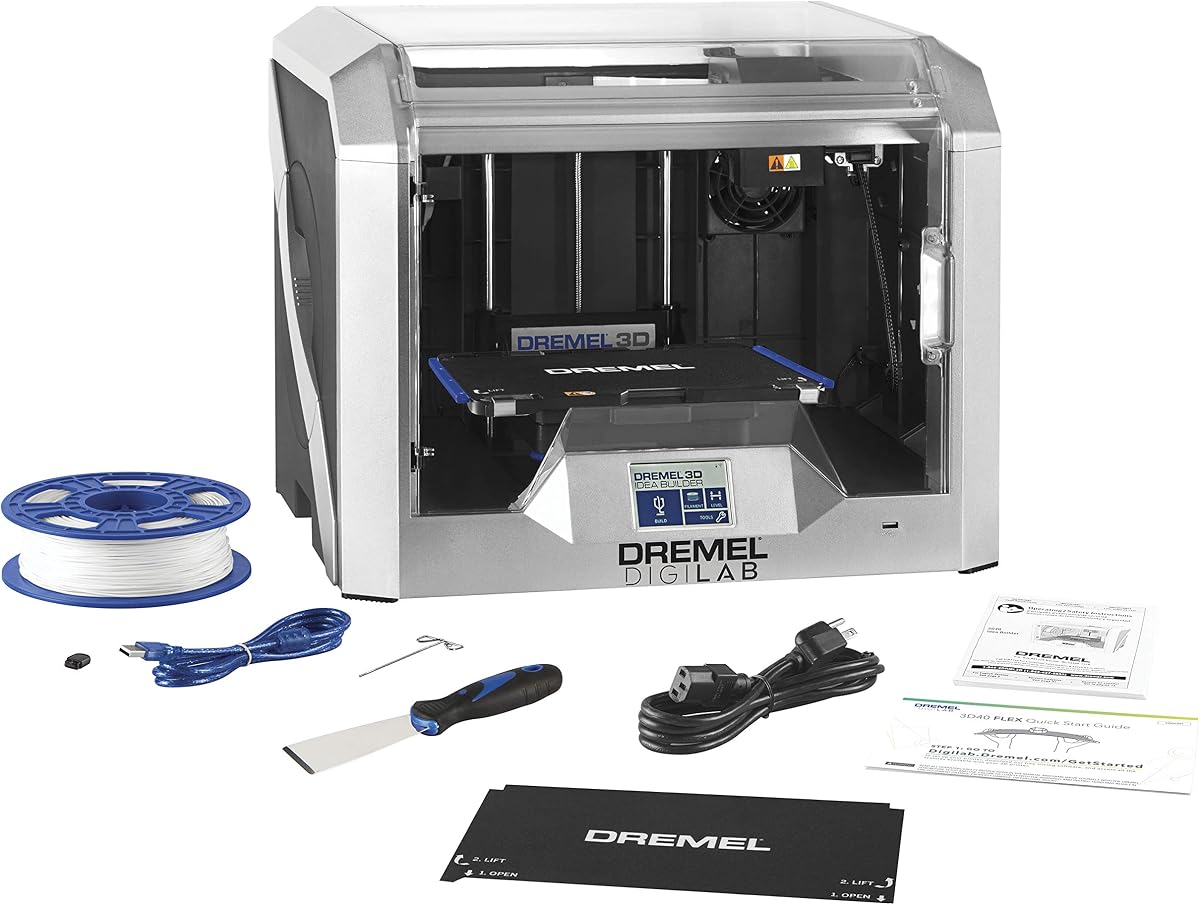
The Dremel 3D40 Flex is built for reliable everyday usage with a flexible build plate and automated leveling. Rated 4.4, it is designed to be accessible for beginners while delivering superior quality and ease of use.
We may earn a commission when you buy through this link, at no additional cost to you.
Its direct drive, all-metal extruder is clog-resistant and heats up to 230°C for smooth prints. Automated 9-point leveling detects any variation in the print bed and automatically accounts for it, ensuring more successful printing every time.
With 50 micron resolution and a fully enclosed UL listed housing, it ensures safety and precision. The flexible build plate with ergonomic handles and magnetic snap-on mechanism makes removing printed models a snap after completion.
Ideal for those prioritizing reliability and support, Dremel offers lifetime access to its customer service team. This model suits everyone from novices to professionals who want a hassle-free setup to get started within minutes.
50 micron resolution ensures detailed prints with high quality and consistency.
Hassle-free guided setup and flexible plate make it accessible for all skill levels.
We may earn a commission when you buy through this link, at no additional cost to you.
The Bambu Lab A1 Combo incorporates advanced technology for a unique experience of speed and quality. Rated 4.6, it combines the A1 printer with AMS Lite to deliver accessible multi-color 3D printing for enthusiasts and professionals.
We may earn a commission when you buy through this link, at no additional cost to you.
Active Flow Compensation utilizes a high-frequency sensor to measure pressure and compensate flow rate accurately. Fully Automatic Calibration handles Z-shift, bed level, and vibration resonance automatically, ensuring optimal performance for every single print job.
With a futuristic design and quick change nozzle using one clip, maintenance is convenient. Active motor noise cancellation calibrates parameters to match individual motor differences, compensating for unwanted engine noise and providing a quieter environment.
Ideal for users wanting versatile multicolor capabilities without complex setups, the Combo offers precision and speed. The open frame design and automatic features make it accessible for everyone seeking high-quality figurines and models.
Fully automatic calibration ensures optimal performance for every print job effortlessly.
Active motor noise cancellation reduces unwanted engine noise during operation.
We may earn a commission when you buy through this link, at no additional cost to you.
Choosing the right 3D printer for figurines and models involves evaluating several technical factors to ensure quality results. This guide outlines the key aspects to consider when selecting a machine that meets your specific creative needs.
Print resolution determines the level of detail your 3D printer can capture on the final model. Higher resolution settings allow for finer textures and sharper edges, which are essential for detailed figurines. Look for printers capable of low micron settings to ensure intricate features are rendered accurately.
Prioritize models that support fine layer heights for smoother surfaces and better definition.
Build volume refers to the maximum size of a model your printer can create in a single print. For larger figurines or multiple models at once, a generous build volume is advantageous. Ensure the dimensions align with the typical size of projects you plan to undertake regularly.
Select a printer with sufficient volume to accommodate your desired model sizes comfortably.
Multi-color capability allows you to produce vibrant models without manual filament swaps. Systems like AMS or IFS support seamless color transitions and reduce waste during production. This feature is highly valuable for creating realistic figurines with distinct color patterns.
Choose printers with integrated multi-color systems to streamline complex, colorful projects.
Automated calibration features such as bed leveling and flow compensation minimize setup time and errors. These technologies ensure consistent print quality by adjusting parameters automatically. For beginners, reliable auto-calibration reduces the learning curve and frustration associated with manual tuning.
Opt for models with comprehensive auto-calibration tools to enhance reliability and ease.
Material support indicates the range of filaments your printer can handle effectively. Some printers excel with PLA and PETG, while others support high-temperature engineering plastics. Assess which materials suit your project needs regarding durability and finish quality.
Verify that your printer supports the specific filaments required for your target projects.
A robust software ecosystem offers intuitive tools for slicing and monitoring prints. User-friendly interfaces and mobile controls enhance workflow efficiency and remote access. Integration with large model libraries can also inspire creativity and simplify project setup.
Ensure the printer pairs with reliable software that matches your workflow and skill level.
Build quality affects the stability and precision of your 3D printing results. Rigid frames, such as CoreXY, reduce vibrations and ghosting during high-speed prints. Solid construction ensures consistent performance over time, even with frequent usage.
Select a printer with a sturdy frame and quality components to maintain long-term accuracy.
Reliable customer support and a solid warranty protect your investment against technical issues. Access to expert guidance helps resolve setup challenges quickly. Look for brands with strong reputations for service to minimize downtime during critical projects.
Prioritize models from manufacturers with comprehensive warranties and responsive support teams.
Before starting, ensure the print bed is properly calibrated and clean to guarantee the first layer adheres correctly. Leveling the bed reduces print failures and ensures consistent quality throughout the entire modeling process.
Maintain your printer by regularly cleaning the nozzles and lubricating moving parts. This prevents clogs and mechanical wear, which are critical for preserving precision when printing intricate figurines over extended periods.
Store filaments in a dry environment to avoid moisture absorption that degrades print quality. Keep the printing area well-ventilated and free of dust to maintain safety and ensure long-term machine performance.
A suitable printer offers high resolution, precise calibration, and reliable extrusion. These features ensure smooth surfaces and sharp details essential for intricate figurines. Multi-color systems add versatility for complex designs.
Yes, multi-color printers enable vibrant and layered designs for realistic models. Automated systems handle color changes efficiently without manual intervention. This capability enhances the visual fidelity of your prints significantly.
Advanced calibration features simplify the setup process for beginners. Automatic leveling reduces the risk of failed prints. This ease of use helps new users focus on creativity rather than technical adjustments.
Build volume determines the maximum size of models you can print. Larger volumes accommodate full-size figurines or multiple small items. Select dimensions that match your typical project sizes effectively.
Filaments like PETG or ABS offer better durability than PLA. High-temperature extruders support these engineering-grade materials. Choose a printer capable of handling these for robust and long-lasting models.
Modern printers feature user-friendly maintenance options like quick-swap nozzles. Regular cleaning and lubrication are simple tasks. Following manufacturer guidelines ensures your machine runs smoothly with minimal effort.
We reviewed ten top-rated models, highlighting standout options like the Bambu Lab A1, FLASHFORGE AD5X, and Snapmaker U1. Each offers unique strengths for precision and multi-color capabilities tailored to different user needs.
Prioritize features such as resolution, build volume, and ease of calibration when selecting your machine. These factors directly influence the quality and complexity of your final prints and overall user experience.
Always check current pricing and availability before finalizing your purchase. Product details and offers can change, so verifying the latest info ensures you make the best investment for your creative projects today.