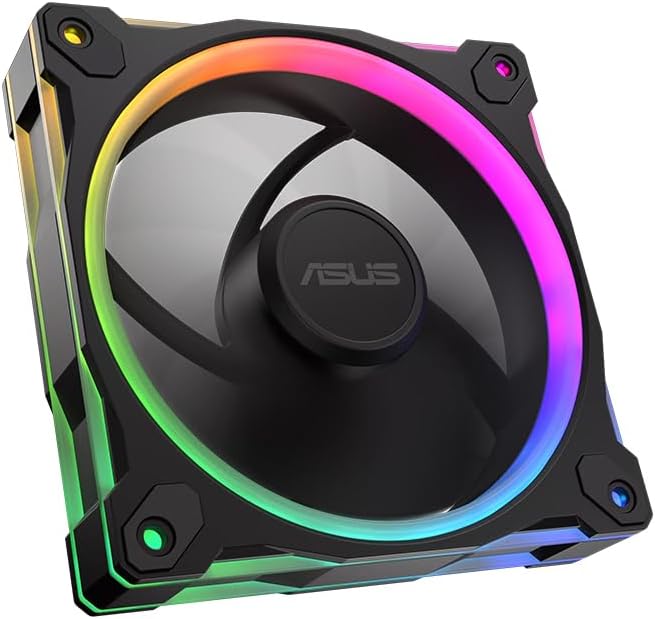
ASUS Prime MR120 ARGB Reverse Fan Black
4.6Editor score
20 Addressable RGB LEDs
Quiet Operation Up To 23dB
Double-Sided Frame Lighting
This guide compares the top ASUS case fans for cooling performance, noise levels, and RGB aesthetics to help you choose the right model for your build.
Choosing the right case fans is crucial for maintaining optimal temperatures in your PC. ASUS offers a wide range of options designed for quiet operation, high airflow, and stunning RGB lighting effects.
We have evaluated ten top models based on their static pressure, airflow ratings, noise output, and build quality. This list covers everything from budget-friendly single packs to premium triple sets.
Each pick highlights key strengths and ideal use cases for different types of system builds. Please note that prices and availability can change frequently so check current listings before purchasing.
4.6Editor score

4.7Editor score

5.0Editor score
The following table provides a side-by-side look at all ten models featured in this guide so you can quickly compare their key specifications and ratings.


The ASUS TUF Gaming TR120 ARGB Triple Pack stands out as the top choice for builders needing high static pressure and style. It holds a strong 4.7 rating from users who appreciate its robust cooling capabilities.
We may earn a commission when you buy through this link, at no additional cost to you.
Its 28mm frame allows for 3.3mm H2O static pressure which is best in class for pushing air through dense heatsinks. The dual layer LED matrix provides rich color saturation and effects unmatched by standard RGB fans.
While it is pricier than single packs the value in cooling performance and build quality justifies the cost. Some users may find three fans too many for small cases unless they plan a full system overhaul.
This pack is ideal for enthusiasts building a high-end rig with liquid cooling or tight airflow paths. We recommend it for anyone prioritizing thermal performance alongside stunning visual customization.
The 28mm frame design increases airflow and static pressure ensuring components stay cool under heavy loads.
The exclusive double layer LED matrix with 16 individually addressable RGB LEDs creates a premium lighting experience.
We may earn a commission when you buy through this link, at no additional cost to you.
This ASUS Prime MR120 ARGB Reverse Fan offers an excellent entry point for builders wanting premium features at a budget-friendly cost. Users rate it 4.6 stars for its reliable performance and aesthetic appeal.
We may earn a commission when you buy through this link, at no additional cost to you.
The reverse blade design ensures that air flows without obstruction from the front frame improving visual clarity. It operates quietly up to 23 dB(A) making it suitable for noise sensitive environments.
While it lacks the high speeds of more expensive models the 1600 RPM range is sufficient for standard case airflow. The single pack format is perfect for replacing one noisy fan without a bulk buy.
Buy this if you need a cost effective solution for intake or exhaust without compromising on RGB aesthetics. It balances price and performance well for most standard PC builds.
The reverse blade orientation eliminates the visible frame spokes when viewed from the front for a cleaner look.
Operating at up to 23 dB(A) this fan ensures your system stays quiet even under moderate load.
We may earn a commission when you buy through this link, at no additional cost to you.
The ASUS ProArt PF120 is the pinnacle of build quality with a perfect 5.0 rating reflecting its superior engineering. It targets professionals and enthusiasts who demand reliability and quiet performance.
We may earn a commission when you buy through this link, at no additional cost to you.
Its blades are made from Liquid Crystal Polymer which resists warping at high speeds. The CNC milled brass bearing housing ensures tight tolerances and long term reliability over years.
The 3-phase 6-pole motor delivers smooth power with minimal vibration and noise. While the price is high the durability and precision make it a worthy investment for critical cooling needs.
This fan is best for workstations or silent builds where every decibel matters. If you value quality over quantity this is the top choice for single fan replacement.
LCP composite blades provide exceptional resistance and stable high-speed operation with natural vibration damping.
The 3-phase 6-pole motor ensures robust performance with minimal noise and vibration.
We may earn a commission when you buy through this link, at no additional cost to you.
The ASUS Prime MR120 ARGB Fan Triple Pack delivers reliable cooling and style at a great value. With a 4.6 rating it satisfies most users seeking a full set of new fans for their case.
We may earn a commission when you buy through this link, at no additional cost to you.
The extra thick 28mm frame improves airflow while keeping noise low at up to 21 dB. Each fan features dual-sided lighting for a seamless and vivid aesthetic throughout the system.
Though it lacks the high RPM of premium models it is well suited for general case ventilation. The triple pack saves money compared to buying singles and the warranty adds peace of mind.
Choose this if you want a complete refresh of your case airflow without breaking the bank. It is a practical choice for standard gaming or office builds needing better cooling.
Operates quietly at up to 21 dB(A) ensuring your PC stays peaceful during daily tasks.
Dual-sided frame lighting provides seamless and vivid lighting aesthetic for a cleaner build.
We may earn a commission when you buy through this link, at no additional cost to you.
This ASUS ProArt PF120 PWM Fan is built for raw performance with speeds up to 3000 RPM. It holds a 4.2 rating highlighting its capability in demanding cooling scenarios despite noise trade-offs.
We may earn a commission when you buy through this link, at no additional cost to you.
The 0.5mm gap between blade and frame optimizes performance and reduces turbulence. Paired with the patented daisy-chain connectors installation becomes seamless and cable clutter is minimized.
While it offers high airflow and static pressure users should manage expectations for noise at top speeds. The LCP blades ensure stability during high-speed operations which is critical for overclocking.
Opt for this fan when you need maximum cooling capacity and can tolerate higher RPM noise. It fits best in cases where thermal performance is the absolute top priority.
PWM control allows speeds up to 3000 RPM for optimal cooling under heavy workloads.
Patented daisy-chain connectors enable seamless installation reducing cable management time.
We may earn a commission when you buy through this link, at no additional cost to you.
The ASUS TUF Gaming TR120 ARGB Single offers strong static pressure and a sleek reverse blade look. Its 4.4 rating reflects its solid build quality and performance for a single replacement unit.
We may earn a commission when you buy through this link, at no additional cost to you.
It delivers 2.75mm H2O static pressure and 76.3 CFM airflow making it great for push-pull radiator setups. The exclusive double layer LED matrix adds vibrant color to your system.
The flexible side pattern allows for personalized aesthetics which is a nice touch. While it runs efficiently its single pack nature might make it pricier than buying a triple set for full setups.
Ideal for users needing just one high-performance fan or wanting to mix colors and styles. Choose it if you want to upgrade a specific intake without replacing your whole system.
Best in class static pressure at 2.75mm H2O with high airflow for effective cooling.
Personalized aesthetic with a flexible side pattern on the frame.
We may earn a commission when you buy through this link, at no additional cost to you.
This ASUS TUF Gaming TF120 ARGB White is a standout for white builds with a 4.7 rating. It combines quiet operation with durable engineering to ensure long-term reliability.
We may earn a commission when you buy through this link, at no additional cost to you.
The advanced dynamic plain bearing supports up to 250000 hours of operation. Anti-vibration pads help reduce rattling so the fan stays quiet even at high speeds.
The double layer LED array produces high color saturation and more lighting effects than traditional RGB fans. It syncs well with Aura Sync devices for a unified look.
Buy this for your white themed case to match components perfectly. It offers the best balance of quiet cooling and style for single fan upgrades in a white theme.
The advanced dynamic plain bearing allows an operating time of up to 250000 hours.
A double layer LED array produces high color saturation and more lighting effects than traditional RGB fans.
We may earn a commission when you buy through this link, at no additional cost to you.
The ASUS TUF Gaming TR120 ARGB White 3 Pack is a top tier choice for full white cooling setups. Its 4.7 rating confirms its quality and performance across multiple units.
We may earn a commission when you buy through this link, at no additional cost to you.
It features an extra-thick 28mm frame for superior cooling and static pressure at 3.3mm H2O. The double layer LED matrix ensures your build glows brightly and consistently.
Flexibility in the side pattern allows you to match your unique case design. The wide speed range lets you tune cooling to your specific workloads easily.
This set is perfect for large cases needing multiple fans for intake and exhaust. If you want a complete white system with high-end lighting this is the way to go.
Higher cooling performance with an extra-thick 28mm fan frame and 3.3mm H2O static pressure.
Personalized aesthetic with a flexible side pattern on the frame.
We may earn a commission when you buy through this link, at no additional cost to you.
This ASUS Prime MR120 ARGB Reverse Single Pack White Edition earns a 4.8 rating for its excellent balance of style and function. It is highly recommended for white builds needing a clean front view.
We may earn a commission when you buy through this link, at no additional cost to you.
The reverse blade design hides the motor hub and frame for an uninterrupted airflow path. It stays quiet up to 23 dB(A) while delivering 58 CFM of airflow effectively.
The double-sided lighting creates a seamless look from any angle which enhances the aesthetic value. While CFM is slightly lower than some rivals the noise profile makes up for it.
Choose this for a white case upgrade where looks are paramount. It offers the highest user satisfaction and is ideal for adding just one high-quality fan.
Quiet operation with a noise level of up to 23 dBA.
The double-sided frame lighting provides a vibrant lighting aesthetic.
We may earn a commission when you buy through this link, at no additional cost to you.
The CORSAIR RS120 ARGB Triple Pack offers an excellent alternative with a 4.6 rating. It brings premium features like daisy-chain and magnetic bearings to the table.
We may earn a commission when you buy through this link, at no additional cost to you.
Its airflow reaches up to 72.8 CFM which is high for this price range. AirGuide technology directs air effectively at hot components especially useful on radiators.
The magnetic dome bearing ensures smooth and quiet operation. Installation is streamlined as multiple fans connect through just one PWM connector reducing cable clutter.
Pick this if you want strong cooling and easy cable management without needing ASUS specific software. It is a solid contender for any builder looking for reliable triple fan value.
Daisy-chain multiple fans together and control them all through just one 4-pin PWM connector and one ARGB connector.
Anti-vortex vanes direct airflow at your hottest components for concentrated cooling.
We may earn a commission when you buy through this link, at no additional cost to you.
Selecting the right case fan depends on several key factors beyond just brand. Understanding these elements will help you build a system that runs cool and quietly.
Airflow refers to the volume of air a fan can move typically measured in CFM. Static pressure indicates how hard the fan can push air through restrictive areas like radiators. For general case cooling prioritize high CFM but for radiators choose high static pressure.
Check your case needs before buying to ensure the fan type matches your cooling setup.
Most cases support 120mm fans but check your chassis specs for any constraints. Some smaller cases may only fit 80mm or 92mm fans. Ensure the thickness like 28mm fits within your case clearance.
Always verify your case dimensions to avoid installing fans that are too thick.
Noise is measured in decibels dB with lower numbers being quieter. Look for fans rated below 25dB for silent operation. Some models trade speed for noise so find the right balance for your environment.
Prioritize low noise ratings if your PC sits in a bedroom or office.
PWM fans allow dynamic speed control via motherboard headers which improves efficiency. Voltage control is older and less precise. For modern builds choose PWM to adjust fan speeds based on temperature.
Select PWM fans for better temperature management and quieter idle performance.
RGB lighting adds style but check if your motherboard supports addressable RGB. ASUS Aura Sync lets you coordinate colors across components. Ensure you have free headers if you plan to connect multiple lighted fans.
Confirm your motherboard has the right headers for RGB lighting to avoid buying unusable features.
Bearing technology impacts longevity and noise. Fluid dynamic or magnetic bearings last longer and run smoother than sleeve bearings. Premium models use CNC milled brass housings for precision.
Look for long life bearings if you need a fan that will last years without failure.
Thicker frames like 28mm offer better durability and often better airflow. Ensure your case can handle the extra depth especially with radiators. Thicker frames also reduce vibration and noise.
Check case clearance for thicker frames to avoid fitting issues with side panels.
Single packs are great for replacements but triple packs offer better value for full setups. Calculate the cost per fan when buying packs to ensure you save money. Consider how many spots you have available in your case.
Buy packs for new builds and singles for replacements to maximize your budget.
Connect your fans to the motherboard headers correctly using PWM for speed control and ARGB for lighting. Ensure cables are routed neatly to avoid hitting the fan blades which could cause noise.
Check your fan angles so intake fans pull air in and exhaust fans push air out. Correct airflow direction keeps your system cool and reduces dust buildup.
Keep dust filters clean to maintain airflow over time. Regularly inspect fan blades for dust or debris that might imbalance them or stop them from spinning.
ASUS case fans follow standard industry sizes like 120mm and PWM protocols so they work with most motherboards. RGB lighting requires addressable headers which might vary by board. Check your manual for connector types.
No special software is needed for basic fan speed control. However Aura Sync lighting features may require the ASUS software for full customization. Basic PWM control works out of the box.
Reverse blades flip the motor hub to the rear so the front looks smooth without visible spokes. This improves aesthetics especially on intake fans. They function the same as standard fans but look cleaner.
The ASUS TUF Gaming TR120 ARGB Triple Pack and Single have best-in-class static pressure at 3.3mm H2O. This makes them ideal for radiators or densely packed components where air resistance is high.
Most models operate between 21 dB and 23 dB which is very quiet. The ProArt series is even quieter due to precision engineering. Noise levels depend on speed so using lower RPM reduces sound.
Yes you can mix different models but ensure voltage and connector types match. Lighting might look inconsistent if models have different RGB designs. Airflow direction should remain consistent for best cooling.
Most ASUS case fans come with a 2 Year warranty from the date of purchase. Check the specific listing to confirm. This covers manufacturing defects but not physical damage during install.
Yes especially the TR120 and PF120 models with high static pressure. They push air through radiator fins effectively to keep your coolant cool. Look for high pressure specs for this use case.
We have reviewed the top 10 ASUS case fans highlighting their cooling strengths and aesthetic options. The TR120 Triple Pack leads with high static pressure while the Prime Reverse Fan offers great budget value.
Prioritize airflow and pressure based on your specific case needs. Consider noise levels for your environment and check RGB compatibility before buying lighting models.
Prices and availability change often so verify current listings before finalizing your purchase. These picks offer reliable performance to keep your build running smoothly for years.