
ARESGAME AGV Series 500W Power Supply
4.4Editor score
80 Plus Bronze Certified
5 Year Warranty Included
Non Modular Design
Discover the 10 best cheap power supply for gaming PC options. This guide compares efficiency, wattage, and reliability to help you choose the right unit.
Finding a reliable power supply does not have to break the bank. Gamers often overlook this component yet it fuels every other part inside your tower. A good unit ensures stability and protects your investment from sudden power spikes or surges that occur unexpectedly.
We analyzed ten real products available online to build this list. Each entry was chosen for its balance of cost performance and safety features. Our comparison focuses on watts efficiency ratings and modular options to help you find the best value.
Each pick below shows key specs and standout strengths for different builds. We highlight budget friendly choices alongside higher wattage units for modern graphics cards. Keep in mind that prices and availability change often so check current listings before buying.
4.4Editor score

4.5Editor score

4.6Editor score
The following table compares all ten selected units side by side. Look at wattage and certification levels to find the right match for your system requirements.



The Thermaltake SMART 600W stands out as a top choice for builders needing reliable power without overspending. It carries an 80 Plus certification and active PFC to ensure stable delivery during gaming sessions. Its robust protection suite keeps components safe from voltage spikes.
We may earn a commission when you buy through this link, at no additional cost to you.
This unit delivers continuous 600W at typical temperatures which suits mid range systems well. The strong 12V rail supports modern graphics cards effectively while maintaining efficiency. Active PFC improves power usage and reduces wasted energy during typical loads.
Non modular cables may create clutter in smaller cases but they simplify initial setup. The hold up time meets industry standards for safe shutdowns during brief power dips. Fans run quietly at low loads and provide sufficient cooling for steady workloads.
Buy this if you need a dependable power supply for a standard gaming PC. It balances cost and performance well for those who do not need extreme wattage. The warranty offers peace of mind for long term use.
The 80 Plus rating ensures at least 80 percent efficiency under load. This helps reduce heat and electricity costs over the life of the system.
Over power over voltage and short circuit protections guard your hardware. These safeguards prevent damage if a surge or fault occurs unexpectedly.
We may earn a commission when you buy through this link, at no additional cost to you.
This 1000W modular unit provides plenty of headroom for demanding gaming setups. It meets ATX 3.1 standards to support future GPUs and high transient spikes. The Gold certification delivers excellent efficiency for long term energy savings.
We may earn a commission when you buy through this link, at no additional cost to you.
Japanese 105°C capacitors ensure durability and stable output under heavy loads. The fully modular cables let you connect only what you need for a clean build. RGB lighting adds style without sacrificing performance or cooling capacity.
While more expensive than budget picks it offers features that justify the cost. The included tool kit helps beginners verify connections and manage cables easily. A decade long warranty shows confidence in its reliability and quality.
Choose this if you plan to upgrade to high end graphics cards soon. It handles power spikes safely and keeps your system running cool. The modular design makes maintenance and upgrades much simpler later.
ATX 3.1 and PCIe 5.1 readiness ensure support for new hardware. The dual color cable helps confirm secure connections for modern GPUs.
A 140mm low noise fan keeps temps down without loud hums. Silent mode ensures quiet operation during light tasks or gaming sessions.
We may earn a commission when you buy through this link, at no additional cost to you.
The ARESGAME AGV Series offers a solid entry point for cost conscious builders. It provides 500W of continuous power and Bronze certification for decent efficiency. The quiet fan ensures a peaceful gaming environment without unnecessary noise.
We may earn a commission when you buy through this link, at no additional cost to you.
All black cables match standard cases and avoid mismatched colors. Protection features like OVP and SCP keep your parts safe from electrical faults. A five year warranty adds reliability to this budget friendly choice.
This unit fits best in entry level builds with moderate power needs. It may not support high end GPUs but works well for integrated or mid range graphics. The non modular setup is simple for small case builds.
Buy this if you need a cheap reliable supply for a basic gaming PC. It delivers steady power and protects components effectively. The warranty ensures support should any issues arise later.
Priced for budget builds without sacrificing safety standards. It balances affordability with necessary protections for typical gaming use.
A 120mm fan maintains cooling while running quietly. This helps keep internal temps stable during extended gaming sessions.
We may earn a commission when you buy through this link, at no additional cost to you.
The CORSAIR RM750e delivers reliable power for modern gaming PCs. It meets ATX 3.1 standards and uses 105°C capacitors for steady output. The fully modular design simplifies cable management for a clean case.
We may earn a commission when you buy through this link, at no additional cost to you.
A rifle bearing fan keeps noise low even under full load conditions. Fast wake from sleep times improve convenience for daily use. The 750W capacity supports a wide range of GPU upgrades without issues.
While it lacks extra features like RGB lighting it focuses on core performance. The modern standby compatibility ensures low load efficiency when idle. This makes it a practical choice for builders who value simplicity.
Choose this if you need a quiet modular unit for a mid range build. It handles power spikes safely and fits most standard ATX cases. The reliability and efficiency make it a safe long term pick.
Fan noise stays low thanks to optimized curve and bearing. This keeps your rig silent during movies or light browsing tasks.
Modern standby support allows fast wake from sleep modes. Low load efficiency reduces power waste during idle periods.
We may earn a commission when you buy through this link, at no additional cost to you.
The Segotep 650W ATX brings Gold efficiency to a lower cost unit. A single 12V rail ensures stable power for demanding components like GPUs. Global voltage adaptation lets you use it in various regions without converters.
We may earn a commission when you buy through this link, at no additional cost to you.
Four PCI-E 6+2 pin connectors support 40 series graphics cards easily. Wires can be separated to improve airflow and keep the case tidy. This design balances performance with affordability for mid range systems.
Non modular cables may require more effort to manage during initial setup. However the high efficiency reduces heat output and energy costs over time. It offers solid value for those who need more wattage cheaply.
Buy this if you want Gold efficiency without paying premium prices. It supports modern GPUs well and provides stable power under load. The global voltage feature adds flexibility for international users.
The 80 Plus Gold rating means over 90 percent efficiency. This lowers heat generation and electricity costs during gaming sessions.
Global voltage adaptation allows worldwide use without extra adapters. This is ideal for travelers or those relocating their system.
We may earn a commission when you buy through this link, at no additional cost to you.
The GAMEMAX RGB-850-SE combines high wattage with full RGB lighting control. It delivers 850W with Gold efficiency to support modern gaming setups. The modular design keeps your build clean and airflow optimized.
We may earn a commission when you buy through this link, at no additional cost to you.
RGB lighting can sync with motherboard software for a unified look. A 140mm fan ensures cooling stays silent even during heavy loads. Japanese capacitors offer reliable long term performance for your components.
Some users may find the RGB lights distracting during gameplay. Cable management can be tricky if you want to hide connectors well. However the power headroom and efficiency are strong for the price.
Choose this if you want aesthetics and power in one unit. It supports high end GPUs with room for future upgrades. The warranty adds confidence in its reliability over years.
Sync RGB effects with your motherboard for a unified look. Software control lets you adjust colors to match your theme.
850W capacity supports high end GPUs and overclocked CPUs. This ensures stable power even during demanding gaming scenarios.
We may earn a commission when you buy through this link, at no additional cost to you.
The MSI MAG A650BN offers a compact solution for small to mid sized cases. It provides 650W of power with Bronze efficiency and active PFC. The low noise fan ensures quiet operation during games.
We may earn a commission when you buy through this link, at no additional cost to you.
DC-DC circuit design improves stability and efficiency under variable loads. Industrial level protections guard your hardware from common electrical risks. A five year warranty supports long term peace of mind.
Non modular cables may add clutter but the unit fits tight spaces well. The active PFC helps maintain consistent power delivery during intense sessions. Its rating and features make it a strong contender in this class.
Buy this if you need a quiet reliable unit for a compact build. It fits standard ATX cases without taking too much room. The protections ensure safety even if power conditions fluctuate.
This unit fits well in smaller chassis without crowding components. It keeps airflow open for better cooling of other parts.
Over voltage and temperature protections keep your system safe. These safeguards help prevent damage from sudden electrical events.
We may earn a commission when you buy through this link, at no additional cost to you.
The MSI MAG A650BE improves on the BN model with semi modular cables. This reduces clutter while still allowing flexible connections for main components. It delivers 650W with Bronze efficiency and active PFC.
We may earn a commission when you buy through this link, at no additional cost to you.
A low noise fan keeps the system quiet during gaming or work. Industrial level protections offer reliable safety against common electrical faults. The compact design fits most cases while leaving room for upgrades.
Semi modular cables make management easier than fully non modular units. Some fixed cables remain but they are essential for basic operation. The trade off offers balance between cost and cable management.
Choose this if you want some modularity without the premium price. It fits tight cases and keeps noise low during heavy loads. The warranty ensures support if you need assistance later.
Semi modular design reduces cable clutter for a cleaner build. Connect only what you need while keeping essential lines fixed.
Low noise fan ensures minimal distraction during tasks. This helps maintain a peaceful environment for gaming or work.
We may earn a commission when you buy through this link, at no additional cost to you.
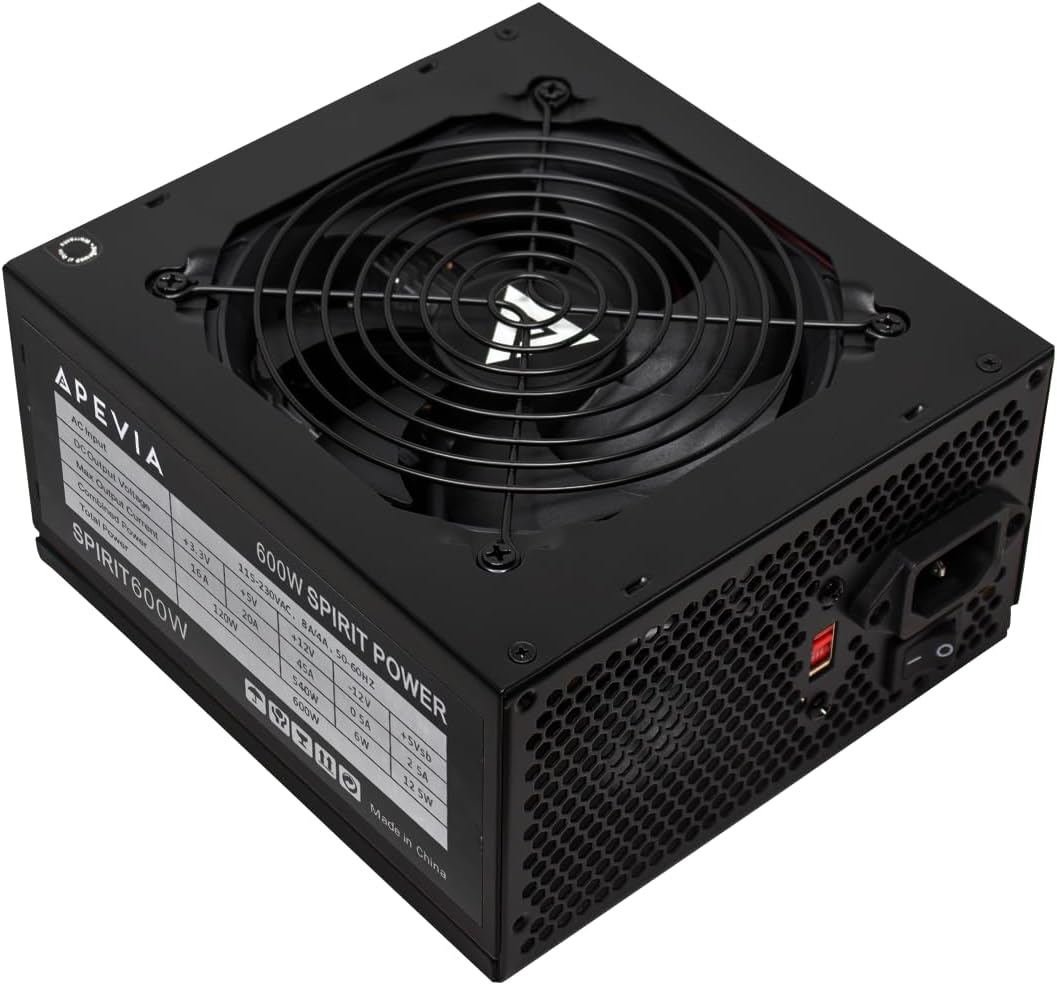
The Apevia SPIRIT600W features split connectors for flexible motherboard support. It delivers 600W and includes auto-thermally controlled fan for cooling. Heavy duty protections guard your system from various electrical risks.
We may earn a commission when you buy through this link, at no additional cost to you.
Split connectors allow compatibility with older and newer boards easily. The fan adjusts speed based on internal temperatures to save noise. This design offers versatility for different builds without high cost.
Lower ratings suggest it may not suit high end or overclocked systems. Cable routing may require care due to split connector shapes. Still it provides adequate power for standard desktop configurations.
Buy this if you need a basic flexible power supply for a budget system. It supports multi core CPUs and offers strong protection features. The split design helps adapt to varied hardware setups.
Split connectors adapt to different motherboard power requirements. This simplifies upgrades or builds with older hardware components.
Auto thermal fan adjusts speed based on case temperature. This keeps noise low when heat levels stay within normal limits.
We may earn a commission when you buy through this link, at no additional cost to you.
The Segotep GM850 850W delivers modern standards for current GPUs. It is fully modular with native 12VHPWR support for 5.1 cards. Gold certification ensures efficient power delivery and lower energy use.
We may earn a commission when you buy through this link, at no additional cost to you.
Native cable support simplifies connections for high end graphics cards. DC-DC structure with resonance assist provides stable output under load. This unit meets ATX 3.1 specs for future compatibility.
It balances modern features with reliable performance for enthusiasts. Flat white cables improve visibility and management during build. The design ensures you are ready for upcoming hardware releases.
Choose this if you want a standard compliant power supply for new builds. It supports high transient loads and keeps your system stable. The modularity ensures clean airflow for all components.
Native 12VHPWR cable matches modern GPU needs without adapters. This reduces complexity and risk of loose connections during gaming.
ATX 3.1 readiness ensures compatibility with upcoming hardware. You can upgrade GPUs without replacing your power supply unit.
We may earn a commission when you buy through this link, at no additional cost to you.
Picking the right power supply requires looking at several key features beyond just wattage. Understanding efficiency, modularity, and protection features ensures you get value for your money.
Wattage determines how much power your unit can deliver to components. Check your GPU and CPU specs to find minimum required power. For gaming, add headroom for peak load spikes.
Selecting a unit with 100 to 200 watts extra ensures stability. This prevents overload during intense gaming sessions.
Efficiency ratings like Bronze or Gold measure how much energy is wasted. Higher ratings reduce heat and electricity costs over time. Look for 80 Plus certification to confirm tested efficiency.
Higher efficiency means cooler operation and lower bills. It is worth the small extra cost for long term use.
Modular designs let you connect only cables you need. Fully modular units offer maximum flexibility for cable management. Semi modular keeps main cables fixed but allows others to be removed.
Modular units improve airflow and reduce clutter in cases. Non modular options are cheaper but require more planning.
Protection features like OVP and SCP shield components from faults. Look for units that include multiple safety layers. These safeguards prevent damage if a power surge occurs.
Always choose a PSU with at least basic protection features. This protects your expensive hardware from electrical risks.
Fan noise affects comfort during gaming sessions. Larger fans run quieter than smaller ones at same speed. Look for low noise ratings or silent mode options.
Quiet fans ensure you focus on gameplay without distraction. Check decibel ratings if noise matters to you.
Warranty length shows manufacturer confidence in quality. Longer warranties mean more support if issues arise. Look for at least five years for peace of mind.
A good warranty can save money on replacements. It is a strong indicator of overall reliability.
Newer standards like ATX 3.1 ensure compatibility with modern hardware. They define transient power handling for new GPUs. Check if your unit meets the latest specs.
Meeting latest standards ensures future compatibility. It avoids needing a new PSU when you upgrade.
Physical size matters if you have a small case. Standard ATX units fit most but measure before buying. Compact options exist for tighter enclosures.
Always check your case specs against PSU dimensions. Ensuring fit avoids installation issues later.
Start by ensuring your unit sits in a case with good airflow. Keep vents clear of dust and objects that block cooling. Proper placement prevents overheating during long gaming sessions.
Periodically clean the fan and vents using compressed air. This removes dust buildup that can reduce cooling efficiency. Aim to clean every six months depending on your environment.
Avoid overloading cables by checking your wattage needs before building. Use only necessary cables to keep airflow open. Regular checks ensure your system runs safely and efficiently.
Gold ratings improve efficiency but are not strictly required for gaming. Bronze rated units work well for budget builds. Higher ratings help reduce heat and electricity costs over time.
Most modern gaming PCs require between 500 and 750 watts. Check your GPU specifications for exact requirements. Adding extra headroom ensures stability during intense loads.
Non modular units are cheaper but can create cable clutter. They work well in budget builds where aesthetics matter less. Modular options offer better airflow and cleaner setups.
A quality power supply typically lasts five to ten years. Proper maintenance and cooling extend its lifespan. Check warranties to confirm expected operational periods.
Newer GPUs may need ATX 3.1 certified units for safety. Older PSUs might lack transient spike handling. Check compatibility before upgrading to high end graphics cards.
Quiet operation improves comfort during long gaming sessions. Fans that adjust speed based on load help reduce noise. Look for low decibel ratings when comparing models.
We have reviewed ten budget friendly power supplies ranging from 500W to 1000W. Each offers unique features to match different system needs and build styles.
Prioritize efficiency and protection features to ensure long term stability. The right choice depends on your specific power needs and budget limits.
Prices and stock change frequently so verify current details before buying. Always double check compatibility with your chosen graphics cards.