
XTAR X6 Swappable Battery Power Base
4.3Editor score
Hot-swappable battery system
Foldable stand included
Direct DC output
This guide compares the top battery backup options for Starlink Mini and standard dishes to keep you connected during outages or while traveling off-grid.
Staying connected is essential in today's digital world, especially when you rely on satellite internet for work or safety. A reliable battery backup ensures your Starlink dish remains online even when the grid fails or you are away from home.
We evaluated ten top-rated power solutions based on runtime, compatibility, portability, and ease of use. Our analysis focuses on devices that provide stable voltage and efficient power delivery to keep your internet link active without interruption.
Each selection below highlights key specifications and real-world performance notes to help you choose the right power source. Please note that product availability and pricing can change frequently, so verify details before purchasing your final setup.
4.3Editor score

5.0Editor score

4.5Editor score
The following table provides a side-by-side comparison of all ten selected power solutions to help you quickly identify the best fit for your specific Starlink setup and usage needs.




This unit offers an impressive ten-hour runtime designed specifically for the Starlink Mini. It weighs only three pounds and includes a 22V battery that matches the device power requirements exactly.
We may earn a commission when you buy through this link, at no additional cost to you.
The high capacity ensures extended connectivity during outdoor camping trips or unexpected power outages at home. Users appreciate the direct power delivery that eliminates unnecessary conversion losses and keeps the system stable.
While it is priced higher than some adapters, the included battery and long run time provide excellent value. The compact form factor makes it easy to pack for travel without adding significant bulk.
Anyone needing dependable uninterrupted power for their Starlink Mini will find this solution highly effective. It stands out as a top choice for those prioritizing runtime and portability in equal measure.
The ten-hour capacity allows users to stay online for long periods without needing to recharge or swap batteries frequently.
At only three pounds, this UPS is easy to carry in a backpack or vehicle for remote work or emergency preparedness.
We may earn a commission when you buy through this link, at no additional cost to you.
This traditional UPS provides robust protection for home office setups including Starlink routers and computers. It features a pure sine wave output that ensures sensitive electronics receive clean power.
We may earn a commission when you buy through this link, at no additional cost to you.
The twelve outlets allow you to connect multiple devices including monitors and phones alongside your satellite equipment. The LCD panel offers detailed insights into load capacity and remaining battery life at a glance.
While it is designed for stationary use and lacks direct DC ports for Starlink dishes, it remains a solid choice for protecting the entire networking stack. You may need an additional inverter or adapter for the dish itself.
Users seeking comprehensive surge protection and power conditioning for a fixed installation will appreciate this model. It is ideal for situations where reliability and equipment safety are the primary concerns.
Provides clean power suitable for active PFC power supplies found in high-end networking gear and computers.
Twelve outlets allow comprehensive coverage for routers switches and devices that share the same power strip.
We may earn a commission when you buy through this link, at no additional cost to you.
This model offers a similar feature set to the higher-end unit but with a simulated sine wave output. It is well-suited for general home networking needs and protection against brownouts.
We may earn a commission when you buy through this link, at no additional cost to you.
The twelve outlets provide ample space for all your networking gear and peripherals. USB ports on the front allow for quick charging of mobile devices during an outage without extra adapters.
As with other traditional UPS units, this device requires AC conversion to power Starlink dishes directly. It is best paired with an inverter if you need to power the dish hardware itself.
It represents a balanced option for users who want reliable backup power for their home network infrastructure. The automatic voltage regulation helps extend battery life by correcting minor fluctuations automatically.
Corrects minor power fluctuations without using battery power which helps extend the total runtime during an outage.
Allows you to keep phones and tablets charged during emergencies without needing to plug into wall outlets.
We may earn a commission when you buy through this link, at no additional cost to you.
This base unit allows you to use swappable batteries for continuous operation. It features a foldable stand that matches the angle of the Starlink Mini for quick setup on flat surfaces.
We may earn a commission when you buy through this link, at no additional cost to you.
The hot-swap design means you can change batteries without rebooting the dish. This is essential for keeping connections alive during long camping trips or remote work sessions.
Note that batteries are sold separately so you must purchase them to use the system. While the base is affordable the total cost depends on how many battery packs you buy for extended use.
Budget-conscious users who already own compatible batteries will find this base extremely versatile. It turns standard batteries into a reliable power source specifically optimized for the Mini hardware.
Swap out depleted batteries instantly to maintain connection without the need to reboot the Starlink device.
The built-in stand eliminates the need for extra mounting gear and ensures the dish sits at the correct angle.
We may earn a commission when you buy through this link, at no additional cost to you.
Designed for professional environments this unit delivers high capacity power in a rack-mount form factor. It includes a rotatable LCD panel so you can monitor status regardless of installation orientation.
We may earn a commission when you buy through this link, at no additional cost to you.
The pure sine wave output protects sensitive network equipment from power anomalies. Eight outlets provide plenty of space for servers routers and switches in a single rack unit.
While ideal for offices it is overkill for casual home use due to its size and cost. You will still need an adapter to connect the Starlink dish directly as this unit outputs standard AC.
Organizations needing robust backup power for critical infrastructure will value this model. It combines high power output with the convenience of a compact rack design and strong warranty coverage.
Fits standard racks to save floor space and organize networking equipment neatly for better airflow and access.
Allows for easy status monitoring whether the unit is installed horizontally or vertically in a server rack.
We may earn a commission when you buy through this link, at no additional cost to you.
This adapter lets you power the Starlink Mini using common DeWalt 20V batteries. It features a dual-slot design that can double runtime or allow for hot-swapping during extended use.
We may earn a commission when you buy through this link, at no additional cost to you.
The low voltage protection ensures your batteries are not drained below safe levels. This helps prolong battery life and prevents damage to expensive power tools batteries used for internet power.
You can swap batteries without interrupting power to the dish thanks to the seamless design. This makes it easy to keep your connection active for hours at a time in remote locations.
Users who already own DeWalt batteries will find this a cost-effective solution. It bridges the gap between existing tool batteries and satellite internet power needs without complex wiring.
Connect two batteries simultaneously to double your available power or use one slot to manage energy consumption efficiently.
Built-in circuitry cuts off power when batteries are low to prevent permanent damage and ensure safe battery cycling.
We may earn a commission when you buy through this link, at no additional cost to you.
This unit stands out with a five-year warranty that covers the battery itself. It is a solid choice for users who want long-term protection for their home office equipment.
We may earn a commission when you buy through this link, at no additional cost to you.
The simulated sine wave output is suitable for most consumer electronics. Twelve outlets and USB ports allow you to connect and charge all your networking and mobile devices easily.
As with other standard UPS units this device protects the power feed rather than providing direct DC power to the dish. You would need an inverter or adapter to power the Starlink hardware directly.
The extended warranty provides peace of mind for investment in your infrastructure. It is ideal for home offices where uptime is critical and equipment protection is a high priority.
Provides long-term assurance that the battery will be replaced if it fails within five years of purchase.
The display alerts you to potential power issues before they affect your equipment giving you time to react.
We may earn a commission when you buy through this link, at no additional cost to you.
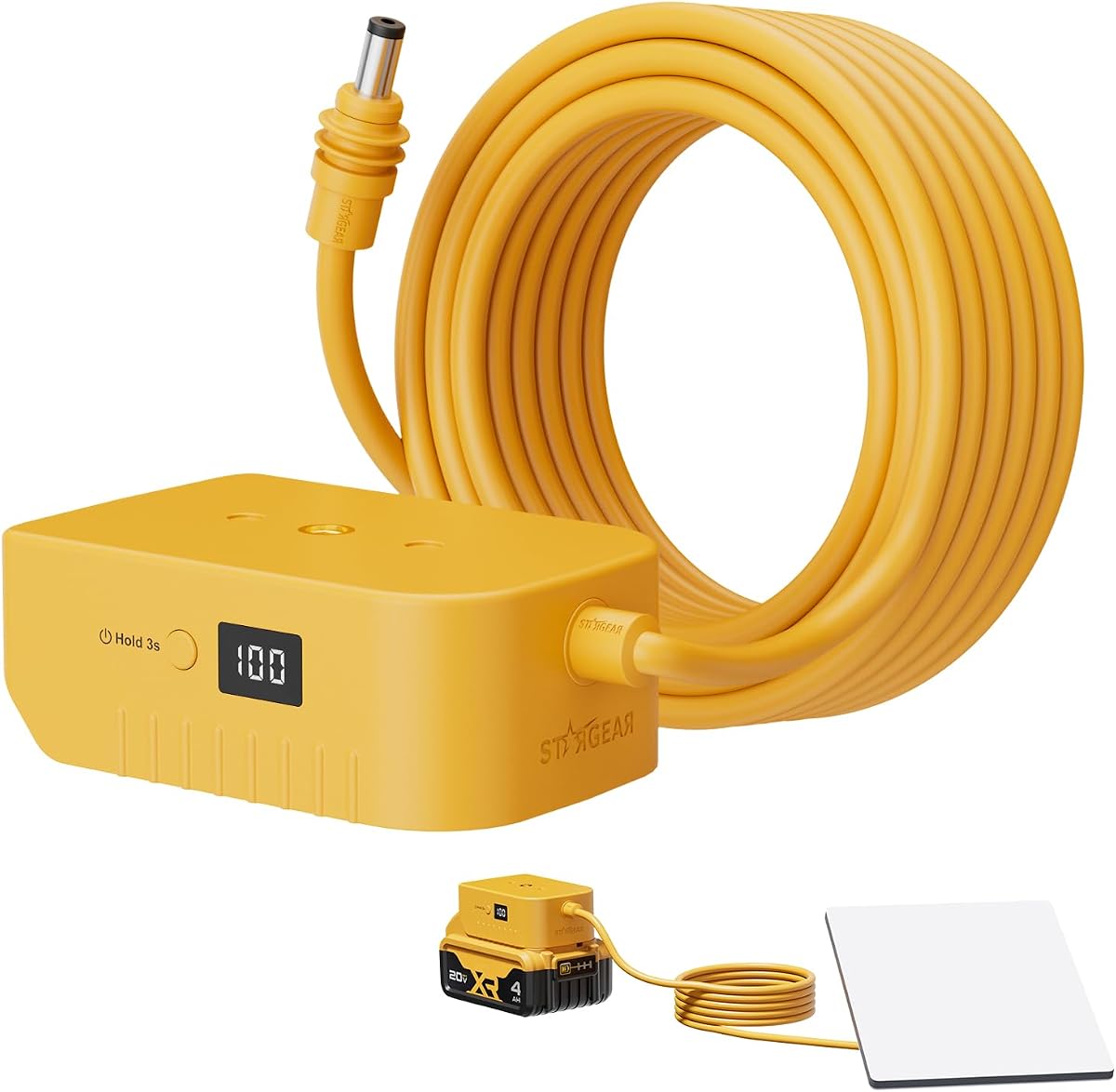
This adapter includes a digital display that shows the remaining battery level at a glance. It works with DeWalt 20V batteries to provide stable power for the Starlink Mini.
We may earn a commission when you buy through this link, at no additional cost to you.
The over-discharge protection safeguards your batteries from deep discharge damage. This extends the lifespan of your batteries and ensures reliable performance over multiple cycles.
A three-meter pure copper cable is included to reduce voltage drop and provide flexible positioning. This length allows you to place the Starlink dish optimally without being too close to the power source.
Users who want to monitor power levels will find the digital display very useful. It offers a simple and effective way to use common power tool batteries for satellite internet connectivity.
Know exactly how much power is left so you can plan battery swaps before the connection drops unexpectedly.
Minimizes voltage loss over distance and gives you flexibility in placing your dish away from your battery pack.
We may earn a commission when you buy through this link, at no additional cost to you.
This adapter consolidates the power connection and mounting into a single unified system. It includes a pipe mount adapter that attaches directly to the Starlink Mini and battery for a clean setup.
We may earn a commission when you buy through this link, at no additional cost to you.
The digital battery display keeps you informed of power levels during use. It supports DeWalt 20V batteries and offers over-discharge protection to keep your investment safe.
The design reduces tangles and wires compared to separate components. This creates a professional look that is easy to manage in outdoor or van life environments.
Anyone who values a tidy setup will appreciate the integrated design. It simplifies installation while maintaining the reliability and power monitoring features users expect from adapters.
Combines the mount and adapter into one unit for a seamless connection that reduces clutter and setup time.
Ensures stable transmission without messy wiring keeping your Starlink Mini ready for action anywhere.
We may earn a commission when you buy through this link, at no additional cost to you.
This adapter pack offers a simple plug-and-play solution for powering your Starlink Mini. It is designed to be lightweight and portable for easy carrying during travel.
We may earn a commission when you buy through this link, at no additional cost to you.
Integrated circuit protection safeguards your battery and device from power issues. This ensures stable and reliable transmission without worrying about damage from surges or drops.
The compact design fits easily into a backpack or storage bag without adding bulk. It is perfect for users who want to carry internet power without a heavy power station.
Simple and efficient this adapter provides an easy path to off-grid connectivity. It is a great choice for those who prioritize portability and straightforward installation.
Weighs very little so you can take it anywhere without worrying about added weight or bulk in your gear.
Protects against power degradation and damage to ensure your devices stay safe during use.
We may earn a commission when you buy through this link, at no additional cost to you.
Selecting the right battery backup involves understanding your specific power needs and usage environment. This guide covers the key factors to consider when purchasing a solution for your Starlink setup.
Starlink dishes require specific voltage inputs to operate correctly. The Mini model typically needs 22V DC while the standard dish uses AC. Ensure your battery or adapter matches this requirement to avoid damaging the device.
Always verify the output voltage of your chosen backup solution matches the Starlink model you own before purchasing.
Determine how long you need to stay online during an outage or trip. Some units provide hours of power while others rely on swappable batteries. Consider your usage duration and how much capacity you need.
Choose a battery capacity that meets your longest expected offline period to maintain connectivity.
Traditional UPS units are heavy and designed for indoor use. Battery adapters and compact packs are built for travel. Decide if you need to move the power source frequently or if it will stay in one place.
Prioritize lightweight adapters for travel and heavier UPS units for fixed home office protection.
Lithium ion batteries offer the best energy density but require protection circuits. Ensure your battery backup includes over-discharge protection to prevent damage. Safety features are critical for outdoor and unattended use.
Look for adapters that include integrated protection to safeguard both the battery and the Starlink hardware.
For uninterrupted operation some systems allow you to swap batteries without rebooting. This feature is essential for long camping trips where you cannot afford downtime. Check if the adapter supports this function.
Hot-swap functionality ensures continuous connectivity when you need to replace a depleted power source quickly.
Integrated designs can simplify setup by combining power and mounting hardware. Look for built-in stands or pipe mounts if you need to position the dish on uneven terrain. Simple integration reduces clutter.
Choose a system with a stand or mount adapter to keep your hardware secure and properly oriented.
Battery life degrades over time so a warranty covering the battery is valuable. Reputable brands offer multi-year coverage and equipment protection guarantees. Check the terms before buying to ensure long-term peace of mind.
Opt for brands with strong warranties to protect your investment against premature battery failure.
Some units sell the battery separately which lowers upfront cost but increases total expense. Calculate the cost of the adapter plus batteries to compare options fairly. Consider value over just initial price.
Evaluate the complete package cost including necessary batteries to determine true affordability.
Connect the adapter to the battery securely ensuring all contacts are clean. Plug the power cable into the Starlink Mini and switch it on. Wait for the dish to establish a satellite link and confirm internet access.
Monitor battery levels periodically during use using the display if available. When levels are low replace the battery or recharge it according to the manufacturer instructions to ensure safety and longevity.
Store batteries in a cool dry place when not in use to preserve their lifespan. Avoid exposing the adapter to extreme temperatures or moisture. Regularly inspect cables and connectors for wear before each trip.
The Starlink Mini requires approximately 22V DC input. Ensure your battery adapter or UPS provides this voltage directly or through a compatible converter to operate the dish safely without external power.
Yes many adapters are designed to work with DeWalt 20V and similar batteries. These are common in workshops and provide sufficient voltage for the Starlink Mini when using the correct adapter.
Runtime varies by capacity but many units provide several hours of continuous use. Higher capacity batteries or swappable systems can extend operation significantly for longer trips or outages.
The Starlink Mini uses DC power so you do not need an inverter. Standard Starlink dishes use AC power so a UPS or inverter is required for those models to convert battery power to AC.
If the battery drains completely the Starlink dish will lose power and disconnect. The unit will automatically reboot once a new power source is connected restoring your satellite link.
Most adapters listed are designed for the Starlink Mini only. Standard dishes have different power requirements and typically need a UPS or power conditioner rather than direct battery adapters.
Yes compact adapters and UPS units work indoors during power outages. Ensure proper ventilation and secure connections to keep your equipment safe and maintain reliable internet access at home.
Charge batteries regularly and avoid letting them sit empty for long periods. Store them at room temperature and use protection circuits to prevent over-discharge for optimal battery longevity.
We have explored ten distinct solutions ranging from compact adapters to full UPS systems. The Pilestone/Woyum Mini UPS offers great runtime while the XTAR X6 provides flexible power for on-the-go use.
When choosing prioritize factors like voltage compatibility and runtime needs for your specific situation. Ensure the device supports your Starlink model and offers safety features to protect your hardware.
Prices and availability can change so always check the current details before purchasing. Verify the latest specifications to ensure you get the right power solution for your internet connection needs.