
WWZMDiB CH341A EEPROM BIOS Programmer
4.1Editor score
Supports 24 and 25 series chips
Includes SOIC8 SOP8 test clip
No welding required for access
This guide compares the top Bios Flash Tool options available today. We review hardware programmers and bootable utilities to help you select the right repair
Selecting the right Bios Flash Tool is essential for technicians and enthusiasts who need to recover or update firmware on modern hardware. Whether you are dealing with a corrupted system or looking to unlock specific features, having reliable access to the firmware storage is crucial for maintaining system integrity and performance.
We evaluated a wide range of hardware programmers and bootable utilities to identify the most effective tools for various scenarios. Our analysis focuses on compatibility, ease of use, and the ability to handle different chip types without requiring complex soldering or specialized knowledge for standard repair tasks.
Each pick in this list highlights specific strengths such as speed, voltage flexibility, or comprehensive software support for different operating systems. Please note that availability and pricing can change frequently, so always verify the current specifications before making a final decision for your specific repair needs.
4.1Editor score
4.4Editor score

4.3Editor score
The following table provides a side-by-side comparison of all ten products reviewed in this guide to help you quickly identify the best fit for your hardware repair requirements.





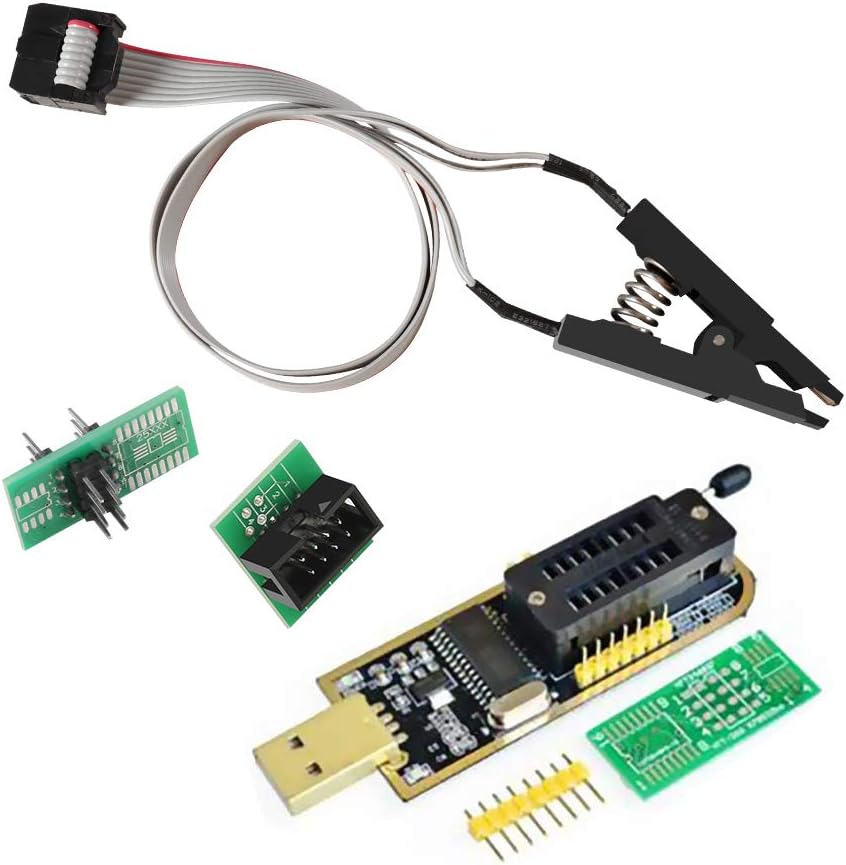
The WWZMDiB CH341A EEPROM BIOS Programmer is an affordable hardware tool designed for users who need to access and modify flash memory on various devices. It features a simple USB connection and includes essential accessories like a clip and conversion plates to handle different chip packages without requiring advanced skills.
We may earn a commission when you buy through this link, at no additional cost to you.
Its main strength lies in its compatibility with the common 24 and 25 series chips found in many motherboards and electronics. The inclusion of the SOIC8 SOP8 clip means you can often clamp directly onto the chip, making the process of backing up or programming firmware significantly faster than removing the component first.
However, users should be aware that this tool is not universal. It supports specific voltage levels like 3.3V and 5V, so you must confirm the chip requirements before starting to avoid damage. Additionally, it does not support more advanced or obscure chip families outside its designated range.
This programmer is best suited for hobbyists or technicians looking for a cost-effective entry point into BIOS flashing. If your work involves standard EEPROM chips and you need a reliable way to manage firmware backups without soldering, this kit provides the necessary hardware at a very competitive price point.
The included test clip allows for in-circuit programming which saves time and reduces the risk of damaging the motherboard during component removal.
By supporting both SOP8 and SOP16 conversion plates it offers flexibility for handling different physical chip sizes commonly found in older and modern hardware.
We may earn a commission when you buy through this link, at no additional cost to you.
The ACEIRMC SOIC8 SOP8 Flash Chip IC Test Clip is a specialized accessory designed to work seamlessly with CH341A programmers. It focuses on making in-circuit programming possible which allows technicians to access EEPROM chips directly on the motherboard without disassembling the system or removing the component.
We may earn a commission when you buy through this link, at no additional cost to you.
This tool stands out because it includes a double clip set and a USB module which streamlines the workflow for frequent users. The ability to program without disassembly is a significant time saver in repair shops where efficiency is key. It supports common 24CXX 25CXX and 93CXX series chips effectively.
There are some limitations to consider regarding peripheral circuits. Sometimes the surrounding components on the motherboard can interfere with the clipping connection preventing successful reads or writes. Users must verify the chip location and ensure there are no circuit obstacles before attempting to use the clip.
For technicians who need a reliable solution for quick firmware updates and backups this clip offers a high level of utility. It is an ideal choice for those who already own a CH341A programmer and want to expand their capabilities with a high-quality adapter that simplifies the physical connection process.
Eliminating the need to remove chips from the board reduces the risk of physical damage and speeds up the diagnostic and repair process significantly.
Supporting multiple EEPROM series ensures that the tool remains useful across a wide range of legacy and modern devices without requiring multiple adapters.
We may earn a commission when you buy through this link, at no additional cost to you.
The Password Reset Bootable USB is a specialized tool designed for IT professionals and power users who need to recover access to locked systems. It functions as a bootable drive that allows you to reset or recover forgotten passwords on Windows and Linux accounts without reinstalling the operating system or losing data files.
We may earn a commission when you buy through this link, at no additional cost to you.
This drive is compatible with nearly all laptops desktops and servers thanks to its support for both Legacy BIOS and UEFI boot modes. The interface is designed to be simple and secure providing on-screen guidance and step-by-step instructions so even non-experts can restore system access quickly and safely.
While it is an excellent tool for account recovery it is not a general repair utility. It does not fix hardware failures or operating system corruption beyond authentication issues. Additionally you must be able to boot from USB which might be restricted on some corporate or managed devices.
This tool is essential for anyone who manages multiple computers or supports users who frequently forget credentials. Its reliability and broad compatibility make it a valuable addition to any technician toolkit for quick and secure access restoration without the need for complex command-line procedures.
The tool allows you to reset passwords without altering system files or losing user data ensuring a smooth recovery process for locked accounts.
Since it does not require an internet connection you can use it in secure environments where network access is restricted or unavailable for security reasons.
We may earn a commission when you buy through this link, at no additional cost to you.
The Bootable USB Drive for Windows 11 is a versatile tool for installing or repairing the Windows operating system on a wide range of devices. It is notable for removing the TPM requirement which allows installation on older hardware that might not meet the standard security specifications for Windows 11.
We may earn a commission when you buy through this link, at no additional cost to you.
This drive supports both UEFI and Legacy boot modes ensuring compatibility with older and newer PCs alike. It is designed to handle both setup and recovery tasks making it useful for fresh installs or repairing corrupted system files without needing to download ISO files manually.
It is important to note that this tool is designed for software installation and recovery only. It cannot fix failing hardware such as bad RAM or failing hard drives so you should verify your system health before purchasing. It is also limited to Windows environments and does not support other operating systems.
For users who need a reliable way to reinstall Windows 11 without dealing with TPM restrictions this USB drive offers a straightforward solution. It is particularly useful for technicians who work with diverse hardware configurations and need a single tool to handle both installation and basic repair tasks efficiently.
By removing the TPM requirement and supporting both boot modes it ensures that even older hardware can run the latest Windows operating system smoothly.
The drive serves both as an installer for new setups and a recovery tool for existing systems providing a complete solution for Windows management.
We may earn a commission when you buy through this link, at no additional cost to you.
The ACEIRMC SOIC8 SOP8 Test Clip Kit provides a comprehensive set of tools for programming EEPROM and Flash chips. It includes the CH341A programmer along with a 1.8V adapter and various socket converters to handle different chip types efficiently without requiring additional purchases or separate adapters.
We may earn a commission when you buy through this link, at no additional cost to you.
Programming speed is a strong point with this kit as it erases at rates up to 2-3 Mbits per minute which is faster than many ordinary ATMEGA8 based programmers. It supports a wide range of applications including TV set memory desktop motherboards routers and card modules making it versatile for various repair tasks.
While it is a robust tool the communication standard uses USB 1.1 which might limit transfer speeds for very large firmware images. Additionally it is primarily designed for 24 and 25 series chips so users working with other memory types may need to look for alternative solutions for their specific needs.
This kit is ideal for technicians who want a one-stop solution for common flash programming tasks. The inclusion of the 1.8V adapter and conversion sockets makes it easy to handle sensitive chips and different physical formats ensuring that you have the right hardware for most standard EEPROM operations.
The ability to erase chips quickly reduces the time required for firmware updates and repairs which is crucial in high-volume repair environments.
Having the 1.8V adapter and DIP8 converters in the box means you are ready to work on a wide variety of chips immediately out of the box.
We may earn a commission when you buy through this link, at no additional cost to you.
The EZP2023 USB Programmer is a high-performance tool designed for users who need the fastest possible read and write speeds for BIOS chips. It is capable of reading EN25T80 chips in just 3 seconds and writing them in 9 seconds making it the fastest BIOS chip programmer currently available on the market.
We may earn a commission when you buy through this link, at no additional cost to you.
It features automatic identification of chip models for most 25 series chips and automatic detection of chip supply voltage which simplifies the setup process. It fully supports 25 SPI FLASH 24 EEPROM 25 EEPROM 93 EEPROM and 95 EEPROM series providing broad compatibility across different memory types.
While it is highly advanced some EEPROM series still require manual selection which can be slightly complex for beginners. However the included set of 12 adapters ensures that you can connect to almost any chip variant without needing additional hardware purchases or complex conversion setups.
For professional technicians or enthusiasts who require speed and versatility this programmer is an excellent choice. The ability to burn offline copies and support a wide range of chips makes it a powerful addition to any advanced repair toolkit focused on efficiency and high-quality hardware support.
The high-speed read and write capabilities significantly reduce the time needed to update firmware which is essential for high-volume repair workflows.
The device automatically detects chip supply voltage which helps prevent accidental damage to sensitive components during the programming process.
We may earn a commission when you buy through this link, at no additional cost to you.
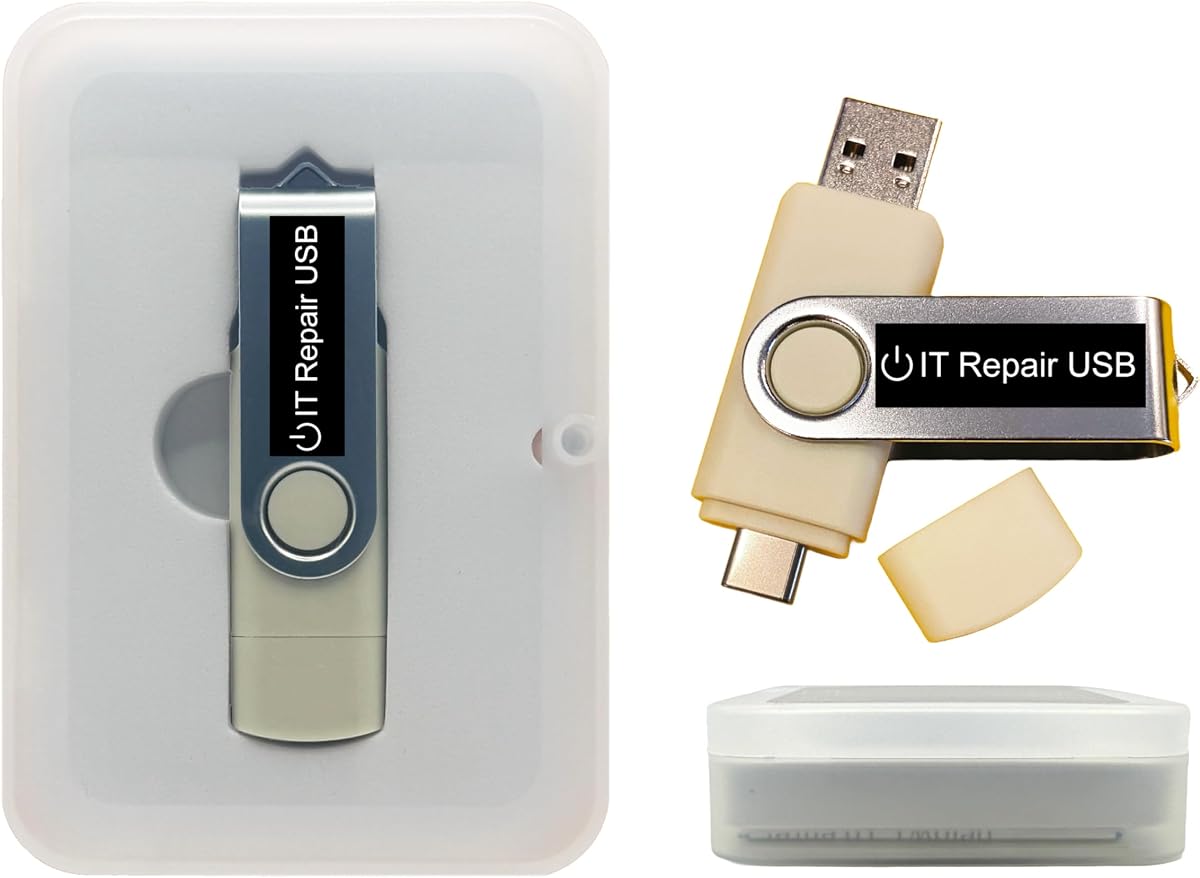
The Windows PC Repair Bootable USB Recovery Toolkit is an all-in-one solution designed for technicians who need a comprehensive set of tools for computer repair. It supports both UEFI and Legacy BIOS modes and offers a user-friendly interface for system diagnostics startup fixes and file recovery.
We may earn a commission when you buy through this link, at no additional cost to you.
This toolkit allows you to run live without modifying the PC which is useful for diagnosing issues before making permanent changes. You can customize the USB by adding or replacing bootable ISO apps installers or utilities to suit your specific repair needs as clear instructions are included.
It is designed to revive old or slow PCs by using lightweight rescue environments that can restore system performance without heavy installation. It also includes tools to remove malware recover files and reset forgotten passwords providing a broad range of solutions for common IT problems.
For professionals who need a versatile toolkit that can handle multiple repair scenarios this USB drive is a practical choice. Its ability to work offline and be customized makes it suitable for a wide range of diagnostic and repair tasks without requiring an internet connection or complex setups.
The ability to add or replace ISO apps allows you to tailor the recovery drive to your specific workflow and technical requirements for various repairs.
Since it runs live from the USB drive you can perform repairs and diagnostics without needing an internet connection or affecting the installed system.
We may earn a commission when you buy through this link, at no additional cost to you.
The SOP16 IC Test Clip is a specialized tool designed to provide access to 16-pin IC flash chips without removing them from the motherboard. It features a hardened clip with a thick gold-plated layer that ensures a stable connection even on challenging boards with difficult-to-reach chips.
We may earn a commission when you buy through this link, at no additional cost to you.
It supports both wide and narrow body chips specifically for 150MIL to 300MIL SOP16 chips making it a versatile addition for technicians who work with various chip sizes. The 40cm connection line provides enough length to reach chips on larger boards without straining the connection or the chip itself.
While it is designed for stable connection there are cases where peripheral circuits on the board may interfere with the programming process. If the board is not recognized or the connection is unstable the chip may need to be removed for programming which adds a step to the repair workflow.
This clip is an excellent choice for those who need reliable access to SOP16 chips. Its design prioritizes stability and ease of connection making it a reliable tool for in-circuit programming where removing the chip would be too risky or time-consuming for the repair task at hand.
The hardened clip and gold-plated connector ensure a reliable connection that minimizes signal loss during critical programming operations.
The 40cm line provides the necessary reach for large motherboards allowing for easier access to chips located in hard-to-reach areas.
We may earn a commission when you buy through this link, at no additional cost to you.
The Bootable USB for Windows 11 & 10 is a recovery and reinstall tool designed to work seamlessly with Secure Boot enabled on most modern PCs. It downloads genuine Windows 11 or 10 directly from Microsoft ensuring that you are using the latest official files rather than outdated ISOs.
We may earn a commission when you buy through this link, at no additional cost to you.
This tool is particularly useful for users who want to reinstall Windows without dealing with the complexities of configuring Secure Boot or downloading files manually. It works with 64-bit systems and requires UEFI BIOS which means it is suitable for most PCs from 2013 and newer.
US-based support is available via live chat or email which provides a reliable safety net if you encounter issues during the recovery process. The drive is designed to be simple to use with clear on-screen instructions guiding you through the repair or installation steps.
For users seeking a trustworthy way to recover or reinstall Windows on modern systems this tool offers significant convenience. While it does not include a product key the ability to work with Secure Boot and download genuine files makes it a reliable option for maintaining system integrity.
By working with Secure Boot enabled you avoid the need to change BIOS settings which simplifies the recovery process significantly.
The tool downloads files directly from Microsoft ensuring that you are installing official and up-to-date software without security risks.
We may earn a commission when you buy through this link, at no additional cost to you.
The Kali Linux Bootable USB is a specialized tool designed for ethical hackers and security researchers who need a comprehensive penetration-testing environment. It includes over 600 pre-installed security-analysis tools for network web and wireless auditing making it a professional-grade platform for digital investigation.
We may earn a commission when you buy through this link, at no additional cost to you.
This drive supports both Legacy BIOS and UEFI modes ensuring compatibility with a wide range of desktop and laptop hardware. You can run Kali directly from the USB or install it permanently for full performance and it includes both amd64 and arm64 builds to support different architectures.
It is important to note that this tool is not designed for general operating system repairs or password resets. It is intended for security assessment and vulnerability analysis so it requires a certain level of technical expertise to use effectively and safely.
For security professionals or enthusiasts who need a portable and powerful toolkit this USB drive offers significant utility. The ability to customize the boot environment and the support for multiple architectures make it a flexible choice for advanced security tasks and investigations.
The USB format allows you to carry a complete security suite and run it on any compatible machine without installing it on the hard drive.
With over 600 pre-installed tools you have access to a vast range of utilities for network auditing and security testing at your fingertips.
We may earn a commission when you buy through this link, at no additional cost to you.
When selecting a Bios Flash Tool it is important to consider your specific technical needs and the types of devices you will be working on to ensure compatibility and ease of use.
Most tools are designed to work with specific chip series like 24 25 or 93. Always verify that the tool supports the exact chip types found on the devices you need to repair to avoid purchasing an incompatible programmer.
Chips operate at different voltage levels such as 1.8V 3.3V or 5V. Ensure the tool supports the required voltage or includes adapters to prevent damage to the chip during programming operations.
Programmers typically connect via USB which is convenient for most users. Check the USB standard to ensure it matches your computer ports and provides sufficient data transfer speed for your workflow needs.
Tools that support in-circuit programming allow you to access chips directly on the motherboard. This saves time and reduces the risk of damage associated with removing components and is highly recommended for frequent repairs.
Consider what accessories are included with the programmer such as test clips conversion plates or adapters. A complete kit can save you from having to purchase additional parts separately and ensures you have what you need for different scenarios.
Faster read and write speeds can significantly improve efficiency especially if you are handling large firmware images or multiple devices. Look for tools that offer high-speed capabilities if you work in a high-volume environment.
The accompanying software should be user-friendly and compatible with your operating system. Ensure it supports the necessary file formats and provides clear guidance for backing up and writing firmware to the chips.
The physical build quality of the programmer and its connectors affects longevity. Choose tools with reinforced connectors and high-quality materials to ensure they withstand regular use in professional environments.
To use your Bios Flash Tool start by connecting it to a USB port on your computer and installing the provided software. Ensure the chip is correctly identified and the voltage settings match the chip specifications before proceeding.
When clamping or connecting to the chip apply even pressure to ensure a stable connection without damaging the pins. If the chip is mounted on a board verify that there are no peripheral circuits interfering with the connection to avoid read errors.
Store the tool in a dry and static-free environment when not in use. Keep the connectors clean and avoid bending the test clips excessively to maintain their shape and ensure long-term reliability for future projects.
The CH341A is a widely used USB interface for programming EEPROM and Flash chips. It is popular due to its low cost and broad support for 24 25 series chips. Other types like EZP2023 offer faster speeds and more automatic features but cost more.
Not always. Many modern programmers and clips support in-circuit programming which allows you to access the chip while it is still on the motherboard. However if peripheral circuits interfere removal may be necessary for a successful operation.
Not every motherboard uses the same chip types or voltage levels. These tools are best suited for boards that use standard 24 25 series chips. Always check the chip marking and voltage requirements on your specific motherboard before using a programmer.
Yes most programmers require specific software to interface with the hardware. Some tools come with basic software while others support third-party applications like NeoProgrammer for more advanced features and broader compatibility.
Selecting the wrong voltage can permanently damage the chip. It is critical to verify the chip's operating voltage before starting the programming process and to use adapters if the tool does not natively support the required level.
No bootable USB tools are typically used for recovering access to operating systems like Windows or Linux rather than writing firmware to chips. Hardware programmers are necessary for direct access to the BIOS chip data on the motherboard.
Choosing the right Bios Flash Tool depends on your specific needs whether you are focused on budget-friendly solutions or high-speed professional performance. The tools reviewed offer a range of capabilities from basic EEPROM access to advanced chip identification and speed.
Prioritize compatibility with the chip types you work with most often and ensure the tool supports the necessary voltage levels and accessories. A complete kit can save time and effort by providing all the necessary components in one package.
Always verify the current availability and specifications of any tool before purchase to ensure it meets your requirements. Investing in a reliable programmer will help you manage firmware tasks efficiently and keep your repair workflow running smoothly.